Windows Store app helps you get new apps of your choice and allow the existing apps to update. So if Store app doesn’t works for you, it is quite difficult to manage and get apps on your Windows 10. Windows 10 edition such as Windows 10 S can only get apps from Store app, hence users on such edition have the Store app is of prime importance.
Recently, we came around a strange error with Windows Store app. In this case, while opening and browsing through the app, we got following message:
Page Contents
Something bad happened
Unknown layout specified in manifest.

It seems relatively new issue and some users have found this problem on Windows 10 Mobile Store app as well. This error prevented us to operate the Store app correctly.
If you’re also victim of this issue, this article will help you to solve the issue. Try out the fixes mentioned below and see if they helps.
FIX: ‘Something Bad Happened. Unknown Layout Specified In Manifest.’ For Windows Store In Windows 10
FIX 1 – General Suggestions
1. Reboot the machine multiple times, check if error gone automatically.
2. Check the date and time settings, along with regional/locale settings and make sure they’re correct. Some community users shared that setting the device location to UK helped to solve the issue.
3. Run the Windows Store Apps troubleshooter.
4. Soft reset Store app by running wsreset.exe command in administrative Command Prompt. You may also reset Store app using Settings app as mentioned in this guide.
5. Try creating new user account and see if Store works fine on that.
6. If Store works fine on new account, you need to reinstall it on issued account using steps mentioned in FIX 2.
FIX 2 – Reinstall Store App Using Windows PowerShell
1. Open administrative Windows PowerShell.
2. Type/paste following and press Enter key:
Get-AppXPackage *WindowsStore* -AllUsers | Foreach {Add-AppxPackage -DisableDevelopmentMode -Register "$($_.InstallLocation)\AppXManifest.xml"}
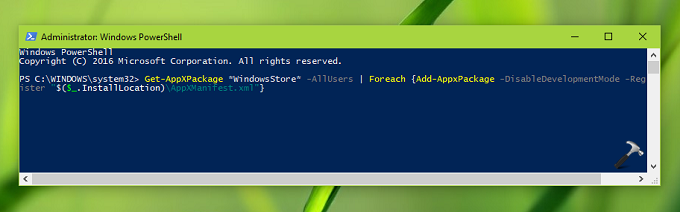
3. Close Windows PowerShell and reboot the system. If restart, Store should work as expected.
Hope something helps you!