

If you’re on recently released Windows 10 Fall Creators Update, you might have noticed My People app icon on the taskbar. This is actually due to My People app integration in Windows 10 V1709. Microsoft introduced this feature so that you can connect with your contacts more easily.
The company says, with My People, you can quick access to your top people. Using others apps such as Mail and Skype, you can do conversation easily from the taskbar, without opening the People app. You can also pin top contacts and share your content to them, right away from taskbar. This would work better only if you’ve switched to Microsoft account from the local account.
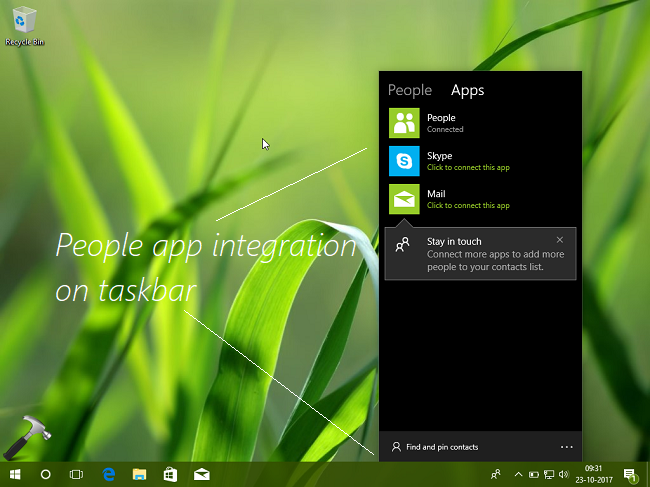
But those users who don’t prefer to use People app on Windows 10 may not like this feature too. Thus they’re looking for the way to remove the “People” listing from the taskbar area, so that they can hold space for other running apps icons. Note the uninstalling People app (as its a built-in app) via Windows PowerShell no longer works in Windows 10 V1709. This is because, My People app in closely integrated in this version.
In this article, we’ll show the simple steps to remove the My People app icon, here’s how:
How To Remove People From Taskbar In Windows 10 Fall Creators Update/V1709
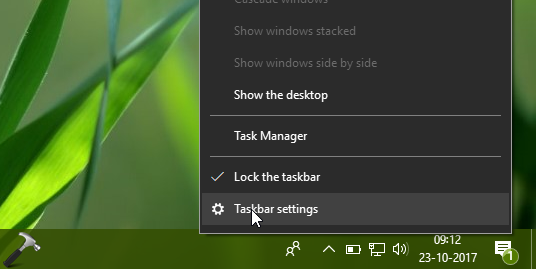
1. Right click on taskbar and select Taskbar settings.
2. In the Settings app window, under Taskbar, scroll down until you find People heading. Then set Show contacts on the taskbar option to Off.
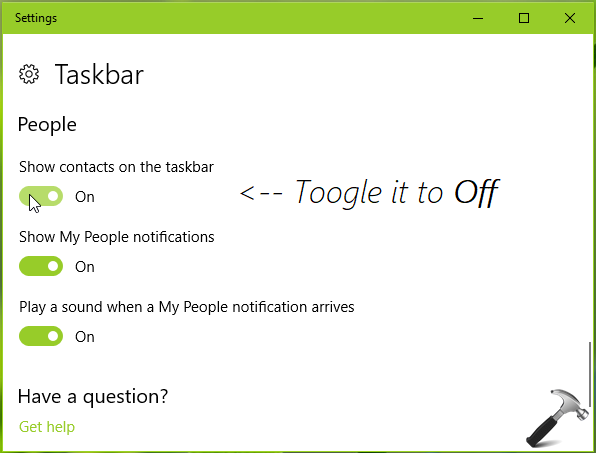
3. As soon as you toggle the option to Off, immediately People app icon from the taskbar will be removed. Close Settings app.
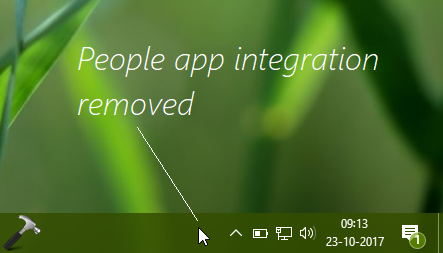
In this way, you’ve removed People app integration from taskbar in Windows V1709. If you later change your mood and want My People app icon on taskbar back, simply turn On the Show contacts on the taskbar option shown in step 2. You can now return to Desktop, if you like.
That’s it!



You’re not removing anything, you’re just hiding it.
since this update my laptop ihas gone barmy, the apps I had on startup have disappeared, I cannot access internet explorer, the store app has gone, I cannot create a tile anymore from edge, I feel like throwing it out the window, it worked great before this update