If you’re creating a system backup, or creating a System Image, or simply adding a System Restore point but it always fails, this article may interest you. While performing either of these operations, you should be having required services running without any issue. In case if any of the required service doesn’t responds calls for the operation, you may see error while performing the operation.
While creating a System Image on one of the Windows 10 system, we came around following error:
Page Contents
Windows Backup failed to create the shared protection point on the source volumes.
The shadow copy provider had an unexpected error while trying to process the specified operation. (0x8004230F)
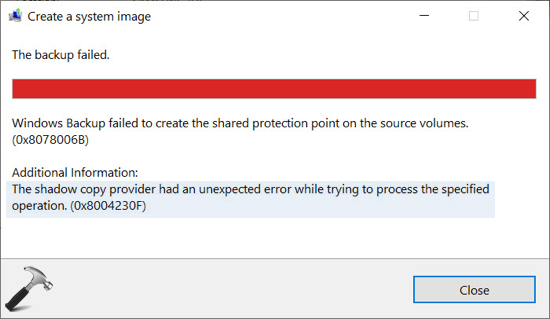
As you can see in the above image, the shadow copy provider is root cause here, as well as, also the hint to solve this issue. You can refer below mentioned fix to get rid of this issue.
FIX: ‘The Shadow Copy Provider Had An Unexpected Error’ In Windows
In Windows, Microsoft Software Shadow Copy Provider manages the software based shadow copies taken by Volume Shadow Copy service. If either of these services are not doing their job, issues like this may happen. So to resolve this issue, you must confirm that both of these services are correctly configured and are running. Following steps will help you to ensure this.
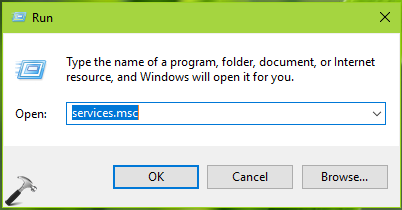
1. Press  + R and type
 services.msc in the Run dialog box, hit Enter key to open Services snap-in.
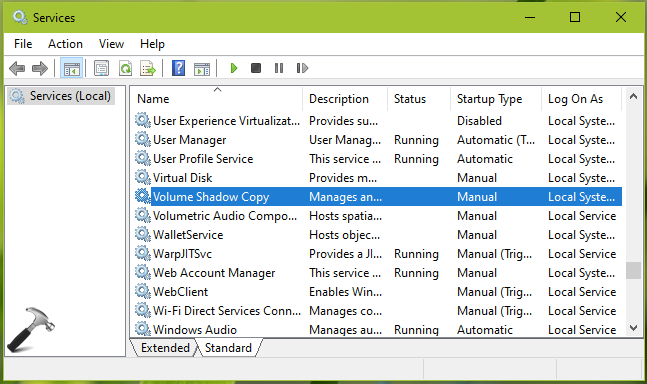
2. In Services snap-in window, look out for Volume Shadow Copy service double click on it.
3. On the service property sheet, set the Startup type to Automatic (Delayed Start) and click Start button to run the service. Click Apply, followed by OK.
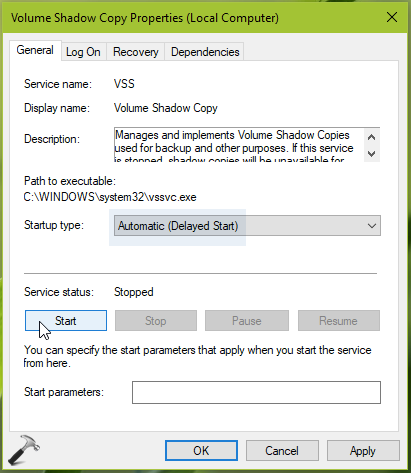
4. Similar to step 3, configure the Microsoft Software Shadow Copy Provider to Automatic (Delayed Start) Startup type and run this service.
5. Close Services snap-in, verify the status of issue, it must be resolved now.
Hope this helps!