A single Microsoft account (MSA) is usually sufficient to use various Microsoft product or services. So when you lost this single MSA, you also lost all access to Microsoft products. This could be quite frustrating but you may have to deal with this condition, if your Microsoft account is blocked.
After signing into blocked MSA, following may be displayed:
Page Contents
Your account has been temporarily suspended
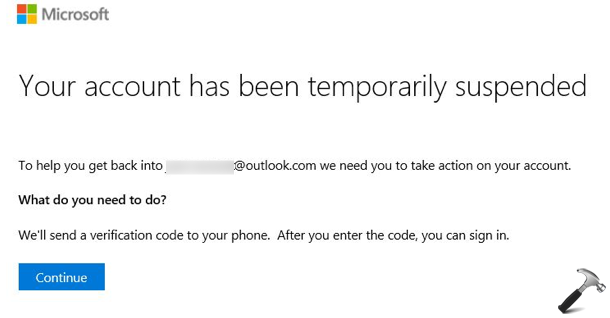
Image credits: Microsoft Community
According to Microsoft, your account may be blocked in following cases:
- Someone has hacked your account
- There is a suspicious activity going on your account
- You have not logged into your account for very long time (in years)
Whenever Microsoft detects either of above happenings, for the safety of your account, it is blocked. Once blocked, the hackers will no longer be go ahead with your account and chances for being your information safe on account increases.
How To Recover Blocked Microsoft Account
If you have already setup recovery methods, your Microsoft account (MSA) can be recovered very easily. These recovery options includes your identity verification using mobile number, alternative email address, authenticator app etc. To recover your MSA, following these steps:
1. Click on Continue message, at the ‘Your account has been temporarily suspended‘ page.
2. Select a verification method, for example, sending a code to your mobile number.
3. Confirm your mobile number and allow page to send you the code.
4. Enter the recovery code correctly.
5. You may be asked to reset your password, security settings.
6. If everything gone correctly, you’ll see ‘Your account has been recovered’ page. This confirms that your blocked MSA is recovered successfully and you can use it as usual.
If you don’t have your recovery methods setup for blocked account, above steps will not be beneficial for you. In that case, you need to fill out recovery form (https://account.live.com/acsr) and allow the Microsoft team to manually review your account, so that they can verify you and unblock your account.
Once your account is recovered, it is strongly recommended that you setup Identity Verification App or two-factor authentication for your MSA.
Hope this helps!