

As we all know, Command Prompt is the most basic tool of Windows and power users uses it a lot. With the help of Command Prompt, we can run programs in sound way.
Command prompt actually run in two ways :
1. With simple user account (Ctrl + Shift + Enter or Run cmd.exe)
2. With UAC permissions (Run as administrator)
Generally most of articles shared on this site involving use of Command Prompt follows the second way (Run as administrator).
Now as far as Windows 8 Beta is concerned, you have to search Command Prompt using Windows Key + Q then you have to right click on program so found and finally click on Run As Administrator from bottom options.
So the overall procedure is quite lengthy (Reason : Missing of Start Menu in Windows 8 Beta). But here is the way to tell Windows that it has to open Command Prompt always with administrative privileges. Here we go:
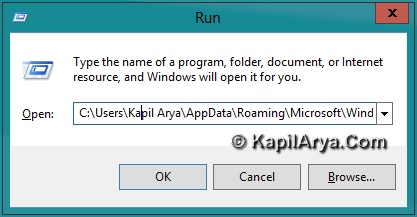
1. Press Windows Key + R, and type following and click OK :
C:Users<username>AppDataRoamingMicrosoftWindowsStart MenuProgramsSystem Tools
e.g. C:UsersKapil AryaAppDataRoamingMicrosoftWindowsStart MenuProgramsSystem Tools
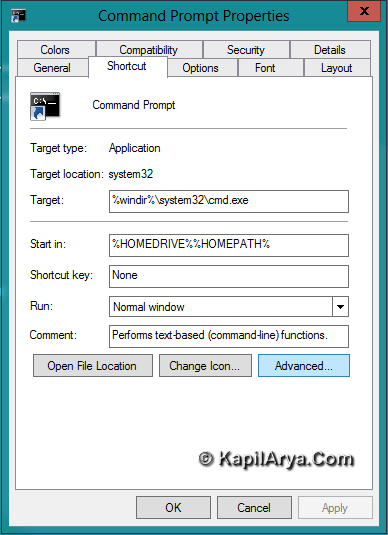
2. Now in System Tools window, right click on Command Prompt and pick Properties. Also pin this shortcut to Taskbar or Start Screen, from where you can access it easily.

3. In Command Prompt Properties window, switch to Shortcut and click Advanced….
4. In Advanced Properties window, put a check mark against Run as administrator.
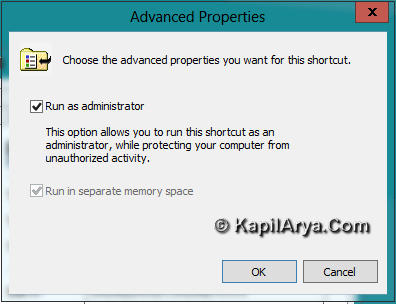
That’s it, now you don’t need to choose Run as administrator each time to use Command Prompt. Cool! Isn’t it?
Page Contents

omg ! Never thought in dis way…