UPDATE : Messaging app is only available in Windows 8 and the same is removed in Windows 8.1.
We all are aware with Metro apps of Windows 8, they just be defined awesome for at least some guys. Well with the help of registry manipulation, you can tweak these apps and make a fun of them.

Suppose, your friend wants to chat with someone using Messaging app on your Windows 8, and in case if it irritates you then wait for while.. In this article, we are going to share you a cool trick to fool your friends by telling them that your Messaging app is corrupt.
So without wasting any more time, lets share the way…
TIP : Disable Opening Of Messaging App At First Attempt In Windows 8
1. Press  + R and put regedit in Run dialog box to open Registry Editor (if you’re not familiar with Registry Editor, then click here). Click OK.
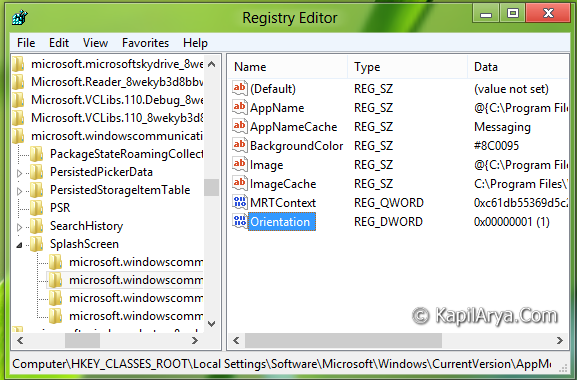
2. Navigate to the following location:
HKEY_CLASSES_ROOT\Local Settings\Software\Microsoft\Windows\CurrentVersion\AppModel\System\AppData\microsoft.windowscommunicationsapps_8wekyb3d8bbwe\SplashScreen\microsoft.windowscommunicationsapps_8wekyb3d8bbwe!Microsoft.WindowsLive.Chat
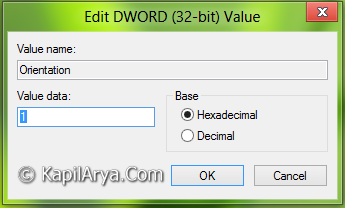
3. In the right pane of this location, you’ll see the DWORD “Orientation” having value as 0. Double click on this DWORD to modify it and set its value 1. Close the Registry Editor.
4. Close the Messaging app first if it is open. Restart it and you’ll be amazed to see the trick results. In that case, firstly Messaging app tries to open but closes automatically or simply pushed back. Once its pushed back, click again over it, this time it would work as usual.
Hope you enjoy the trick!