

Recently one of our reader submitted a weird issue faced on Windows 8, he said:
When I go to the PC settings screen, I can’t see most of it because colors are all messed up; the only things that do show up is the menu on the left and some other things but only when I drag the mouse over it, and the rest is all black. This is really frustrating me, please help me to solve the issue.
Here is the screenshot of this unexpected issue as experienced on Windows 8. As you can see that the colors are horribly messed up and this makes us uneasy to pick the settings options. However, this kind of issues are particularly related to display drivers.
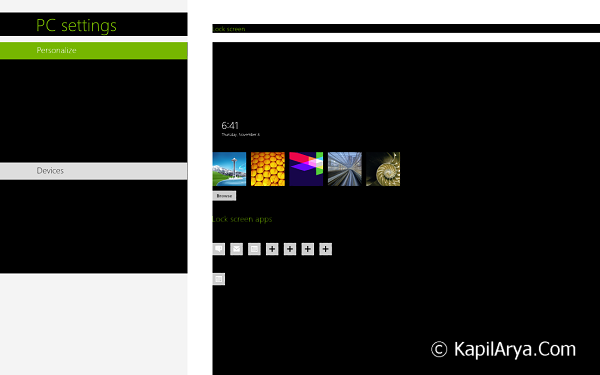
So unfortunately it is serious issue as far as end users are concerned, because they are unable to make changes in basic settings of their PC which can create further issues. We also noticed that this problem has also affected to Start Screen, take a look:
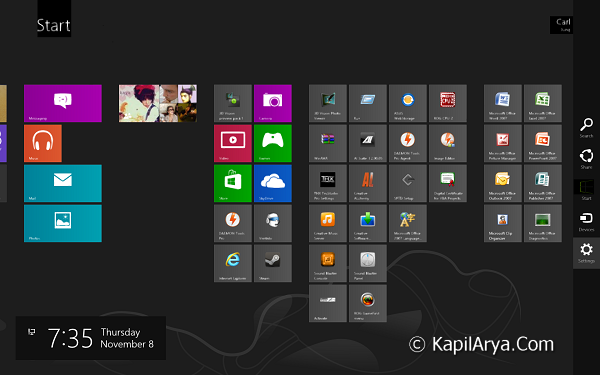
This type of issues must be solved at their best. After making conversations with friends, I finally got the solution to this problem, which I’m going to share via this article.
FIX : Windows 8 Showing Weird Black Colors In PC Settings
In order to get rid of this bug, you guys need to move NVIDIA Control Panel. Here you have to make the Auto-Select selection for the Preferred graphic processor. It must be set before to High-performance NVIDIA processor, if you’re the victim of this issue.
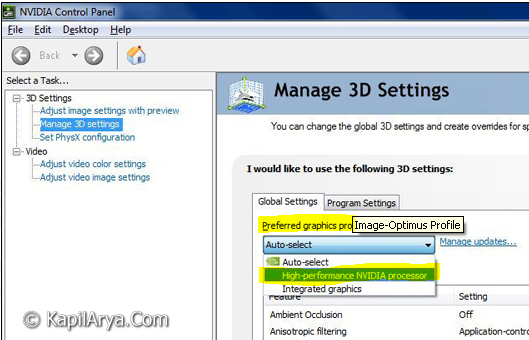
Thus restart hopefully after making changes, and your problem should be fixed now.
Hope this helps!





awesome…
grete article here.. never faced such issues, will be beneficial for such horrible conditions :)