

Windows 8 has a lot of hidden possibilities in it. We’re regularly posting on these possibilities for the convenience of users. Today, we’ll discuss yet another hidden feature about navigation pane for File Explorer in Windows 8.
So, today I’m going to share this hidden feature with all you guys. Windows 8 enables users to remove or add the “Favorites” in the explorer navigation pane.
Page Contents
How To : Show Or Hide “Favorites” In Windows 8 File Explorer
Here is how to enable or disable this option:
From Folder Options
You can hide “Favorites” very easily from the Folder Options in Control Panel. Just click on the Folder Options link there and you’ll get following window:
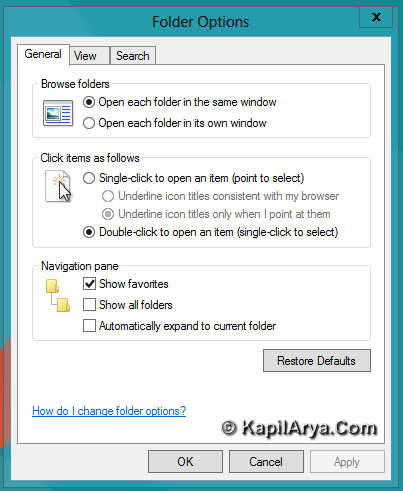
Now remove check from the Show favorites option under Navigation Pane heading.
From File Explorer Itself
The second way to hide “Favorites” lies inside the context menu in Windows 8 explorer itself. When you right click on the navigation pane in explorer, you’ll get the option to show / hide “Favorites”. Take a look:
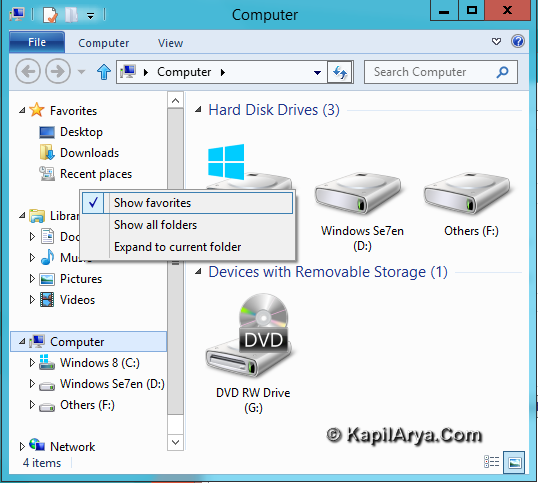
If you check Show favorites option, Favorites are shown (default) whereas if you uncheck the same option, Favorites will be hidden.
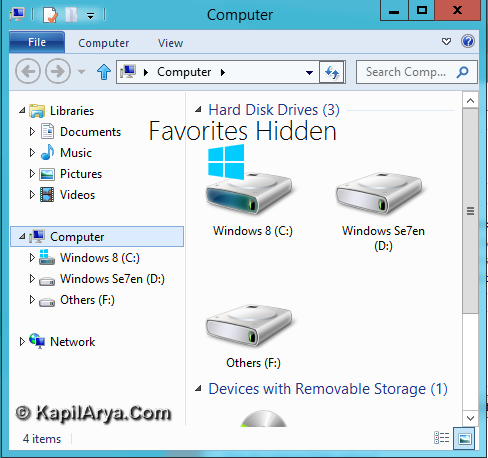
That’s it. Thus the ways to hide or show Favorites discussed so far!




dats gud…>>>>