If you’re using Office 365 on your system and suddenly started receiving an account notice message, this article is for you. Recently, we came around this problem where one of our machine started showing following error:
Page Contents
We’ve run into a problem with your Office 365 subscription, and we need your help to fix it.

The machine had a valid and active Office 365 subscription. Still we keep receiving the account notice while using any of the Office 365 app. We already tried restarting the machine many times but there were no changes in the situation. In case if you’re also facing similar problem, here is how you can fix it.
We’ve Run Into A Problem With Your Office 365 Subscription
According to Microsoft, you might face this problem because of validity of your Office 365 subscription. Either it may be expired, deactivated or if it is no longer valid. So first of you need to confirm that your subscription is still active.
Try these steps to make sure that:
1. Go to https://admin.office.com in your favourite browser.
2. In the right pane, click on Billing and then click on Product & services.
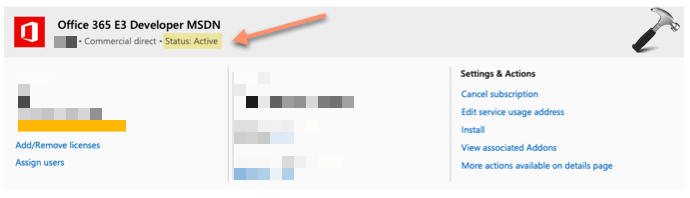
3. The corresponding right pane should show your license status. So from here, you can confirm, whether your subscription is active or not (refer below shown screenshot).
4. In case if your subscription is not active, in left pane, click the Bills & payments.
5. Then in right side, click on Payment methods.
6. Verify the current payment method and if it shows an error, update it.
Once you update the payment method, you’ll be no longer facing this problem.
If issue still persists, try the official Microsoft Support and Recovery Assistant. You can use this tool on Windows to look out and fix Office 365 problems. Microsoft has designed the tool to deal issues like above one. We believe, after try the tool, you will be able to resolve it finally.
Hope this helps!