Microsoft and most of the Windows experts usually recommends you to install latest Windows Updates. While installing latest updates can sometimes be very helpful and resolve the issue you’re facing on your system. However, sometimes, installing the latest updates may give rise to new issues. For example, you installed a latest Windows Update but you can’t login after that.
It is true that not all users will face this problem, but those whose face can’t be ignored. Microsoft hardly test their updates before they’re rolled out to end users. But as there are million of devices who receive updates, the company can’t satisfy update perfectly for each device. Hence some devices may give negative response to some updates and issues like this arises. So in case if you’re also unable to login after a recent update, here is how to correct it.
FIX: Can’t Login After Latest Update In Windows 10
1. Boot into Advanced Recovery Options.
2. Under Advanced options screen, click on Uninstall Updates.
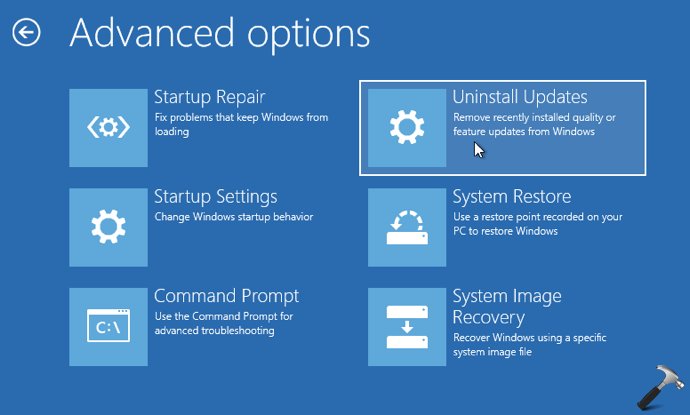
3. Next, under Uninstall Updates, choose the type of update after which you started facing this issue. In this example, we opted the Uninstall latest quality update option. Please note that if you select Uninstall latest feature update option, you can really go ahead with it only if it is less than 10 days post you installed the update.
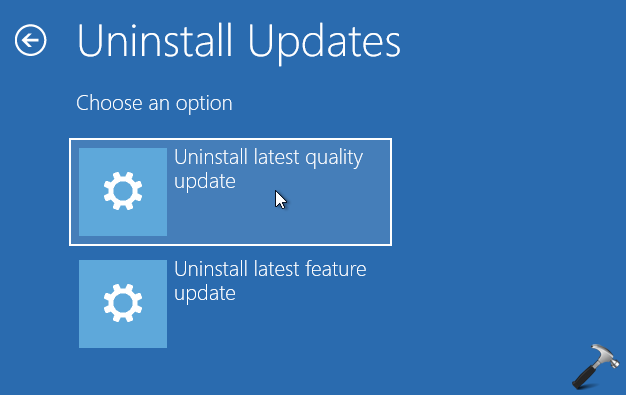
4. Anyways, the system will reboot after your selection in previous step. After reboot, select your account to continue.
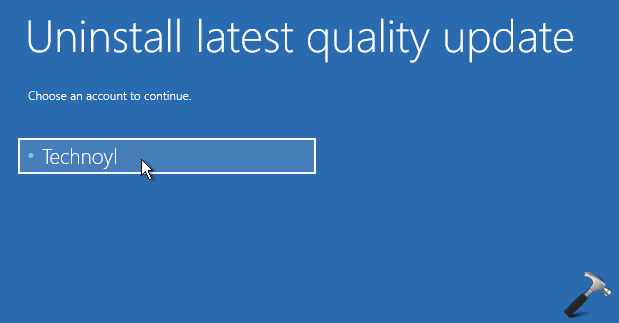
5. Type in the password and click Continue button.

6. Finally, the problematic updates should be uninstalled now and you should be able to login as usual.
7. As Windows 10 have automatic updates enabled, the chances that problematic updates re-detected and installed again is high. So it would be better if you skip or hide those problematic updates for a while. It is a feature update, you can refer this guide to block it.
That’s it!
![Windows needs your current credentials [Fix]](https://www.kapilarya.com/assets/password_icon_1783831080.jpg)