

First of all, let me know you that Internet Explorer 11 has got the exclusive interface for Google Search results. If you’re using this latest iteration of Microsoft‘s propriety browser, you might have observed this already; so this is the old news. But today, I came around a weird issue with Google Search results in the same browser. What I saw, that the results looks like if they have shrink and they doesn’t utilizes the horizontal axis completely, have a look:
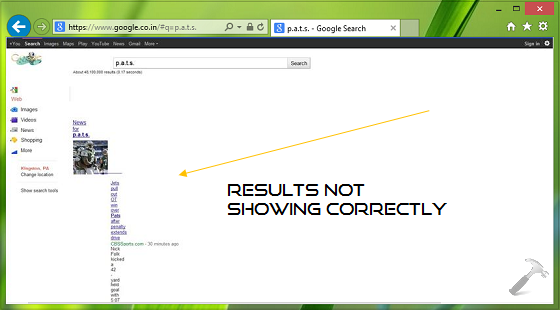
From the above screenshot it can be easily concluded that results aren’t as they are supposed to be. In order to fix this, I tried to restart Internet Explorer in no add-on mode, and I found no differences in the situation. So it is obviously not the issue due to malfunctioning of add-ons. I also tried to reset Internet Explorer settings, but no luck. Finally, I came around this solution and it worked perfectly for me:
FIX : Google Search Results Not Displaying Correctly In IE 11
Registry Disclaimer: The further steps will involve registry manipulation. Making mistakes while manipulating registry could affect your system adversely. So be careful while editing registry entries and create a System Restore point first.
1. Press  + R and put regedit in Run dialog box to open Registry Editor (if you’re not familiar with Registry Editor, then click here). Click OK.

2. Navigate here:
HKEY_CURRENT_USER\Software\Microsoft\Windows\CurrentVersion\Internet Settings\Zones\0
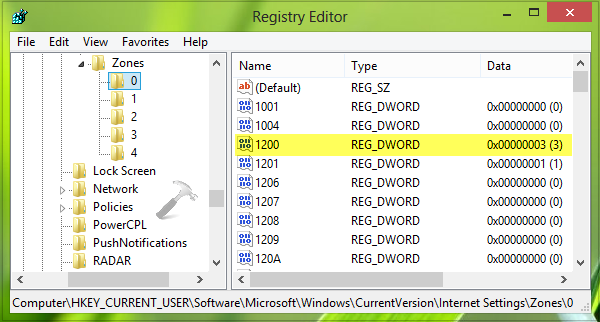
3. In the right pane of this location, look for the DWORD named 1200, since you’re facing the issue, you might found the Value data associated with DWORD equals to 3. Double click on the same DWORD in order to change its Value data:
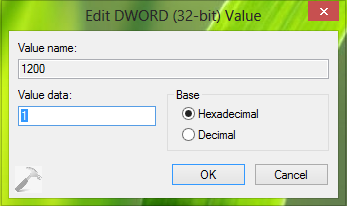
4. Replace the Value data in above shown box from 3 to 1. Click OK. You may now close the Registry Editor and reboot the system to activate the changes you’ve made so far. After restarting the machine, the issue should be fixed.
Hope this helps!
