

Recently, we told you about the Windows Phone 8.1 new features and improvements which you can read here. With the arrival of Windows Phone 8.1, we have the same Xbox Music app in our phone which was available with Windows 8.1 operating system without any variations. Actually, Microsoft has tried to provide unified experience to their users across various devices, as a result of which, we can find same apps with similar GUI for our phone and computer/laptop/tablet. Meanwhile in the Xbox Music app, today we came across following error while trying to play any song:
Page Contents
Sorry, we can’t play this file on your phone.
Error code: 80070057

With Windows Phone 8, we had never faced this hitch, but after upgrading to Windows Phone 8.1 which brought the enhanced Xbox Music app, also brought this error. We tried to restart the app, even the phone, but this didn’t fixed the issue either. Well, after playing with different options inside the Music app itself, we eventually got a working solution to fix this problem, which is mentioned here:
FIX: “Sorry, We Can’t Play This File On Your Phone” In Music App In Windows Phone 8.1
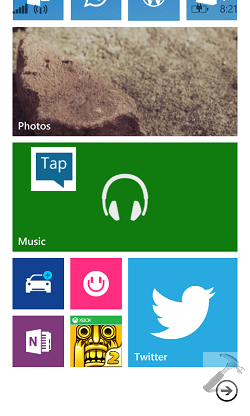
1. Go to Start Screen, tap the Music app tile.
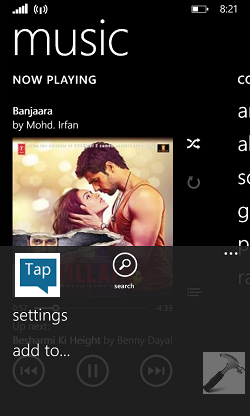
2. In the Music app screen, tap  and then tap settings option.
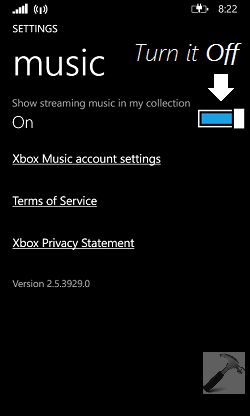
3. Finally, in the below shown SETTINGS screen for Music app, turn Off the option Show streaming music in my collection.
This worked for me and we hope it will fix the issue for you too!




There is no such option like show streaming music in my collection to turn it off….your version is 2.5 and mine is 2.6
^^ Yeah, just checked the changelogs and it seems like the issue is fixed by app team, that’s why the option is removed. Well still if you’re facing the issue, I suggest you to reboot phone, or re-enter SD card and see if that helps.
With the lastest update (some time prior to Nov 8 2014), there is a more sporadic version of a bug sort of like this, whereby only *some* file appear to play. I have managed to fix this individual cases sometimes by converting the file to .ogg and back to .mp3 (with Audacity), or, in other cases, by sightly changing the song name tag!! Perhaps an obscure bug in indexing, or some daft and bungled attempt to enforce copyrights?
This update also seems to have destroyed the capacity of the phone to continue to play a playlist when put into standby, which is an extremely annoying regression. Microsoft ought to consider it a company emergency to get Xbox Music working correctly and not getting trashed by updates, lest the discourage people from entrusting their critical activities to its productions.
to moderator, in above: fail to play <- appear to play
^^ Yeah, agreed. The app has too many bugs in the newer versions. Like if you play music via this app in background, then even after closing the app, music is still playing.
It really sucks when it doesn’t work
I want to watch YouTube what do I do?
But if go to setting in music there is no turn off or on . 😐😐😐
There is no turn off or on in music settings
please help me