

In Windows 8, different shortcuts always helps you to navigate in between different workspace. “Alt+Tab” is also one of those shortcuts which provides us the flexibility to switch in between different programs. Few months back, we’ve shared you the freeware named Alt Tab Tuner VIII; using which you can customize the “Alt+Tab” menu.

Well, today in this article we’re going to discuss the issue of non-working of “Alt+Tab” menu. I observed that on one of my computer, the name for tabs shown above the tabs (refer to screenshot above), was shifted to bottom. Plus the menu also not let me to switch in between the tabs. This weird issue has made me slow while using Windows, as I can’t simply switch in between Desktop apps.
So how to fix it then? Well, after doing some registry manipulations, I’ve came up with following solution:
FIX : “Alt+Tab” Menu Is Not Working In Windows 8/8.1 Using REGEDIT
Registry Disclaimer: The further steps will involve registry manipulation. Making mistakes while manipulating registry could affect your system adversely. So be careful while editing registry entries and create a System Restore point first.
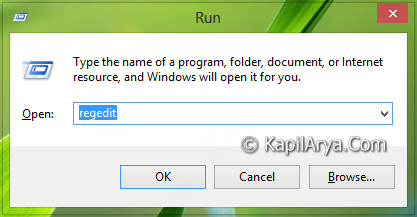
1. Press  + R and put regedit in Run dialog box to open Registry Editor (if you’re not familiar with Registry Editor, then click here). Click OK.
2. Navigate here:
HKEY_CURRENT_USER\Software\Microsoft\Windows\CurrentVersion\Explorer
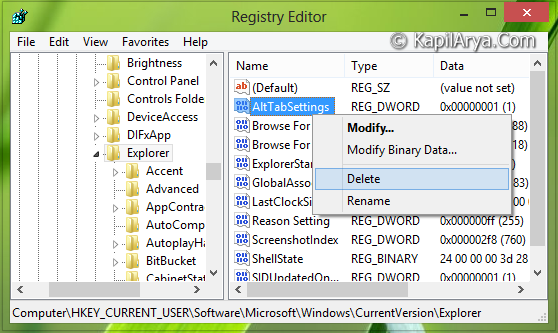
3. In the right pane of this location, you’ve look for the AltTabSettings named DWORD (REG_DWORD) having the Value data set to 1 as you’re facing the issue. So do a right click over this same DWORD and select Delete as indicated in the image and delete the DWORD. When you’re done with it, you can close the Registry Editor and reboot the machine to get the “Alt+Tab” menu working again; as usual as it is expected.
Hope you find the fix useful!



Works great for me on Asus transformer T100. Thanks!
if the alt tab thing is not their just go make a new file named that and make click modify and make the value 1.. it took me months to fix this im so happy