

Microsoft Word is a multipurpose document editor, everyone know this. With Word 2013, your capabilities to modify documents has increased to many folds, since the latest iteration contains best of Office you can get. However, there are some scenarios when you can’t get the Office components working as expected. Recently, while working on Word 2013, I received following error message:
Page Contents
We’re sorry, but Word has run into an error that is preventing it from working correctly. Word will need to be closed as a result.
Would you like to repair now?
[Repair Now] [Help] [Close]

As the error message suggested, I tried both the manual repair and online repair, but nothing worked. Then I uninstalled Office 2013 and re-installed it, but again, no differences in the situation and I was keep getting this error. Then I tried to run Office using troubleshoot compatibility settings, and after making few experiments, I was able to get Word and other Office components correctly.
So if you’re too facing this issue, here is what you need to do:
FIX : Word Has Run Into An Error That Is Preventing It From Working Correctly
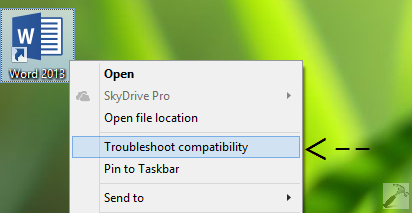
1. Go to Word program file location and do a right click on it, select Troubleshoot Compatibility.
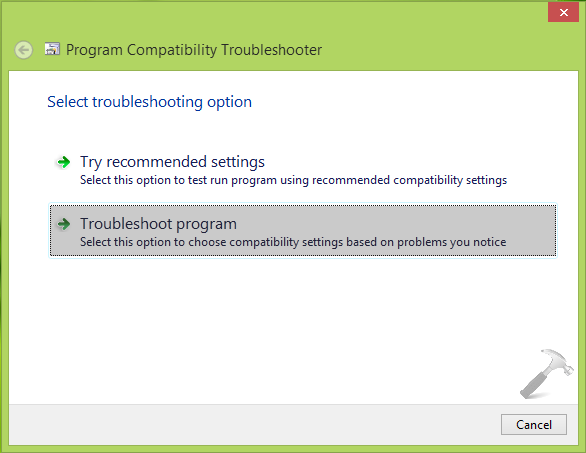
2. In the Program Compatibility Troubleshooter window, select Troubleshoot program option.
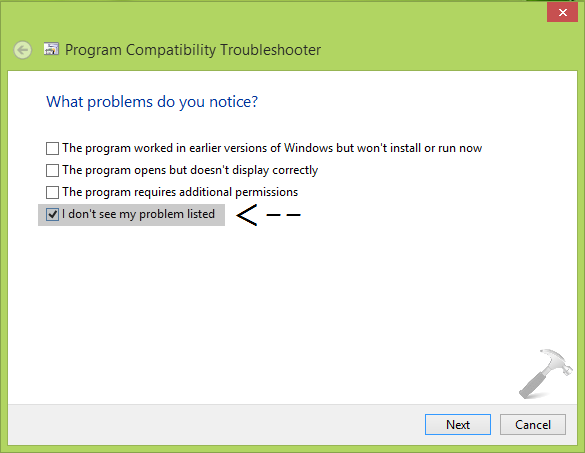
3. Moving on, select I don’t see my program listed under What problems do you notice? area. Click Next.
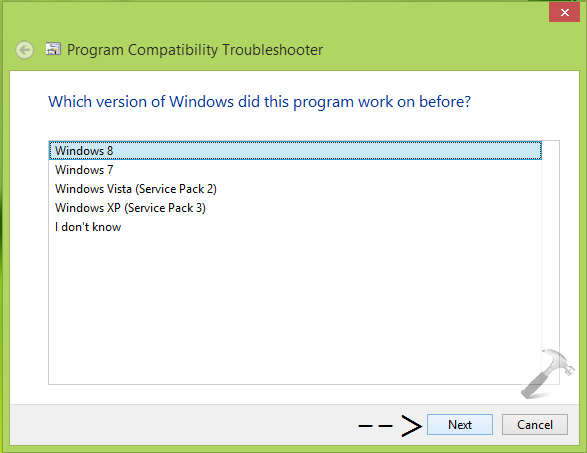
4. Next, select Windows 8 and click Next in following screen:
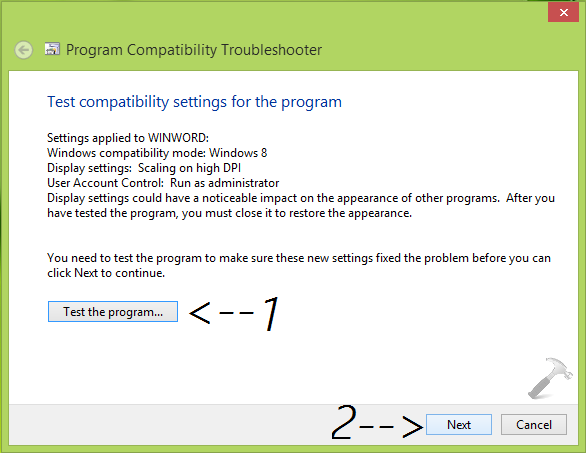
5. Now its time to test the working of Word, so hit Test the program button. As expected, Word would work fine for the settings enlisted here, so you can then click Next after testing it.
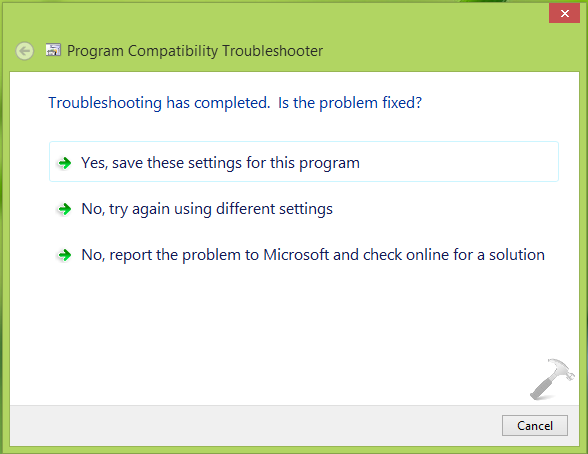
6. Finally, click on Yes, save these settings for this program option in the following window and preserve these settings:
When you’re done, once again check Word. You’ll observe that the issue has been resolved successfully. You can fix other Office components as well in similar fashion.
Hope this helps!





Thank you! Helped me a lot
^^ Thanks for feedback :D
It worked here. You’re awesome. Thanks alot.
Thanks, worked for me!!
Hi Kapil,
I am facing the same issue. I have installed Office 2013 on Windows 7 x64. After working on Word for a while. I started getting the error message. I have tried your solution, but under “Which version of Windows did this program work on before?”, I get only Windows Vista and Windows Server 2008. Not even Windows 7. Can you help me with this?
Thanks.
Niteen
^^ In that case, you may give a try to Windows Vista option and see if it works. If not, then upgrade to Windows 8 and then it you’ll have Windows 7 option too. Good luck :)
Thanx! it totally worked!!! I’m not kidding… Now my Word is functioning correctly!
^^ Glad we could help :)
Kapil,
I am having this exact problem, but when I right click troubleshoot capability it goes to a “detecting issues” screen and just sits there. It never moves to the next step so I can correct the problem.
Any help or ideas to fix this would be awesome, I’ve tried everything I can find and nothing works.
Thank you,
Tim P
^^ Try running the troubleshooter in Safe Mode and see if it helps.
Brilliant. I tried many a much more complex solution from other sites with no luck, but this is the one that worked. Thank you.
^^ Glad it helped :D
oh my gosh, I think I love you. I have been tearing my hair out over this for three days, and now it works like a charm. Remind me never to follow the online help in future!
Thanks!
^^ Cool!
Fabulous! Very grateful for your post.
^^ Thanks for your feedback!
thanks a lot man..it solves my problem..wohooh…
^^ Glad it worked! :)
unfortunately didn’t work for me.
Hi Kapil,
I am experiencing this message on opening / amending both Word and Excel files.
I have MS Office 2013 running on Windows 8.1 but I am not very techy when it comes to trouble shooting.
Your guidance seems to have worked but I now get a window open before Word launches showing “User Access Control – Do you want to allow the following program to make changes to this computer. Y/N”.
Have also noticed that both Word and Excel file types display after the file name, “Word (Non Commercial Use) Unlicensed Product)” which I have not noticed before.
I would very much welcome your thoughts on what has happened.
The only difference that I can think of between working before today is that my Norton application recommended running PC Optimisation this morning, which I did, and it was whilst that was running the issue seemed to appear?
^^ Seems like that suggested program has messed up your system. Try the repair to Office now and see if it helps:
https://www.kapilarya.com/how-to-repair-office-2013-offline
Thank you man, your suggestions worked perfectly!
^^ Glad to hear that!
Hi,
Upgraded windows 7 to 10, have Office 2013 home. Word worked for a few days and I suddenly started getting the error ‘We’re sorry but Word has run into an error…’. I have tried almost all the fixes that are available on the web including the suggestion given in your post as well as Quick repair, online repair several times. I have also uninstalled and installed Office 2013 several times. I have problem only with Word, all other office applications open. Word does not open at all. Can you help me fix this problem?
^^ Uninstall Office 2013 using this tool:
https://www.kapilarya.com/download-microsoft-fix-it-to-uninstall-office-2013-without-leaving-traces
Then reinstall Office back, Word should work fine now.
God dammit! I tried this two times before, and when I found out it all didn’t work, I went on to the next solution, but nothing worked.. And now I saw this and thought, what the hell. Let’s try it agian. And there it was, it god damn worked. Thank you ~
^^ Lol, glad to see it worked finally! Thanks for feedback :)
It didn’t solve my problem with the above mentioned option and I tried the second checkbox “the program opens but doesn’t display correctly” and apply settings for “scaling on high DPI” to make it work. Thank you so much!!
^^ Appreciate your feedback! Glad to see it helped and thanks for adding this :)
Thank you so much!
I spent all day on trying all options until your suggestion. Many thanks again!
^^ Cool :)
Thank you! It fixed my problem xD
^^ Awesome :D
I right click on word icon but i don’t see an option for troubleshooting
^^ Which edition you’re on?
I’m having the same issues as above but recently I’ve had unlicensed product added to all the other things and it should be licensed! Tried so many things and unfortunately yours didn’t either…. any other thoughts???
I’m using windows 7 and it didn’t work for me.
Thanks Kapil, that fixed it – when nothing else worked (least of all the ‘official’ Microsoft ‘fix’ of making sure updates were up to date!)
^^ Very cool 😎
halo,
i`m using the office 2013, facing the same problem. but as the 1st step click right and open the “Troubleshoot Compatibility”.
i can`t get the “Troubleshoot Compatibility”this selection on my right click list.
^^ Try locating the shortcut in File Explorer window, in the ribbon, you may have the option.
I have the same problem as Somesh above, “Upgraded windows 7 to 10, have Office 2013 home. Word worked for a few days and I suddenly started getting the error ‘We’re sorry but Word has run into an error…’. I have tried almost all the fixes that are available on the web including the suggestion given in your post as well as Quick repair, online repair several times. I have also uninstalled and installed Office 2013 several times. I have problem only with Word, all other office applications open. Word does not open at all. Can you help me fix this problem?” I saw your suggestions to us Microsoft Fix it, but it isn’t available anymore. Do you have any other suggestions?
^^ The compatibility troubleshooter is still available, you can run it and follow the steps.
I have and it works for a few minutes, then shuts down and I’m back to square one.
will this work for Office 2016 as well?
^^ Most probably, yes! It should work.
No, it doesn´t. At leat on my Windows 10 / Office 365 machine. Any suggestions?
same situation as Josh on Windows 10/office 2016 the solution you suggested does not work.
Any suggestions
No its doesn’t work!.
Please any other suggestions?
Thanks from 2021
This does not work for me. Am running on Windows 10 and I installed office 2019. Same issues no solution