[How To] Report An Unsafe Website In Internet Explorer 9

How To Report An Unsafe Website In Internet Explorer 9

Kapil Arya
11x Microsoft MVP · Admin
1 min read
Add as a preferred
source on Google

Sometimes, while surfing the web it may happen to incur and visit an unsafe website, webpage or blog containing adult and illegal material or even viruses and spywares able to infect your computer. An excellent way to prevent and stop this website from being visited is to report it to Internet Explorer 9 (IE 9) which will redirect your request to Microsoft SmartScreen Filter.

How To : Report An Unsafe Website In Internet Explorer 9

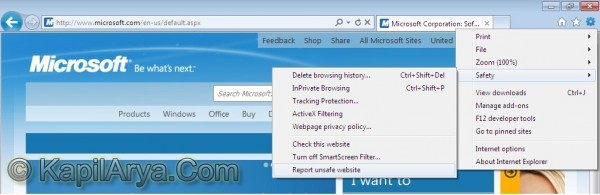
1. Go to Tools -> Safety -> Report unsafe website.
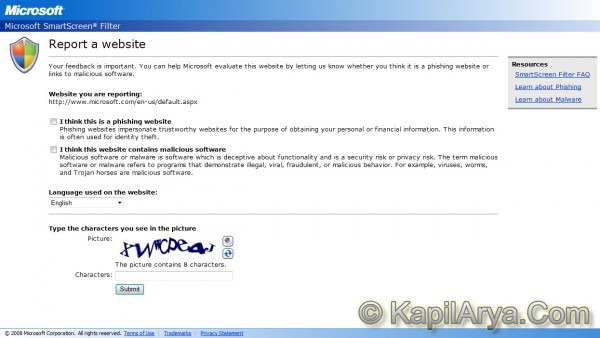
2. A new form opens, fill up the form with appropriate answers. Fill the captcha, submit the form.
3. When the form is been submitted successfully, a confirmation has been received.

That’s it!

Share this article
https://www.kapilarya.com/report-an-unsafe-website-in-internet-explorer-9

Shareable URL

Article by

Kapil Arya
11x Microsoft MVP · Admin

Kapil holds Microsoft MVP title in Windows IT Pro expertise, 11-times in a row (2014-2025). He is 8-times Windows Insider MVP as well, and author of 'Windows Group Policy Troubleshooting' book. In 2015, Microsoft India accomplished him as 'Windows 10 Champion'. Being passionate Windows blogger, he loves to help others on fixing their system issues. Kapil has worked with official Microsoft Community Engagement Team (CET) on several community projects. You can subscribe him for news/updates and fixes for Windows.

Leave a Comment

Your email address will not be published. Required fields are marked *