

User accounts facilitates personalized experience to different people using same computer. When an user specific account files or configuration are corrupted, the user may start facing its consequences. One of those symptoms is logging into temporary or roaming profile.
When you discover that Windows keep logging you as a temporary user rather than standard/normal user, then there is something wrong with your profile. In such cases, you’ll get following notification as well:
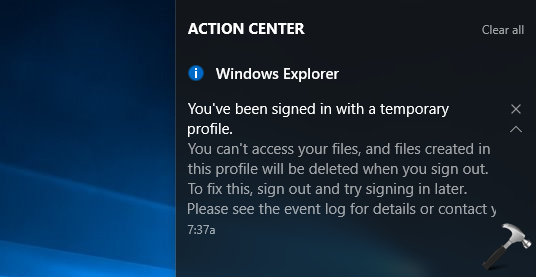
Since Windows is logging you as temporary user, the documents you create will be removed after you re-login. The simplified steps mentioned below will help you to fix this weird issue.
Page Contents
Fix: You’ve Been Signed In With A Temporary Profile In Windows 11/10
Manual fix
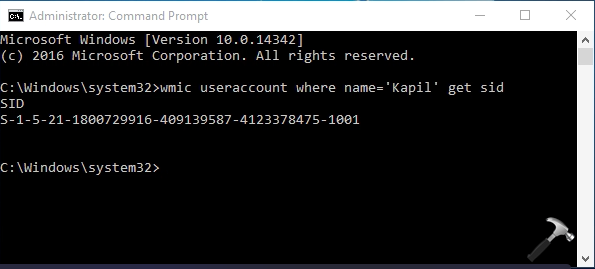
1. Right click on  and select Command Prompt (Admin). In the administrative Command Prompt window, type following command:
wmic useraccount where name='<USERNAME>' get sid
*Replace <USERNAME> with your actual user account name.
Once command is executed, note down the security identifier (SID), especially last four digits of SID.
Registry Disclaimer: The further steps will involve registry manipulation. Making mistakes while manipulating registry could affect your system adversely. So be careful while editing registry entries and create a System Restore point first.
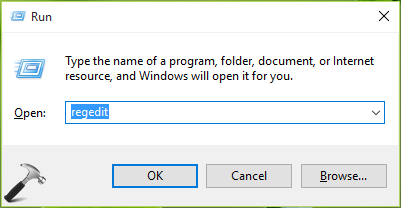
2. Press + R and put regedit in Run dialog box to open Registry Editor (if you’re not familiar with Registry Editor, then click here). Click OK.
3. In the left pane of Registry Editor, navigate to following registry key:
HKEY_LOCAL_MACHINE\SOFTWARE\Microsoft\Windows NT\CurrentVersion\ProfileList
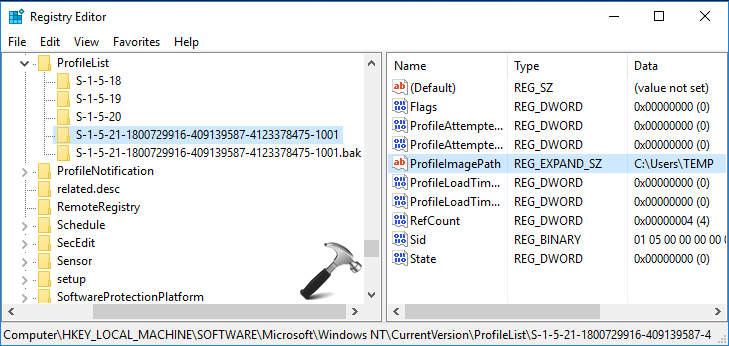
4. When you expand ProfileList key, you’ll find SID specific registry keys. Using the SID we noticed in step 1, spot the correct SID registry key for your profile. In the corresponding right pane, you’ll be able to locate ProfileImagePath, which is expandable registry string (REG_EXPAND_SZ). Since you’re facing this issue, the string data might be pointing to C:\Users\TEMP. Double click on the same string to modify its Value data.
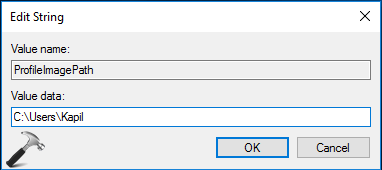
5. In the Edit String box, put the Value data as C:\Users\<USERNAME>. You need to substitute C: with your system root drive and <USERNAME> with your user account name. Click OK.
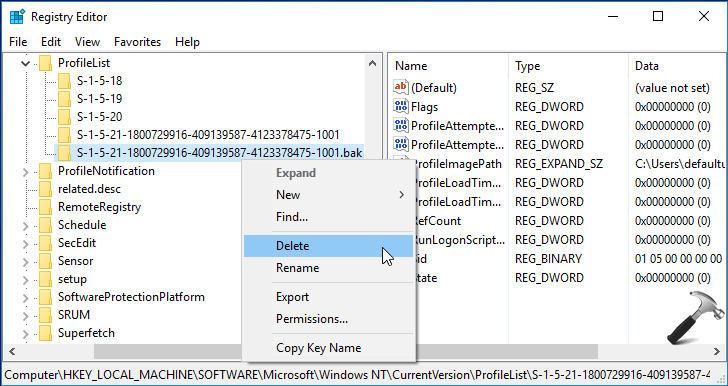
6. Finally, right click the SID registry key with name same as your SID and ending with .bak. Right click on this key and select Delete. You can now close Registry Editor and reboot.
After restarting your machine, you’ll be able to log in to your standard or normal user account.
Video fix
Checkout following video to understand the steps more better:
Hope this helps!
Related: How to allow/prevent user logon with temporary profile.
*Originally written on 30 Jun, 2016. Last updated for Windows 11.







when I try to get sid on the comman dprompt ,I get ‘no instance(s) available.what should I do.pls help.
^^ Try using the full location of user folder C:\Users\ instead of user name only. Also make sure you use
\\instead of\in your command.I restarted my computer after the registry fix, and I must not have hit the “Sign out” button from the “We can’t sign into your account” notification. Now I might have lost my account features. And I don’t think I have a system restore for this.
I might have messed up big time.
^^ Sorry to hear that man, I wish you could have restore points created.
I started to create a restore point as suggested in one of the procedures recommended and discovered an existing restore point mid March 2017 and decided to attempt a restore to this point before going further with the recovery process. This seems to have gotten my “old” profile back and everything seems normal again. I can’t tell you exactly what in your response got me on the right track, but I am back to normal again and am very thankful to you specifically and Microsoft Community in general for saving me again!!!
^^ Glad the issue is resolved 😊
I can log in with a user into Win 10 ok. I cannot connect to the domain, even using the administrator account without getting this error. I was setting up a new Win 10 64 bit pc. I have done system restore to go back. I have unjoined the domain and try to rejoin. I deleted the profile list keys for domain entries as well as their user folders in c:\users. I have created new profiles and the server, but can’t connect to any without the WE CAN”T SIGN INTO YOUR ACCOUNT.
At one point i had on AVG Antivirus but it was removed with the system restore. I had also installed Client Access ver 7. It required 32 and 64 bit Microsoft Viscual C++2005 Redistributable files. Please help!
^^ After joining domain, try the above mentioned registry fix and see if you still have the issue.
The problem is (as shown in the first screenshot) changes to files/ the hive are not saved when you log out of this Temporary Profile
I have lost my word file from desktop when I restarted my PC. Everytime while I restart it a message comes “You have signed in with a temporary account” and files saved on desktop are not there. How can I retrieve my lost word files now ?
Same problem with me – I have lost my word file from desktop when I restarted my PC. Everytime while I restart it a message comes “You have signed in with a temporary account” and files saved on desktop are not there. How can I retrieve my lost word files now ? Kindly do reply ASAP.
^^ Files on temporary profile can not be recovered, unfortunately :(
Hello Kapil, I don’t seem to tell which one is my actual profile name. I am trying to follow your steps above. Please help me which one could be my actual profile?
Hi, I followed all these steps exactly, and then when I rebootted the computer, it was like the real profile had been completeley deleted. It went through and created a new profile. When I now sign in under the same username it doesn’t even pop up saying it’s a temporary profile, its just as if its set up a brand new profile. Is there anything I can do. I followed all the steps above exactly. the only thing im unsure of it this part “in the Edit String box, put the Value data as C:\Users\. You need to substitute C: with your system root drive and with your user account name. Click OK”
I did this is C:\Users\Theo which is the username and C is the normal system root drive. Any advice ? thanks
This process simply deletes the damaged profile’s contents entirely – it leads to disaster.
Please do not follow this process.
Does the tutorial work on Windows 7?
^^ Yep!
If you are on a domain then push a ‘user must change password upon next login” to the user having the issue, this fixed all instances of this for me.
^^ Thanks for sharing this!
What is the man cause of Temporary profile issue and how to avoid?
^^ There is selective root cause and issue may be encounter due to various reasons. Usually, corruption of registry might cause it and you can fix it by pointing ProfileImagePath’s data to correct location.
Hello,
right from the start, after putting the command for sid, the answer i get is “No instance available”
how do i proceed with the rest of the fix?
thank you
^^ Make sure you’re running Command Prompt as administrator.
It started freshly and all my data’s are gone…
^^ When you’re on temporary profile, data will not be saved.
I have problem with the first step my command prompt is saying “No Instance Available” please help me
I did it as instructed and it was solved. But the problem is that I can’t set up a new pin. It only takes my old password. What should I do?
^^ Refer this fix: https://www.kapilarya.com/fix-cant-add-sign-in-pin-for-windows-10.
Ok so I just starting this but when i open my command prompt mine doesnt say c:\windows\systems32> It says c:\users\Mykco> is that an issue, because my computer wont even let me have access to my c drive.
Also when I try and go into the registry I get an error message that says that I am unable to access the that happens any time I try to access anything that might actually be helpful.
Very helpful. Thank you!
^^ 👍
Very helpful. Thank you!
Thank you so much! I’ve been at this machine for hours trying to fix this issue. Found a leftover registry .bak entry for the deleted profile. I deleted that entry and was able to successfully re-create the domain user profile on the machine. Much love!
^^ Glad to help Andrew 😎
Hello sir,
Thank you for the fix but it had all my personal data deleted including the outlook file, …don’t know how to recover them, any idea ?
Do we have to be in safe mode or anything or can we do this in the temp and also when I go to safe mode and rester my pc it goes back to my normal account but I want my laptop to just login 1 time instead of having to restart and Al that stuff please help me everything up there I did but still nothing