

In Windows, you can easily install the program of your choice. It can be a UWP app or third-party desktop program from a software vendor. When you have these additional programs installed, you can easily modify or uninstall them from Settings app. In Windows 10 or Server, you’ve to go to Settings app > Apps > Apps & features and from there you can uninstall or make changes to a program. However, if you can’t uninstall program on your Windows from Apps & features page, this article is for you.
Recently, I was working on my Windows Server 2019. When I tried to remove a program from the Apps & features page in Settings app, I was unable to do so. Whenever I click on Uninstall button for a program, the following message appeared:
Page Contents
Windows cannot access the specified device, path, or file. You may not have the appropriate permissions to access the item.
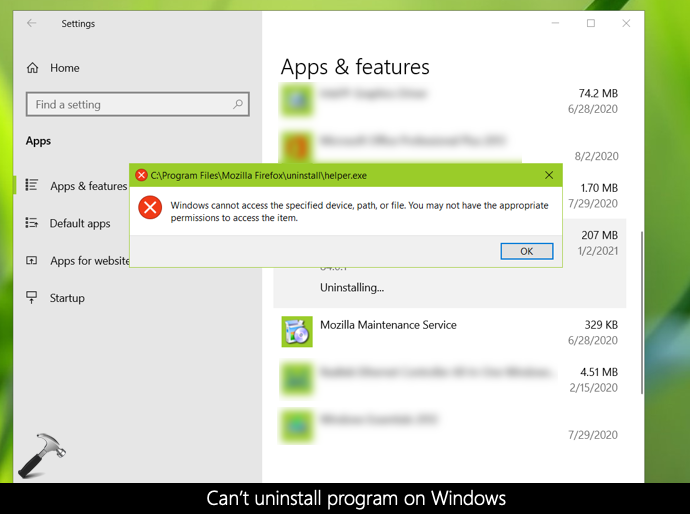
The message appeared prevented me from uninstalling any of the programs listed on this page. If you are also facing the same problem, here is what you can try to fix.
Fix: Can’t uninstall program on Windows
This is the solution which actually worked for me and it resolved my problem. Here are the steps I performed in this case.
1. Press  + R keys and type
 appwiz.cpl in Run. Click OK.

2. This resulted in opening the Programs and Features window under Control Panel. This is actually the older interface we have been using in older Windows editions such as Windows 8.1, 7 etc. to uninstall programs from our system. From here, I can simply highlight the program I want to remove and click Uninstall.
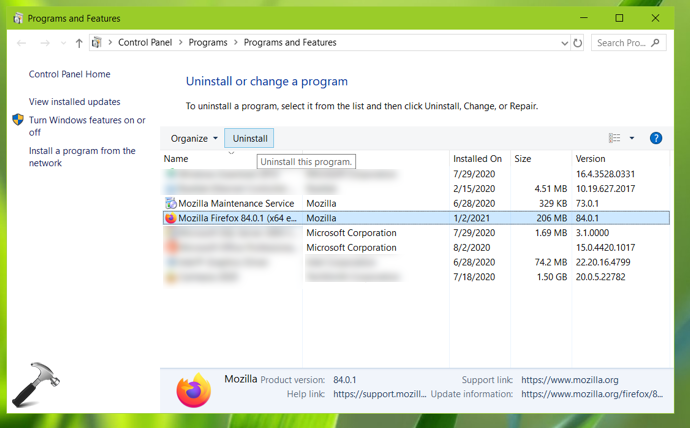
This immediately remove the program from my system and resolved the problem.
Apart from this problem, if you are on Windows Server, you can receive a different message while uninstalling a program:
This installation is forbidden by system policy. Contact your system administrator.
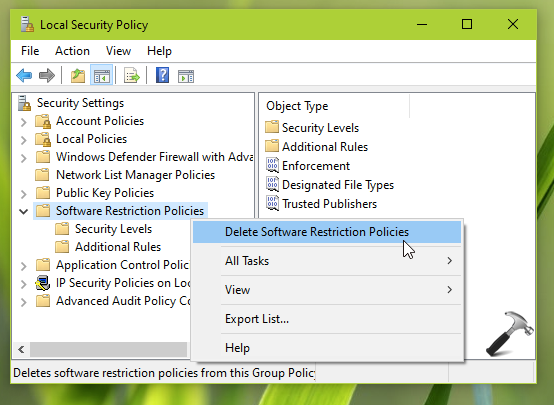
This could be due to Software Restriction Policies applied on the system. You can contact your system administrator to remove such policies. If you’re the system administrator, open Security Policy snap-in using secpol.msc command. Go to Security Settings > Software Restriction Policies. From here, you can manage the policies applied by you or any other administrator. You can also right click on Software Restriction Policies and select Delete. This will resolve the problem for affected users.
That’s it!





![[How To] Completely Uninstall Printer In Windows 10](https://www.kapilarya.com/assets/Printer-768x481.png)
