[How To] Prevent Changing Of Icons & Cursors In Windows 7

If you are a Windows 7 user, you might came across the new themes and also played to trying them. You might have also noticed changing of cursors and icons by t

Kapil Arya
11x Microsoft MVP · Admin
1 min read
Add as a preferred
source on Google

If you are a Windows 7 user, you might came across the new themes and also played to trying them. You might have also noticed changing of cursors and icons by themes.

In this article we’ll tell you how to avoid the changing of icons and cursors. The quick tip is here:

How To : Prevent Changing Of Icons & Cursors In Windows 7

1. Right click on desktop and select Personalization. In the right pane, you have two options, pick the first one.
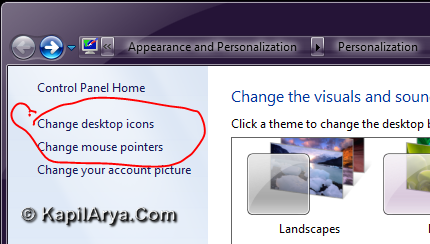
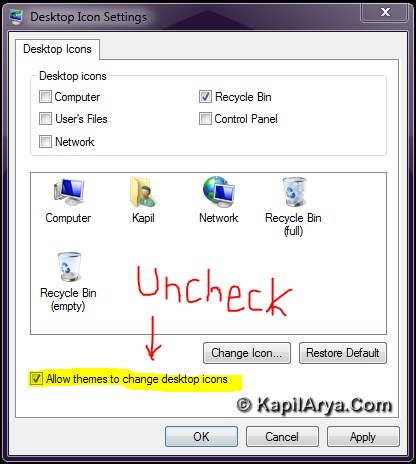
2. A small window opens, in which uncheck the option saying Allow themes to change desktop icons. However here you can also select the icons which you want to show on desktop.
3. Now select the second option in the first step, i.e. Change mouse pointers. Again a new window opens in which uncheck the Allow themes to change mouse pointers. Click Apply followed by OK.
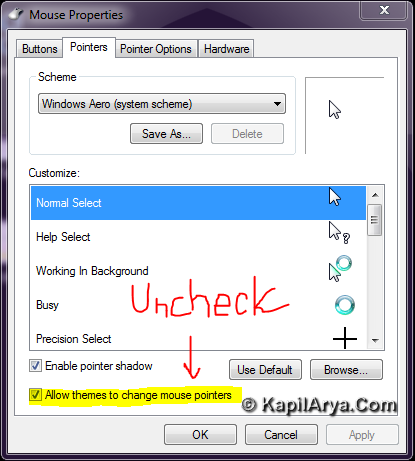
Now the new themes you’ll try won’t effect your cursors and icons.

That’s it!

Share this article
https://www.kapilarya.com/prevent-changing-of-icons-cursors-in-windows-7

Shareable URL

Article by

Kapil Arya
11x Microsoft MVP · Admin

Kapil holds Microsoft MVP title in Windows IT Pro expertise, 11-times in a row (2014-2025). He is 8-times Windows Insider MVP as well, and author of 'Windows Group Policy Troubleshooting' book. In 2015, Microsoft India accomplished him as 'Windows 10 Champion'. Being passionate Windows blogger, he loves to help others on fixing their system issues. Kapil has worked with official Microsoft Community Engagement Team (CET) on several community projects. You can subscribe him for news/updates and fixes for Windows.

2 Comments
ganesh

nice pick

odio

ohhh! i haven’t noticed that yet. thanks 4 sharing#

Leave a Comment

Your email address will not be published. Required fields are marked *