

I always prefer to use Mozilla Firefox as my default browser. It works great and I always appreciate its performance. But nowadays, I’m facing a weird problem in this browser. The issue is that Adobe Plugin in Firefox is not working properly, showing some vulnerable issue texts.
This error effects mostly the ads with flash content. Have a look at a specimen:
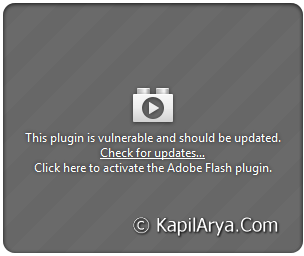
Actually Mozilla has blocked the Flash Player and its derivatives rated below 10.2 as of 5 October 2012, but it seems like the issue also persists with Flash Player above 11 edition. Here, I tried the link given with error i.e. to check for updates but it looks like the plugin checker service at Mozilla‘s server will take ages to reveal what’s wrong!
Then I tried the hit and trail solutions, and find one as handy. This is actually the Real Player plugin’s interfere with Adobe‘s Shockwave Flash plugin. In this article, I’m going to discuss that working way…
FIX : Error “This Plugin Is Vulnerable & Should Be Updated” In Firefox
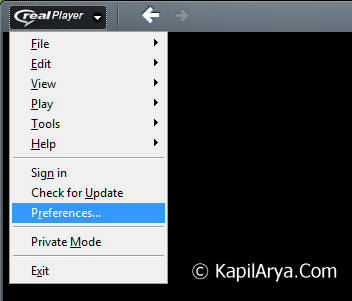
1. Open Real Player. On the upper left corner, click Real Player icon and select Preferences.
2. On the Preferences window, uncheck Enable Web download & Recording for these installed browsers.
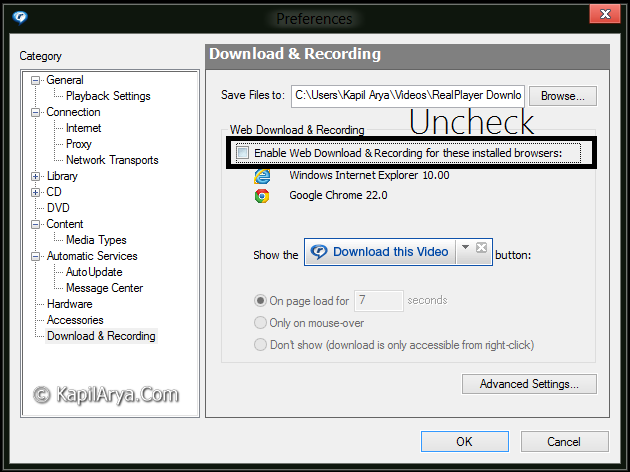
3. Click OK, then restart Firefox and it should work fine.
That’s it!



I tried to disable the real recording plugin, but no luck: HELP
It makes me out of Firefox :P
^^ I’ve not told to disable the “RealPlayer Download Plugin”! Just uncheck the option as said in article, it will work on. No need to configure in Firefox :)
I tried your method, i works but not properly :P
@mahesh, you can also use flashgot add-on :D
That is not the problem. I do not have real Player installed on my computer at all.
^^ Refer to above comment and try the flashgot add-on :)
Moreover, this issue is now fixed by Mozilla in the latest iterations.
Thank you very much, sir! It worked! I looked over a dozen of possible solutions in the web and yours was the solution. Cheers!