

Mozilla Firefox like other competing browsers, can understood various kind of network protocols for example, FTP, HTTP, RSTP etc. But if the protocol setting of Firefox is either disturbed or malfunctioned, it may have trouble understanding the protocol you’re requesting. The protocol setting of Firefox could be affected due to harmful content inside cookies or cache, thrown by the websites you visit. Additionally, the add-ons you use could also change the protocol settings. Recently, I came around following error while using Firefox, even with HTTP addresses:
Page Contents
The address wasn’t understood
Firefox doesn’t know how to open this address, because one of the following protocols (javascript) isn’t associated with any program or is not allowed in this context.
You might need to install other software to open this address.
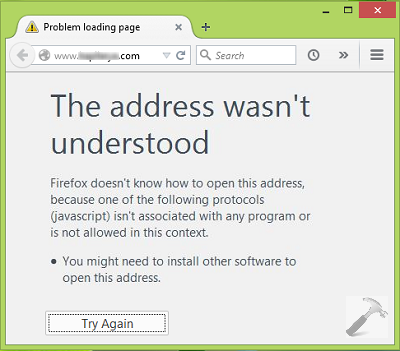
After receiving this error, the first thing I did was restarting Firefox, but no change in the situation. Secondly, clearing cookies and cache too didn’t helped in my case. At last, I tried to change the advance protocol handling settings, and this finally fixed the problem. Hence, I am sharing the cure to this issue, with you guys:
FIX : “The Address Wasn’t Understood” Error In Mozilla Firefox
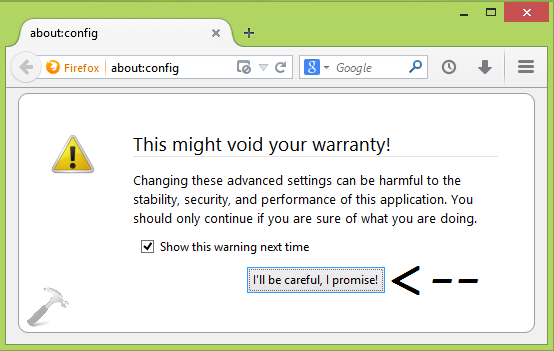
1. Open Mozilla Firefox window, type about:config in the URL bar and hit Enter key. Click I’ll be careful, I promise! option now.
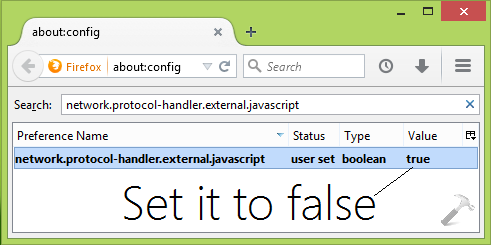
2. In the Search filter, type network.protocol-handler.external.javascript and you’ll be resulted Preference named network.protocol-handler.external.javascript which is set to true, actually it is the root cause of this problem. All you need to do is to double click on this Preference Name to set its Value to false which is the default value.
You can now close Firefox and restart it, the problem should be fixed on the go.
Hope this helps. Do checkout about:config tricks for Firefox!



thank’s … god job! manteb om …. xixixixi
Did not work as it was already set to false
same as geoff worthless advice
Didn´t work. It was already set to false.
hello , i have simillar problem :
Firefox doesn’t know how to open this address, because one of the following protocols (tg) isn’t associated with any program or is not allowed in this context.
You might need to install other software to open this address.
what can i do to solve the problem.
mine is not (javascript) its (loaditem) please solve this error
thankz i use mozilla firefox now
^^ 👍
Didn’t work. It was already set to false, And the software is already installed
I use my computer for entertainment instead of cable or satellite. EVERY time I sign in to google through BING; FIREFOX I get this confusing message. Just recently. I don’t have time to trouble shoot every night when time is precious.
Can I not just go back to last week’s settings when I could access you tube without problems\/
Thanks,
JG
You could use the hammer approach and go to the library icon on the top right of the page, select history then clear history. You will be presented with an option to clear history from different time periods or all history. I just cleared all history and it worked. Didn’t have time to find out which particular item was causing the problem.