For the Ease of Access, Windows have some of the productive features inside it. Suppose there is a guy with some sort of issues in eye-sighting, he may like to have a strong cursor blink while using Windows. Thus for him, and others like him, Ease of Access provides variety of components like High Contrast, Narrator, Magnifier etc. As far as typing is concerned, you can always control blinking cursor width so that you can type without any issues.
Increasing pointer width will be quite helpful for the people suffering from eye-sighting related issues. Because with the help of that, they could easily locate where the pointer is actually. In this article, we’re going to show you the way to control cursor blinking width aka Caret Width using Registry Editor.
How To Change Cursor Thickness In Windows 10/8/7
Registry Disclaimer: The further steps will involve registry manipulation. Making mistakes while manipulating registry could affect your system adversely. So be careful while editing registry entries and create a System Restore point first.
1. Press  + R and put regedit in Run dialog box to open Registry Editor (if you’re not familiar with Registry Editor, then click here). Click OK.

2. Navigate here:
HKEY_CURRENT_USER\Control Panel\Desktop
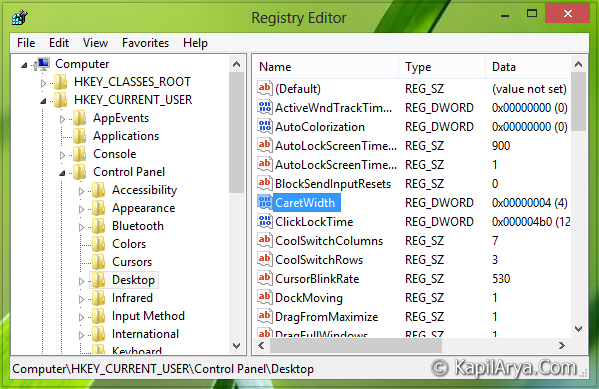
3. In the right pane of this location, look for the CaretWidth named DWORD. Double click on the same DWORD in order to modify its Value data:
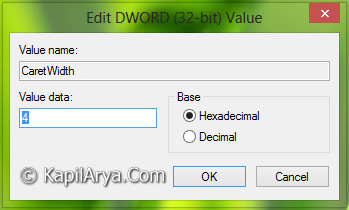
4. For increasing the blinking cursor width, input the Value data more than 1; for example say 4. Keep in mind that more the Value data is directly proportional to blinking cursor width, so more the Value data, more will be the Caret Width. Click OK after inputting your desired Value data. You may close the Registry Editor now and reboot to see changes effective.

That’s it!