

Windows Action Center is the hotspot point to manage the security options on a computer. Using Security Center, you can manage Firewall, Automatic updating, Antivirus, Maintenance, Reset, Internet security settings, UAC (User Account Control) etc. Thus, from the maintenance point of view, Security Center is somehow an important parameter. But sometimes, you may face the error while turning the Security Center on. In this article, we’re going to discuss how to fix when you get The Windows Security Center service can’t be started error in your Windows system.
Here is the screenshot of the error we just received while turning on the Security Center:
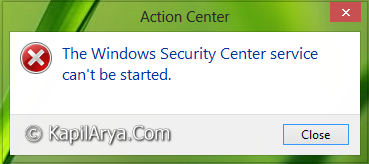
As you can see in the image above, there is no other option than to close the error message. Well, you just need to start the associated service with Security Center and the issue could be fixed up significantly. Here is how to do that:
Page Contents
FIX : The Windows Security Center Service Can’t Be Started In Windows 10/8/7
FIX 1 – Using Services Snap-in
1. Press  + R and put services.msc in Run dialog box. Click OK to open Services.
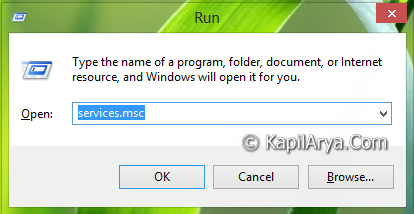
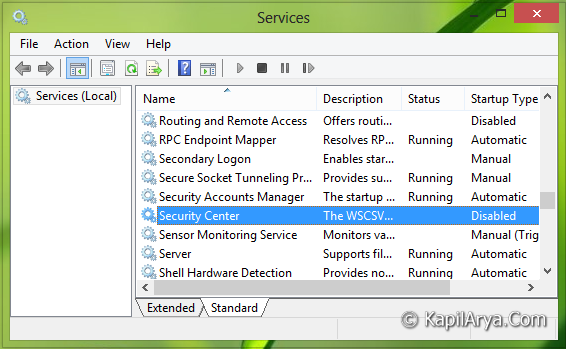
2. In the Services window, scroll down and look for Security Center service. Since you’re facing the issue, the service should be disabled then. Double click on the same service to modify the status of it.
3. Now in the following window, select the Startup type to Automatic. Click Apply followed by OK. Then click on Start and again click on OK.
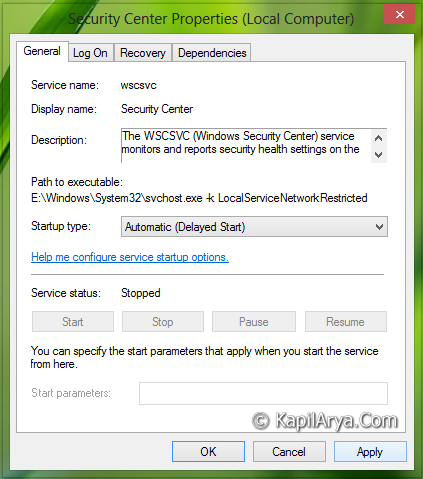
That’s it! Now reboot the system and you won’t see the error message again.
FIX 2 – Using Registry
If FIX 1 doesn’t resolve the issue, you can try the registry manipulation mentioned in this video fix:
This registry fix should definitely solve this problem for you.
Hope it solved your issue! Check this post if you can’t start Windows Defender on your system.






Thanks for the tip. Nice article.
I tried it on Windows 7 and it worked :-D
How to access Security Center in Windows 8 by the way?
^^ The Security Center lies in Windows 8, go to search, type Security Center and from search results, click Check security status and you’ll got the Action Center window, from where you can turn on Security Center.
Security Center did not even come out in the services window. Help.
^^ You mean that Security Center service is not available on your system?
Hi. Thank you so much for being so helpful. I think it’s amazing that there are highly intelligent people like you in the world who are willing to volunteer their time, while being off from their regular full time careers, to help people like me!! That being said, I can make my way around a computer OK but this one had me stumped until I found your page. But I only got to the section where it says to double click and change the startup type from “disabled” to “Automatic”. The reason? Mine is completely grayed out…I was going to supply a screen shot of the window but I couldn’t figure out how to do so (all my screen shot apps only work on webpages…not one will take a pic of my desktop of windows on my desktop). Either way, where yours says “Automatic (delayed start)” under Start-up type, mine says disabled and it won’t let me change ANYTHING in the window. Your thoughts? Anything you can do to help would be greatly appreciated!!
Tracie
^^ Make sure you’re logged on as the administrator of your system. Also confirm that you’re set to recieve Windows Updates automatically.
THANK YOU SOOOOO MUCH!!!! I finally found your advice after starting my lap top in safe mode over and over! My problem was on startup, all lights & fans came on but then nothing…Blk screen w a curser. Then it would boot up fully in safe mode but I was getting the “security center service cannot be opened” after doing the steps u advised it worked!! Unfortunately now that It has booted up its just loading and loading on the “login” screen, and will not let me go onto the internet:( any advice on that? I have a 4yr old hp pavilion g series
Thank you your knowledge is greatly appreciated!!!
Catrina
^^ Glad we could help. Boot it again into Safe Mode, switch to local account from Microsoft account. Now boot normally, it should work this time and then switch to Microsoft account :)
still not started and running as expected after you reconfigure and start Security Center
^^ Still receiving the same error message, or something else?
I followed the steps exactly as posted. After applying the changes and hitting restart, I still get the same error: “Error 1068 The dependency service or group failed to start.”
^^ In Security Centre‘s properties in Services there is a Dependency tab (step 3). Make sure each service on that tab is started. The dependencies are ‘Remote Procedure Call (RPC)‘ and ‘Windows Management Instrumentation‘.
In reference to Windows Security Center Service can’t be started:
When I click on ‘Start” in the “Security Center Properties (Local Computer) box, the message I receive is “Windows could not start the Security Center Service on Local Computer. Error 1075: The dependency service does not exist or has been marked for deletion.”
What now???
Also when I open the ‘Dependency Tab’ I find two boxes:
One says”This service depends on the following system components:”
And also “The following system components depend on this service:”
Both boxes are empty.
^^ Open Registry Editor. Navigate to HKEY_LOCAL_MACHINE\SYSTEM\CurrentControlSet\Services\wscsvc and in the right pane, delete DependOnService. Let me know if it helps, Good luck!
thank you very much it realy helped for me thank you
^^ Glad we could help :)
I tried it everything was going as you said until I had to click on security center, I couldn’t find it nowhere. Please help
^^ Please refer the registry manipulation discussed here in previous comments.
There was no security center option .what can i do …
^^ Try registry manipulation.
security center is missing from services, there is a secuirty accounts thats showing started but the start stop option is not selectable.
wscsvc is missng , there is a wpscsvc? what should do , do i have to get back wscsvc?
^^ Can you spot the service in System Configuration Utility? (Run msconfig command, switch to Services tab then)
thnks for tips..its working
^^ Cool :)
It was really worked.thanks
^^ Glad it worked 😊
in mine it show error 2: files specified are not found.
need help
^^ Run System File Checker scan: https://www.kapilarya.com/how-to-use-system-file-checker-to-repair-windows
With reference to windows security center,
I tried everything as you said to start the Windows Security Center Service even the Registery Manipulation. But, it did not work. In Registery Manipulation when i deleted the DependOnSerivce it showed a error that “All specified value can not be deleted” . In security center properties, STARTUPTYPE is blocked. I can not start a sevice or stop it. Actually , I have no control over all the services which are present in services. msc.
^^ The registry steps are not mentioned here, may I know what steps you followed?
It gives me error code 1068
^^ Refer previous comments here.
Thanq it worked at that time.. But when i turn off and started again then it was showing the same error windows security services cant be started
thank you so much for your help
^^ Happy to help 😊
Thanks you verry much
^^ You’re most welcome 😊
thank you so much its very helpful…
Worked for me, thanks Kapil!
thnx buddy… got solved
^^ Nice!
thanks sir
Thank you a lot for the information to help. I had no clue what was going on. I got the same message after following your steps ,that it still wouldn’t start. Because one of the dependents wasn’t started. So I’m glad someone asked in comments lol. Again thank you very much.
^^ Glad the problem is fixed finally 😊
Thanks a lot this article is really helpful. it has helped me to solved many of my windows issues.
^^ Glad it helped 😎
I got error 1079 what to do
thank god finally i resolve the issue by reading this article.
it’s very helpful to me……
^^ Thanks a lot for your feedback purna 😊
Finally, after so many weeks I was able to ON windows firewall. Thanks, kapil.
^^ Glad to hear it helped 😎
Status type doesnt illuminate
my pc got the same problem yesterday by installing third party applications some i watched ur video ,my security center folderor file is not there plz help me sir
^^ There is no mention of ‘my security center folderor file’ in either article/video. Can you try uninstalling the third-party app and see if it helps.
Why I cant find mscsvc and?
I cant find security center too