

When you’re about change a particular setting in your Windows system, the dependency services must operate to avail the alteration. In case if dependency services are stopped or not working properly, you’re more likely to face issues. Recently, while changing Lock Screen, we came around following error:
C:\Users\<USER NAME>\Appdata\Local\Packages…\AAA_SettingsPageLockScreen.settingcontent-ms
Page Contents
The remote procedure call failed.
![[FIX] The Remote Procedure Call Failed While Setting Lock Screen](https://htse.kapilarya.com/FIX-The-Remote-Procedure-Call-Failed-While-Setting-Lock-Screen.png)
Specifically read : The Remote Procedure Call Failed While Resetting App Cache.
The system on which we faced this problem have a genuine and activated Windows copy. So activation wasn’t the issue. Also from the error message mentioned above, it is clearly looking like the issue is related with Remote Procedure Call service. This service runs in background and if it is stopped or not working properly, issues like this came into light.
Here are the simple steps you need to follow, in order to suppress this problem:
FIX : “The Remote Procedure Call Failed” In Windows 10/8.1/8
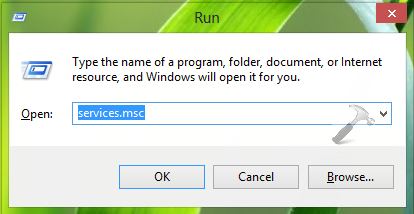
1. Press  + R and put services.msc in Run dialog box. Click OK to open Services.
2. In the Services window, scroll down and look for the Remote Procedure Call (RPC) service. Since you’re facing this issue, this service may not be running. Double click on same service.
![[FIX] The Remote Procedure Call Failed While Setting Lock Screen](https://htse.kapilarya.com/FIX-The-Remote-Procedure-Call-Failed-While-Setting-Lock-Screen-1.png)
3. In the service properties window shown below, you’ve to select Startup type as Automatic. Then click the Start button so that service may start functioning. Click Apply followed by OK. Close Services window now.
![[FIX] The Remote Procedure Call Failed While Setting Lock Screen](https://htse.kapilarya.com/FIX-The-Remote-Procedure-Call-Failed-While-Setting-Lock-Screen-2.png)
Once you successfully started the service, you can try to change Lock Screen or the action where you faced error. You’ll find that problem no longer exists now and everything is working fine.
That’s it! Checkout these recommended stories:
1. [How To] Change Default Lock Screen Image For Multiple Users In Windows 10
2. [FIX] Error “Setting The Lock Screen Failed. Please Try Again” For Windows 8, 8.1



Hi, my Remote Procedure Call (RPC) is already set into automatic type but the problem is still there. Do you know anyother way to solve this problem?
^^ Try the third DISM command mentioned here and see if it helps:
https://www.kapilarya.com/fix-do-inbox-corruption-repair-using-dism-in-windows-8
I still have the issue.
Device setting, pc info ….. are not opening from search “remote procedure call failed” suggest me a way to fix this.
^^ If you’re on Windows 10, you can easily reinstall the OS without affecting anything:
https://www.kapilarya.com/reinstall-windows-10-without-affecting-personal-files
omg thank you! thank you! and again thank you!!!!!!
^^ Glad we could help :)
In step 2, mine is on automatic and is running. Should I continue?
^^ Check the Dependencies tab, and make sure services mentioned there are also running.
i did the refresh and still have the issue.