

Prior to Windows 10, only Internet Explorer seems to be interacted with Credential Manager. But Windows 10 comes with Microsoft Edge as default browser and hence Edge now seems more interacted with Credential Manager as compared to IE.
We all know that Credential Manager saves user passwords as Web Credentials, that were saved during browsing session performed using Edge or IE. However, today when I open Credential Manager, I came across following error:
Credential Manager Error
An error occurred while performing the action.
Error code: 0x80070057
Error Message: The parameter is incorrect.
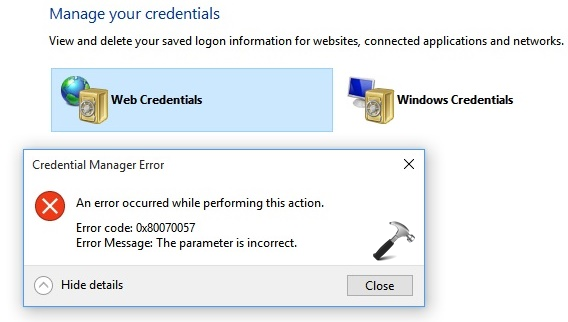
This problem seems to be appearing only with Web Credentials, if I try to open Windows Credentials, its working fine. If you’re also the victim of this issue and facing it on your Windows 10, here are the ways you can try to fix:
Page Contents
FIX : Windows 10 Credential Manager Error 0x80070057. The Parameter Is Incorrect.
FIX 1 – Using Services snap-in
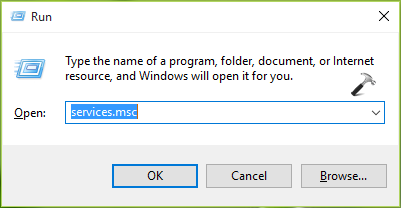
1. Press  + R and type services.msc in the Run dialog box, hit Enter key to open Services snap-in.
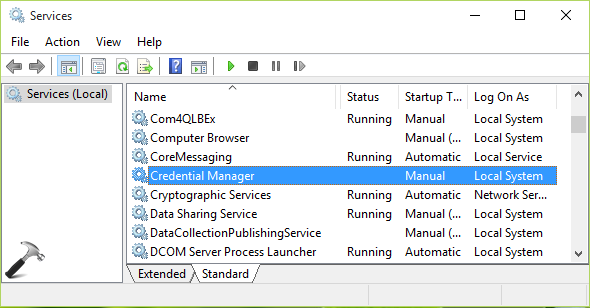
2. Moving on, in the Services window, scroll down and look for Credential Manager service. Since you’re facing this problem and if this service is culprit for that, you may find it not running. Double click on the service to modify its status.
3. In the Credential Manager service property sheet, firstly make sure that you’ve set Startup type to Manual. Then click Start button to propagate the service. Click Apply followed by OK.
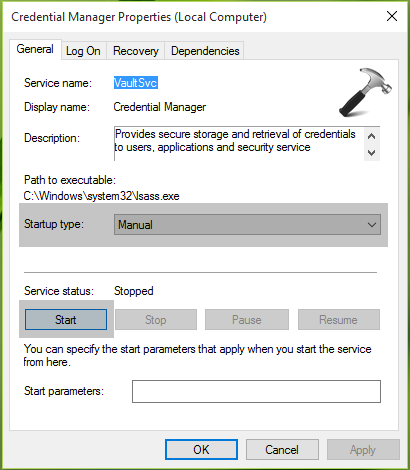
Close the Services snap-in now and check the status of problem. You’ll find that issue no longer exists. In case, if the problem still persists, try FIX 2.
FIX 2 – Use Microsoft Edge to browse and manage credentials
If FIX 1 didn’t solved this problem for you, here is an alternative. Actually, Microsoft Edge has its own password manager like the other browsers and you can use it to manage your web credentials. To access it, try these steps:
1. Open Microsoft Edge and go to Settings > Advanced settings. Now scroll down in Advanced settings and look for Privacy and services section. Here, click on Manage my saved password link.
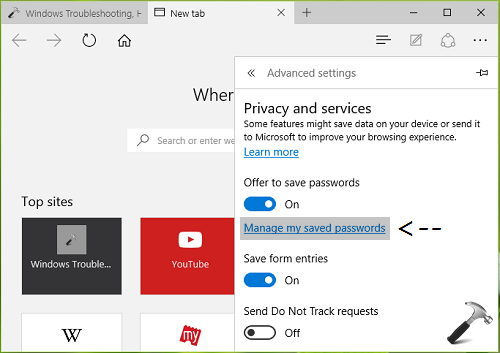
2. Next, you’ll be able to browse saved web credentials in this password manager. Hence you can edit or remove passwords directly from here.
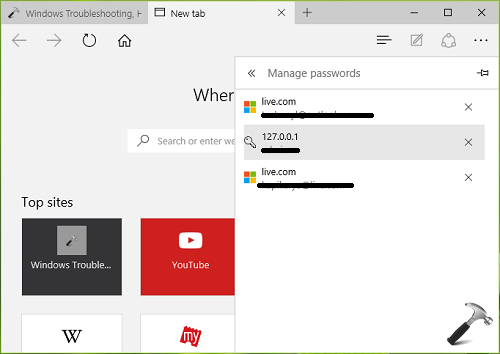
When you’re done with managing your credentials, close Edge and return to Desktop if you like.
FIX 3 – Using File Explorer
This method has been found later, and discussion about it can be found in comments. Since it worked to solve the issue, it has been included as a part of this article.
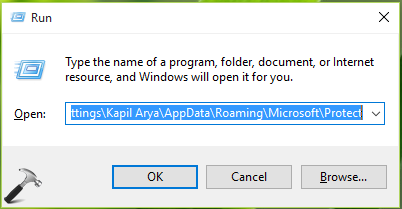
1. Make sure you’re enabled hidden items in File Explorer. Press + R and type following location in Run:
C:\Documents and Settings\<USERNAME>\AppData\Roaming\Microsoft\Protect
*Substitute C: with your system root drive and <USERNAME> with user profile name.
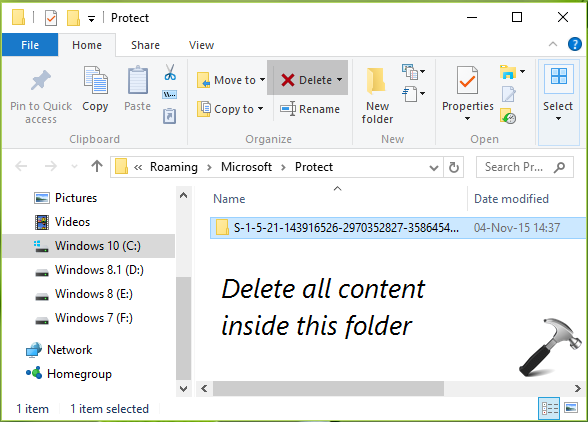
2. In the Protect folder, backup all the files and folders. Then delete all content under this folder.
Open Credential Manager and you’ll find that issue has been resolved.
That’s it! See this article if you want to completely disable Credential Manager in Windows.







This worked perfectly on my W10 Home. Thank you!
^^ Glad we could help :)
Neither of these suggestions helped me. With all due respect as you are apparently knowledgeable in many areas, but none of your suggestions have ever helped me. Peace!
The advice given here did nothing to help me. It sounds like the original poster knows nothing about the actual causes. This is especially frustrating since all google hits seems to point to this post.
^^ Suggest you delete all files and folder present under C:\Documents and Settings\(USERNAME)\AppData\Roaming\Microsoft\Protect. Make sure you backup them before delete. Let me know if it works :)
Yeah, erasing the content of the Protect folder worked. But I would have appreciated if you would have warned me that all passwords in all apps on my Windows 10 machine would be erased by that action.
^^ Oops, apologies for that :( But I’m happy that problem is fixed, thanks for confirming! I’ve updated the post with this method :)
FIX 3 brought the solution to this problem. Everything works as before. Thank you very much to share this information !
^^ Glad it helped :D
Great help!. Tank you so much.
^^ Thanks for your feedback!
i have a iphone 6 and windows 10 laptop, I am trying to transfer my media from my iphone to my laptop. some videos cannot be played or transferred over as this message keeps appearing ‘ Error 0x80070057: The parameter is incorrect.’ what do I do ?
None of these fixes worked on my Windows 10 Pro install. This is very frustrating
^^ It worked for all others here, let me know what you’ve done so far!
HI,
Thank you for providing expert information, but above all steps are not helping me out. i am searching web from last few hours and unable to find solution.
C:\Documents and Settings\(USERNAME)\AppData\Roaming\Microsoft\Protect is not a file path that exists on my machine. Are you sure it is not C:\Users\(Username)\AppData\Roaming\Microsoft\Protect?
^^ I’m pretty sure that path is C:\Documents and Settings\\AppData\Roaming\Microsoft\Protect.
All this did not work, still have the problem, did also fix 3, and folder was without content….