With the availability of Windows 8 Milestone Build 7850(6.1.7850.0.winmain_win8m1.100922-1508), we all have a very awesome news for you. With this build, you can use a registry manipulation and unlock the Modern Task Manager for your system. This Task Manager is more stable, and simplified along with outcome of some new features. Here are the features that you would love in this Modern Task Manager.
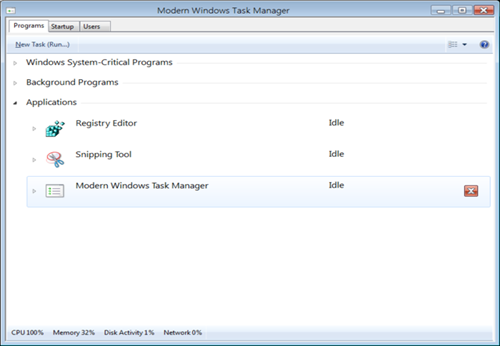
How To : Unlock The Modern Windows 8 Task Manager Using Registry
The Modern Task Manager is pretty different from one we have been using in Windows XP/Vista/7. Following are the changes we found so far:
- New interface to kill an existing process.
- A tab to manage the startup programs. We wont have to go to “wpconfig” utility anymore to manage startup programs/processes.
- Separate drop downs for system processes, Which would make it easier for us to recognize the user processes and hence kill any application which is causing trouble and not system requirement.
If you have already installed the Windows 8 build 7850, then here is registry hack you can use to unlock the Modern Windows Task Manager.
1. Press  + R and put regedit in Run dialog box to open Registry Editor (if you’re not familiar with Registry Editor, then click here). Click OK.
2. Navigate here:
HKEY_LOCAL_MACHINE\Software\Microsoft\Windows\CurrentVersion\TaskUI
3. In the right pane of this location, right click and New -> DWORD Value.
4. Name the newly created DWORD as TaskUIEnabled, set its Value data to 1 by double clicking it.
That’s it!