

As we all know, Windows Security (earlier known as Windows Defender or Windows Defender Security Center) is the built-in AV shipped with Windows 10. This eliminates need of third-party AV program. Windows Security is as powerful as third-party AV programs available in market and can safeguard your Windows 10, if you keep its virus and spyware definitions up-to-date.
However sometimes user may face a common issue we’ll discuss in this article. When users go to Virus & threat protection section of Windows Security, they may see following mentioned:
Page Contents
Your Virus & threat protection is managed by your organization.
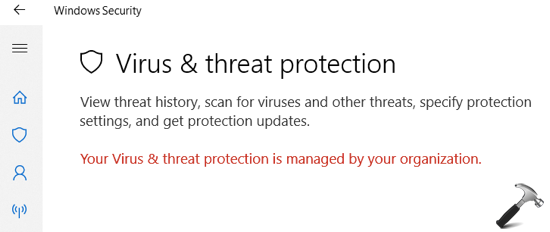
If you’re also experiencing this issue on your Windows 10, here is how you can fix it.
FIX: Your Virus & Threat Protection Is Managed By Your Organization
FIX 1 – General Suggestions
1. Restart your system and see if it resolves itself.
2. Perform clean boot.
3. Scan your system well known malware removal tool. Some of these tools may work fine with Windows Security and helps you to remove malware instantly from your system.
4. If you’re currently using or earlier used any third-party AV program, completely remove it using the dedicated uninstall tool from AV program vendor.
5. See this guide to view configured Group Policy settings on your device. And then set all the policy settings related to Windows Security/Defender to Not Configured status.
6. If your system is part of domain or organization, talk to your IT support person and ask them remove any policy setting they might have applied to Windows Security. You can also just ask them to follow step 5 mentioned above.
FIX 2 – Via Command Prompt
1. Right click on Start Button and select Command Prompt (Admin).
2. In the administrative Command Prompt window, type commands mentioned in bold and press Enter key:
REG DELETE "HKEY_LOCAL_MACHINE\SOFTWARE\Policies\Microsoft\Windows Defender" /v DisableAntiSpyware
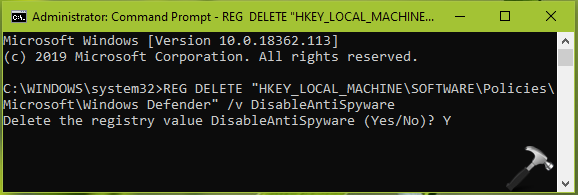
3. For the confirmation, type Y and press Enter key. Close Command Prompt and reboot.
After restarting your system, the issue will be resolved.
See this video to illustrate this fix:
Hope this helps!




Thanks kapil, fix 2 worked for me :-)
^^ Glad I could help!
Error: Access is defined
^^ Make sure you open Command Prompt as administrator.