

Want to share desktops over the internet? Do it with TeamViewer. Desktop sharing has never been easier, but with TeamViewer you can connect your partner’s desktop anywhere over the internet. In other words, you can share your desktop to your friend through internet. Here are some advanced capabilities of this freeware non-commercial tool:
TeamViewer : Freeware Tool To Make Desktop Sharing Easy
1. Remote control without installation : With TeamViewer you can connect to any PC from anywhere on the Internet. No installation is required, just run the setup file and choose the option Run in installation process.
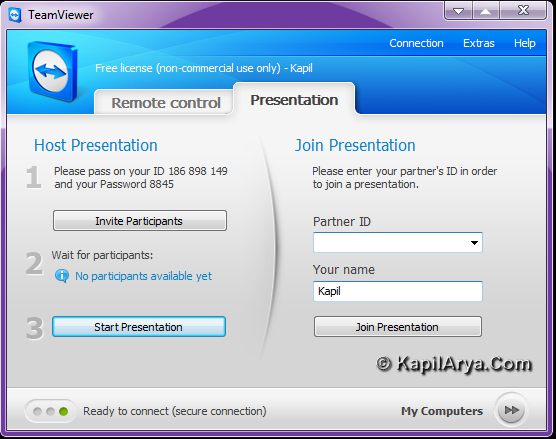
2. Remote permission of products, services and solutions : TeamViewer allows you to see the desktop of your friend. So it is easy to show your demos, presentations with your friends, business clients etc.
Highlights of this tool:
- Enhanced multi-monitor support
- Save connection settings for each computer in computers and contact list
- Schedule meeting and send invitations directly from your email client
- Direct connection and file transfer are now even better
- Record your screen presentations and convert videos to AVI format.
You can download the latest version of TeamViewer at http://www.teamviewer.com/download/TeamViewer_Setup.exe.
Hope you find the utility useful!

will my friend be able to see my hidden files?
^^ Nope.