

Internet Explorer 9 (IE9) is known well for its fast GPU acceleration and high quality experience browsing. However there are some scenarios when you found non-responsiveness for this browser and the cause is GPU acceleration or browser key corruption. Here are some situations when you can expect this error:
- When you are using too much tabs
- Missing of Automatic Crash Recovery in IE 9, it means that when any tab on IE crashes it will recover it by automatic restart (this option was good in previous IEs)
- IE is experiencing bad plugin management

If accidentally you are facing this issue and more importantly restarting IE doesn’t seems working, here is the simple fix that works to resolve this:
[FIX] Internet Explorer 9 Not Responding
1. Press the  + R key combination on keyboard and put inetcpl.cpl inside the Run dialog box.

2. Under Internet Properties window, switch to Advanced tab.
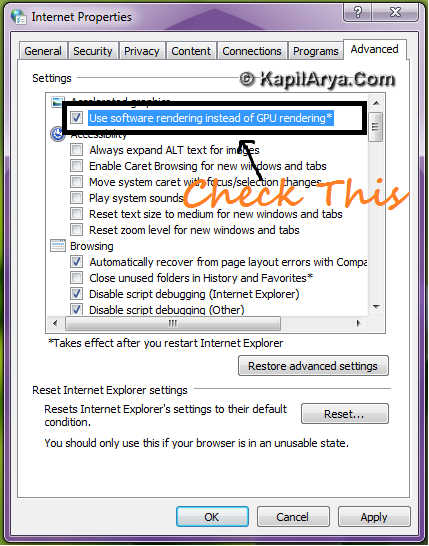
3. Put the check mark against “Use software rendering instead of GPU rendering“. Click Apply followed by OK. That’s it. Open IE 9, it should work fine now.
Hope this helps!

so easy!!! thankx
Hi, can we use cleanboot disable add-on?
^^ Please be more specific! Are you talking about KB929135?
yes i’m talking abt kb929135 using that clean boot n starting ie in no add-on mode works fine for me. change the advanced setting and u can enable add-on again and ie becomes responsive!
@ kaira, good way to think on, but shit is that cleanboot will disable the plug and play already along with sys restores????!!!
@ kaira, Ian is saying correct since it affects other setting too, also using cleanboot method there is no surety that issue is fixed permanently. However method of above article also decreases graphic quality means IE will loose its beauty of web LOLZ :)
absolutely! but its good way ;) thanks…..
thnx guys! So better for ie
very nice post! Keep it up..
what will you say about sfc /scannow ?
^^ We’re fixing the non-responsiveness of IE not non-working of it!
great disscusion here …. i’m gonna tweet it!!!!!!!!!!