The wait is over! Finally, Microsoft has released the much awaited Windows 11 Version 26H2 (Windows 11 2026 Update). If you know, Microsoft releases one major feature update for it’s Windows 11 versions. It is usually released in second-half of the year. For the year 2026, the update would be called as Windows 11 2026 Update. It serves Version 26H2, the successor of Version 25H2 released last year. The RTM build number is 26300.9452.
Page Contents
Microsoft released Windows 11 Version 26H2 (2026 Update)
If you are on Windows 11 Version 24H2, 25H2 and your system meets Windows 11 requirements, you can download this update right away. It would be rolled out in phased manner, just like the previous version upgrades.
When Microsoft releases a a feature update for Windows 11, it is usually supported for the next two years. If you are using Windows 11 Home, Pro, Pro Education, Pro for Workstations, you would be entitled to receive 24 months support from the date of release. In case if you are using Windows 11 Enterprise, you would receive three years support from the date of release.
Since Windows 11 24H2 and 25H2 versions shares core identical system files, you can upgrade to Version 26H2 from these versions using enablement package (eKB). Enablement package is basically a small update that activates the feature of the new version. The new features may already be shipped from the previous Windows Updates. They remain in the dormant state and enablement package activates them and marks the Windows 11 version as latest version.
How to upgrade to Windows 11 Version 26H2
To upgrade you Windows 11 version, you can simply head over to the settings app.
Go to the Windows Update section and check for the latest updates available to you.
You’ll see Windows 11, Version 26H2 is available banner. Simply click on Download & install, the update would be automatically downloaded and installed.
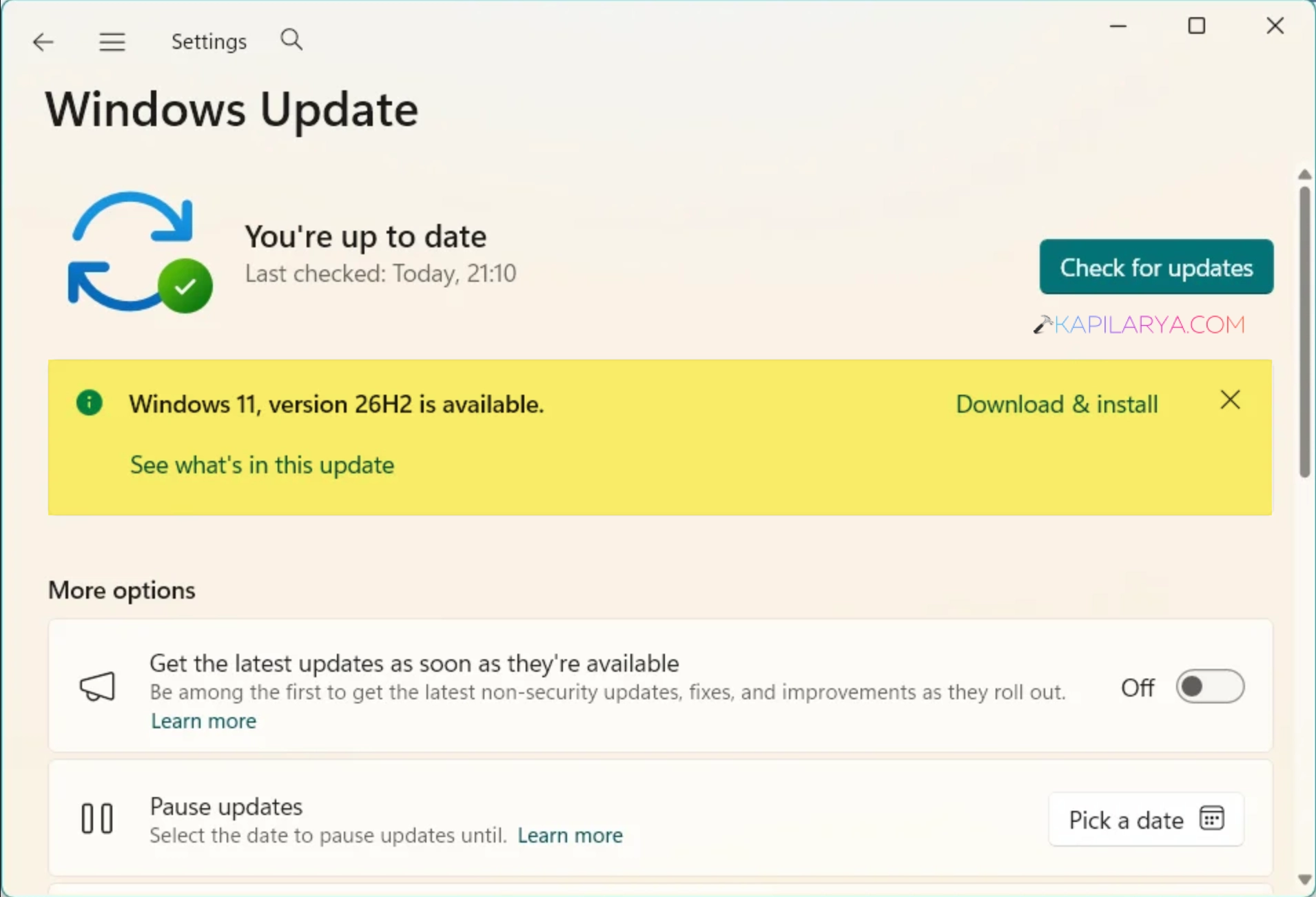
If you don’t see the update notification, you must turn On the Get the latest updates as soon as they’re available option.
After this, you would receive Windows 11 Version 26H2 to update via enablement package.
If you are on Version 23H2 or earlier, you would be able to download the full pledged Windows 11 Version 26H2 update.
Upgrade to Windows 11 Version 26H2 using ISO file
Since Windows 11 Version 26H2 is now available, you can also download its ISO file from Microsoft’s public website. You can follow our detailed guide to download the ISO file. Alternatively, you can also download the Windows 11 Version 26H2 ISO file from your Visual Studio Subscription.
Once you have the ISO file downloaded, you can just double click on it to mount it to a virtual DVD drive. Then go to the virtual DVD drive to which ISO file has been mounted, and click on the setup.exe file there. Now follow the on screen instructions to complete the upgrade.
You can also check out our detailed step-by-step guide to upgrade to Windows 11 version 26H2 using ISO file.
Clean install Windows 11 26H2
If you like, you can also clean install Windows 11 Version 26H2 using our dedicated guide:
That’s it for now! I hope you would find the Windows 11 Version 26H2 enjoyable.