Disabling Or Customizing “Backspace Key” In Mozilla Firefox

In Mozilla Firefox "backspace key" provides a function to go back/recent visited page. But this feature sometimes become non-sense in following cases. If you

Kapil Arya
11x Microsoft MVP · Admin
1 min read
Add as a preferred
source on Google

In Mozilla Firefoxbackspace key” provides a function to go back/recent visited page. But this feature sometimes become non-sense in following cases.

If you are a windows user like me, you want to alter this default feature of backspace key, as the similar key provides page scroll up feature in Linux.

Suppose you want to erase a word as you have typed it wrong but the backspace key takes you to the previous page.

Don’t worry this article will help you to alter the default function of backspace key.

Disabling Or Customizing “Backspace Key” In Mozilla Firefox

Here are certain measures to be taken out:
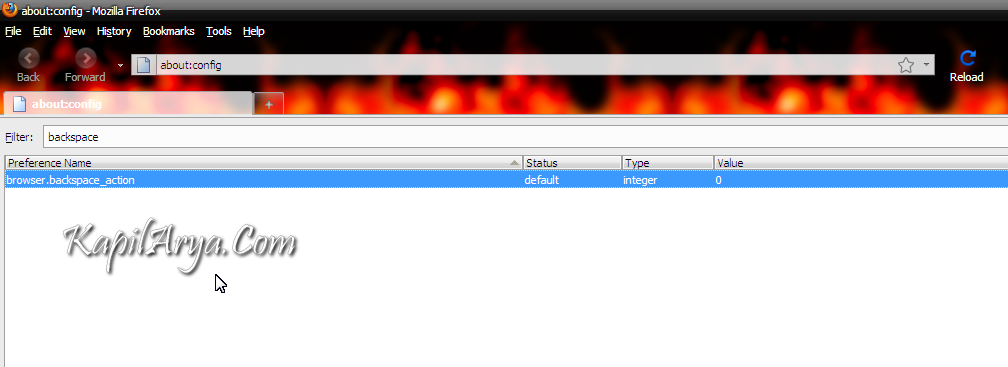
1. Open Firefox, and type about:config in address bar.

2. Now enter browser.backspace_action in filter box.

3. Right Click On browser.backspace_action, then navigate to Modify and use following integral values to specify a function.

Enter 1 to change its action to scroll up in a page. Use Shift+Backspace to scroll down.

Enter 2 to disable it.

To restore backspace tab’s default function, enter ‘0‘ as integral value.

That’s it!

Share this article
https://www.kapilarya.com/disabling-or-customizing-backspace-key-in-firefox

Shareable URL

Article by

Kapil Arya
11x Microsoft MVP · Admin

Kapil holds Microsoft MVP title in Windows IT Pro expertise, 11-times in a row (2014-2025). He is 8-times Windows Insider MVP as well, and author of 'Windows Group Policy Troubleshooting' book. In 2015, Microsoft India accomplished him as 'Windows 10 Champion'. Being passionate Windows blogger, he loves to help others on fixing their system issues. Kapil has worked with official Microsoft Community Engagement Team (CET) on several community projects. You can subscribe him for news/updates and fixes for Windows.

Leave a Comment

Your email address will not be published. Required fields are marked *