

Registry Editor present in Windows helps us to quickly modify any setting by overriding manual settings. Whether it is a how-to guide or is a troubleshooting fix, Registry Editor finds its applications in both of them. If you’re new to Windows, you can explore more about Registry Editor tool in our getting started guide:
Getting started with Registry Editor
Today, in this article, we’ll discuss an issue happening in this tool that prevents you from opening a registry key. Sometimes while opening specific keys, this problem comes into play. The error message received in this case and its corresponding screenshot are shown below.
Page Contents
An error is preventing this key from being opened.
The system cannot find the file specified.

You may spot this error message under following conditions:
- If you searched for registry key/location/data whose name is too long that the tool can’t handle it
- When your account do not have required permissions to open/modify/delete a specific registry key
If first point is true in your case, you can try splitting your search query. If you’ve complete registry location available, you can access it manually, key by key. If second point is true in your case, you need to run Registry Editor as SYSTEM account rather than administrator account (default). This can be done using a command-line tool named PsExec. Here is what you need to do:
FIX : “An Error Is Preventing This Key From Being Opened” For Registry Editor In Windows 10
1. Firstly, download PsExec tool by Sysinternals from Technet using following link.
2. The downloaded compressed (.zip) file can be extracted using right click -> Extract All option.
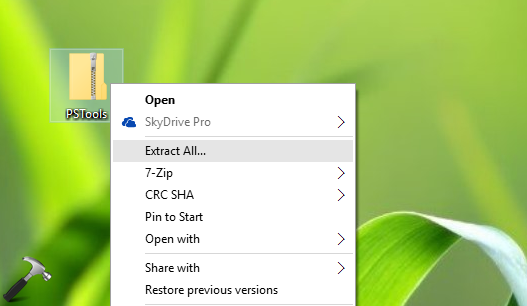
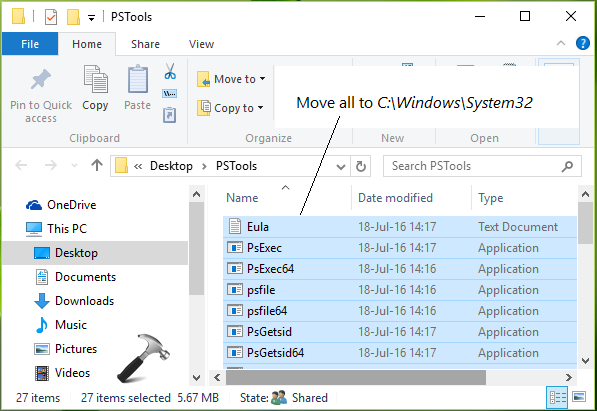
3. Upon extracting file, you’ll get PSTools folder. Copy all the content inside this folder to C:\Windows\System32 folder. You can replace C: with your system root drive.
4. Right click Start Button and select Command Prompt (Admin). Type this command and press Enter key:
psexec -i -d -s c:\windows\regedit.exe
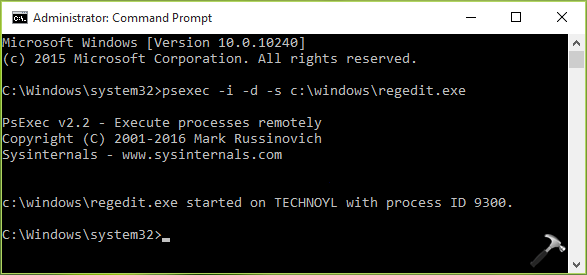
This will launch Registry Editor with system account and hence the error to open a key will no longer occur now.
That’s it!


Thank you. My problem is solved.
^^ Thanks for your feedback 😊
Hi even i am running through PsExec iam unable to delete it. Its showing drmkpro64 cannot be opened an error is preventing this key from being opened. Details:acess is denied
Plz help me
Thanks in advance.
I got message could not install psexecvc service
access is denied
i use admin acocunt!
after entering: psexec -i -d -s c:\windows\regedit.exe
get message:
couldn’t install PSEXESVC service:
Access is denied
Thank you million times!
^^ Glad we could help 😎
Hello,
This did not work to delete the Avast Software key from my registry (Windows 7 Ultimate).
What to do?
Thanks!
^^ Check with Avast and try their dedicated uninstall tool to remove AV.
This fixed my problem. Thanks.
^^ Glad to help 😊