Consider a scenario that you’ve a Windows 10 machine is connected to a domain. When you login to this machine and try to connect the already mapped drive, you can’t. Instead, you got following error message while doing so:
Page Contents
The system cannot contact a domain controller to service the authentication request. Please try again later.
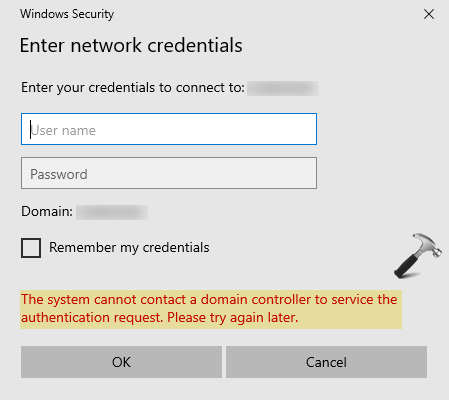
At first sight this looks like you’ve lost the connectivity to your domain controller (DC). Hence you tried pinging the domain name, its ip address or via FQDN in the Command Prompt. Then you found that you can still ping the domain, but the issue is still present when you access mapped drives. So how to resolve this issue now? Well, here are some suggestions that must be helpful for you to fix this hiccup.
The System Cannot Contact A Domain Controller To Service The Authentication Request
1. Temporarily remove the security program such as antivirus on your system.
2. In case if you’ve some third-party firewall or VPN program, see if removing them helps you in this case.
3. Try pinging the server via computer name and see if it comes with IPv6, the IPv4 might be getting suppressed and that could cause the issue. So try disabling IPv6 and continue with IPv4 and see if that helps. If you can also follow our guide to force your Windows to use IPv4 over IPv6.
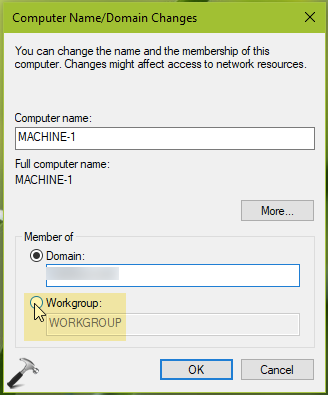
4. If above mentioned points didn’t helps, let us isolate the workstation in question. Go to Computer Name/Domain Changes window, and set the Member of to Workgroup. You can also try these steps to leave a domain. Reboot the machine, so it leaves domain completely.
5. Ask you IT admin to remove the machine from AD structure.
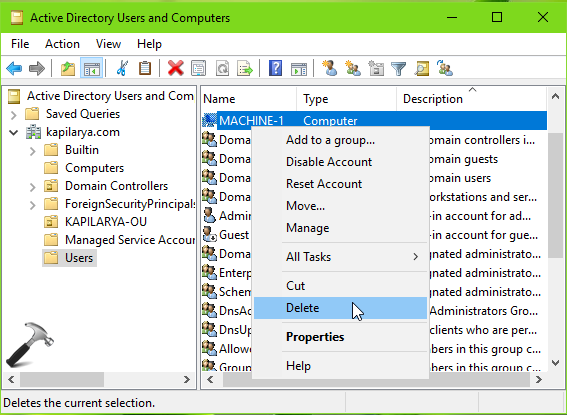
6. Then re-enroll back your machine in the AD structure and join the workstation to domain. This should eventually fix up the issue.
Hope this helps!