

Time to time, Microsoft releases newest updates regarding latest features in Windows Phone OS. Especially, if you’re using Preview for Developers app mentioned here, you’re supposed to receive phones updates more frequently. In latest Windows Phone 8.1 builds, you can now schedule the time your phone should install latest updates. Till now, we all are familiar with following screen, when a new update is ready to install.
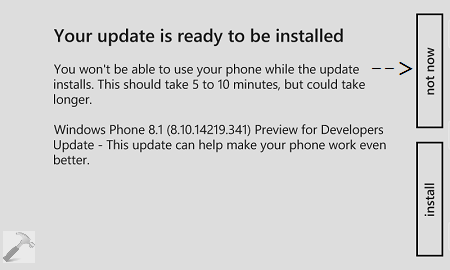
Here we can simply deny using “Not now” option, if we want to install the phone updates later. But now, moving a step ahead, scheduling of updates installation is possible too. So if you don’t want to waste your time in installing phone updates during work-time, you can schedule this task for night when your phone is offline. Hence, while you’re taking rest, your phone is getting new firmware updates. Here is how to schedule or configure updates installation time:
How To Schedule Phone Updates Installation Time In Windows Phone 8.1
1. Go to Start Screen, tap Settings tile.

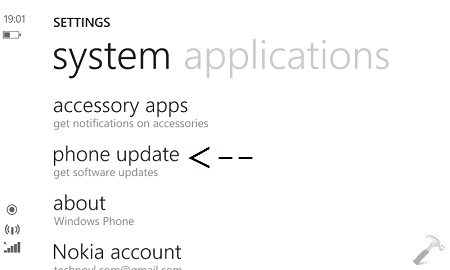
2. In the SETTINGS screen, scroll down to look for phone update option and tap it.
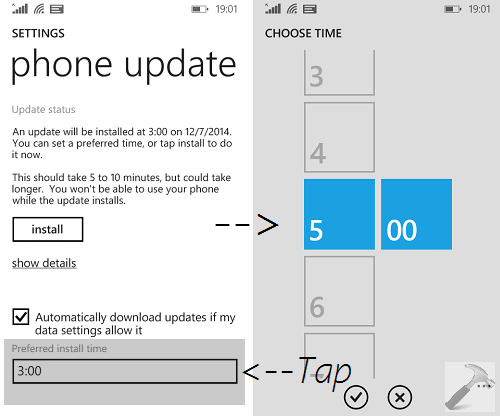
3. Now in the phone update screen, scroll down and look for the Preferred install time label. Tap on the time next to it and then you can see CHOOSE TIME screen. Thus from here, you can set whatever time is convenient to you, for scheduling the updates. Make sure your phone is on at this time and have a battery power above 60%.
You can now close Settings app and return to Start Screen if you like.
Also checkout how to set live lock screen in Windows Phone 8.1!
