In Windows, you can have Microsoft account and/or local account on your system. We’ve already seen how to setup a local account in Windows. We’ve also shared you the guide to switch to Microsoft account from local account and revert back.
Following the above mentioned guide, we came to a strange issue which we’ll be discussing in this article. Actually, we were facing some trouble with Microsoft account on one of our systems. So we decided to convert the Microsoft account to local account, but surprisingly we can’t do that because of this error:
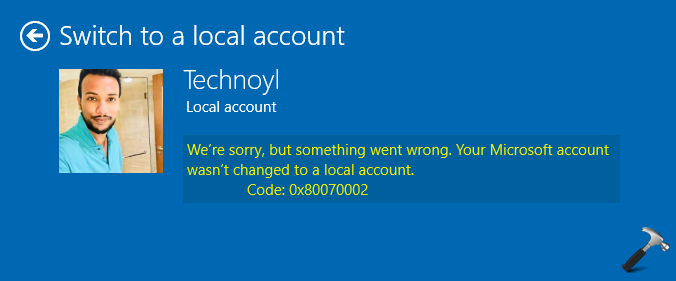
Coincidently, if you’re also facing this issue on your system, try below mentioned suggestions and see if they helps.
Page Contents
FIX: Your Microsoft account wasn’t changed to a local account in Windows 11/10
Fix 1: General Suggestions
1. Open Services snap-in by running services.msc command. Make sure Microsoft Account Sign-in Assistant and User Profile Service are Running.
2. Run Microsoft account troubleshooter.
3. Perform clean boot and see if you can convert to local account then.
4. If this is secondary standard user account, change the account type to administrator and see if it helps. You could also try reverse, that is, if account type is administrator, change it to standard user and check.
Fix 2: Via Security Policy Snap-in
1. Press  + R and put
 secpol.msc in Run dialog box. Click OK to open Security Policy snap-in.
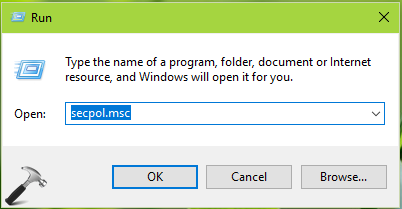
2. Then in Security Policy snap-in window, navigate here:
Security Settings > Local Policies > Security Options
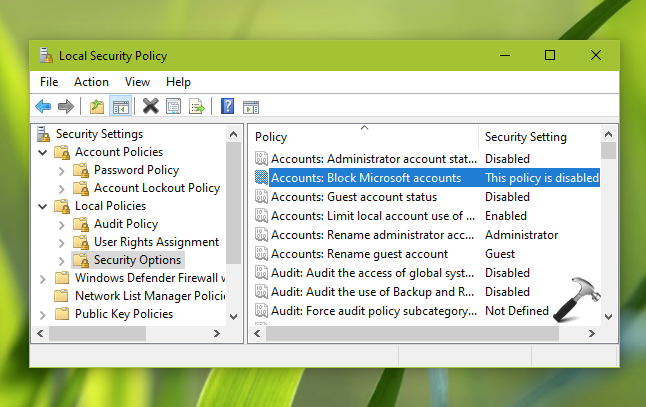
3. Make sure the Accounts: Block Microsoft accounts policy setting is set to This policy is disabled state. Close Security Policy snap-in and try switching to local account.
Let us know via your comments, if issue still persists!