When you start using Outlook and add your account to it, some of the information are stored on your system. These information is used to facilitate Outlook features. The files holding those information can Outlook Data File (.pst file) or Offline Outlook Data File (.ost file), which are also known as ‘data files’. Some type of accounts, like POP accounts stores the information in .pst file. While Outlook 365 accounts, Exchange accounts, IMAP accounts, and Outlook.com accounts stores the information in .ost file.
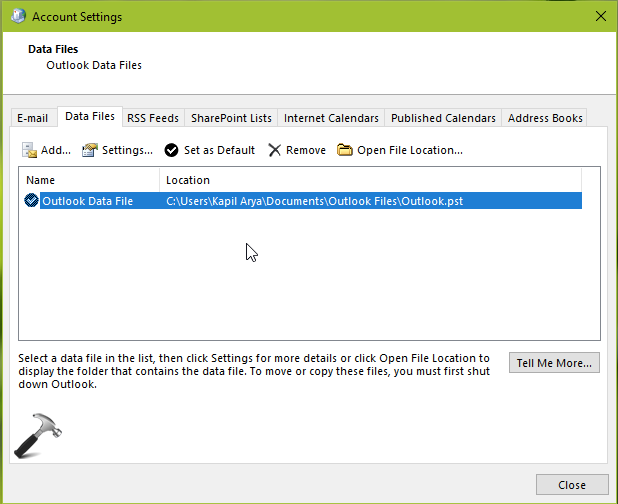
You can go to Control Panel > Mail > Data files and locate the .pst or .ost file stored on your computer, as shown in below screenshot.
Okay so with continue usage of Outlook, these data files may grown to a larger size. If you’re low on disk space, you might want to limit the size of these data files. In this article, we’ll see how you can do so.
Here’s is the how-to part:
How To Limit PST Or OST File Size For Outlook
1. Open Registry Editor by running regedit command.
2. Go to HKEY_CURRENT_USER\Software\Microsoft\Office\x.0\Outlook.
Note: Substitute x.0 with 16.0 for Office 2019 or 2016, 15.0 for Office 2013, 14.0 for Office 2010 in above registry location.

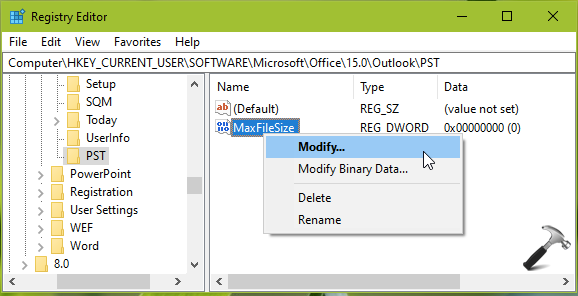
3. In the right pane of Outlook, right click and select New > Key. Name the newly created registry sub-key as PST. Now come to right pane of PST and create new registry DWORD (REG_DWORD) and name it MaxFileSize. Right click on it and select Modify.
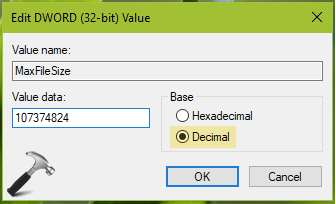
4. Now edit the DWORD Value to limit the file size of .pst or .ost file. Choose the Decimal base and input the value in byte. For example, if you want to set limit to 1GB, you’ll use value 1x1024x1024x1024byte=107374824. Using this formulation, you can set your own custom value and click OK.
5. Close Registry Editor and reboot to make changes effective.
Now Outlook won’t allow to grow the .pst of .ost file size beyond the limit you set.
That’s it!
Read next: How To Convert OST Into PST File.