If you’ve just installed your Windows 10 and you’ve trouble activating it, this post may help you. Basically, after installing Windows 10, to unlock all features of OS, it is mandatory that you activate it. Check this article to learn why you shouldn’t use Windows 10 without activation. The activation must be completed using a genuine Windows 10 license. However, when you try to activate, following message may appear:
Page Contents
We can’t activate Windows on this device because you don’t have a valid digital license or product key. If you think you do have a valid license or key, select Troubleshoot below. Error code: 0xC004C003
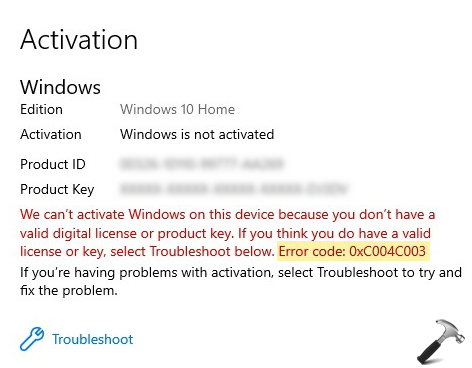
If you don’t understand why this message appears and how to proceed from here, read on the fix we’re providing next.
FIX: Windows 10 Activation Error 0xC004C003
If you’ve upgraded to Windows 10 from Windows 7 or Windows 8.1, then you don’t have digital license anymore. This is because Microsoft already ended free upgrade offer back in July 2016. So the mention of ‘digital license’ in the error message was valid before July 2016. Now the only reason left behind error code 0xC004C003 is the product key.
According to Microsoft, ‘you may see this error because the Windows 10 product key you entered isn’t valid’. The product is actually unique in nature. It can be used on only one machine at time. In case if the same product key is repeatedly used on multiple machines, Microsoft’s activation servers marks it as invalid. After that, no matter how many attempts you try, the product key won’t activate.
Now let us see what choices you’ve.
- Use this guide to find your product key and make sure you’re entering correct product for activation.
- If you’re pretty sure that your product key is correct and you’ve genuine retail or OEM license, run Activation troubleshooter.
- If you bought the product key (Windows 10 license) from an authorized retailer, contact them for the assistance.
- If your device came pre-installed with Windows 10 and never activated, you need to contact your device manufacturer.
- If you still need help with this error, contact Microsoft global customer service/support.
Hope this helps!