Activation errors with Windows 11 are very frequent, and when you are dealing with one, this is the article you are looking for. Activation is vital in verifying that your Microsoft Windows is a real copy and that it has not been applied to more computers than the limit Microsoft placed on the license rights. Windows 11 does not boot up, making this a frustrating process, and most problems are solvable through the proper steps. This comprehensive article addresses all the typical Windows 11 activation errors and demonstrates the way to resolve it.
Page Contents
Before You Begin
Microsoft enables various ways of activation, such as using digital licenses based on your Microsoft account or typing in product keys in the process of installation. In case of a recent drastic hardware upgrade (e.g., a motherboard replacement), you might be asked to re-activate your copy of Windows with the same Microsoft account that was associated with the license.
Another thing to note prior to doing so is that you must confirm that you are actually using Windows 11 and that the operating system is completely updated. This can be easily checked by locating and opening up the winver tool.
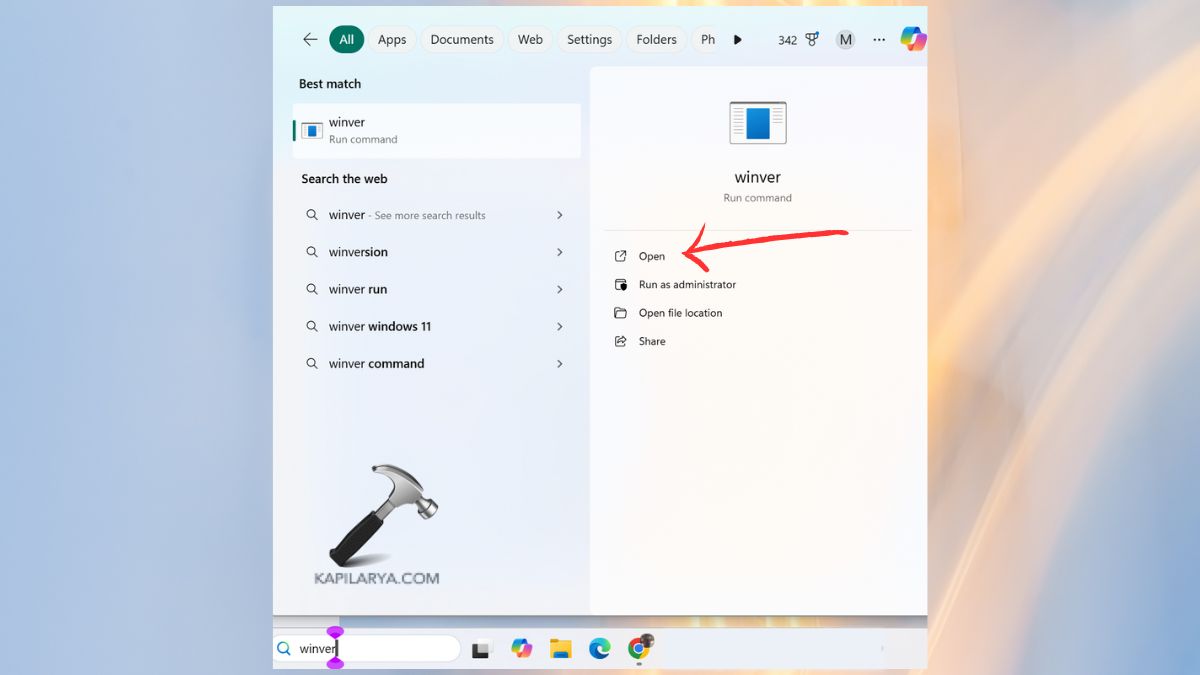
This gives you your version and build number of Windows. Unless your device is already running Windows 11, you will first have to update to it, as a large number of the activation features and fixes are only available to Windows 11.

Solutions to Fix Windows 11 Activation Errors
These 3 solutions are easy to use in correcting errors that occur in the activation of Windows 11. You really should watch the video to be guided on the way just in detail.
Solution 1: Connect Your Microsoft Account
A Microsoft account can have a digital license tied. This resolves hardware change errors or incorrectly missing digital licenses.
1. Open Settings. Go to Accounts > Your Info.

2. Sign in with a Microsoft account.
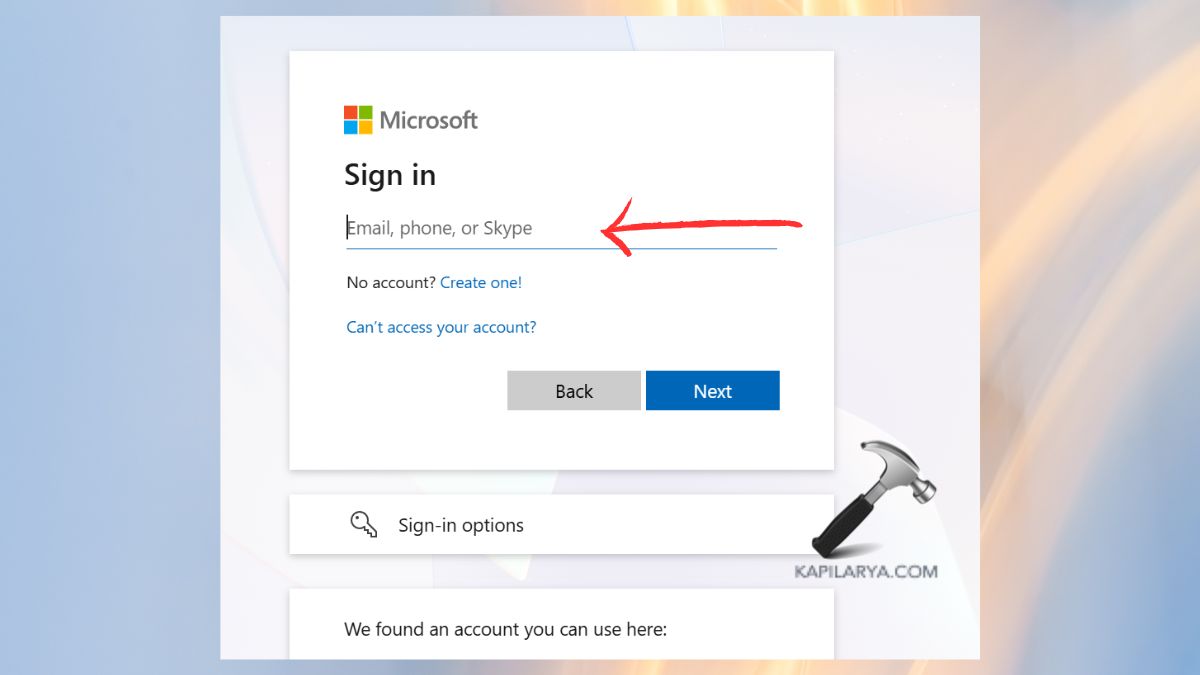
3. Or in case you use the device controlled by an organization, select the work or school account with your Windows license. Click on the Accounts > Access work or school.

4. Tap on “Connect”.

Solution 2: Run the Activation Troubleshooter
Through the in-built troubleshooter, Windows is able to automatically identify and correct numerous problems with activation. This can be used particularly after windows are re-installed or after changing hardware.
1. Proceed to Settings > System > Activation.

2. Click Troubleshoot. Follow the instructions. Apply the recommended fix.

Solution 3: Change the Product Key
When your product key is wrong, has erased or the mismatch with the correct product key, type in the correct key.
1. Click on Settings > System > Activation.
2. Click Change product key. Enter your 25-character key. On the next screen, tap on Activate.
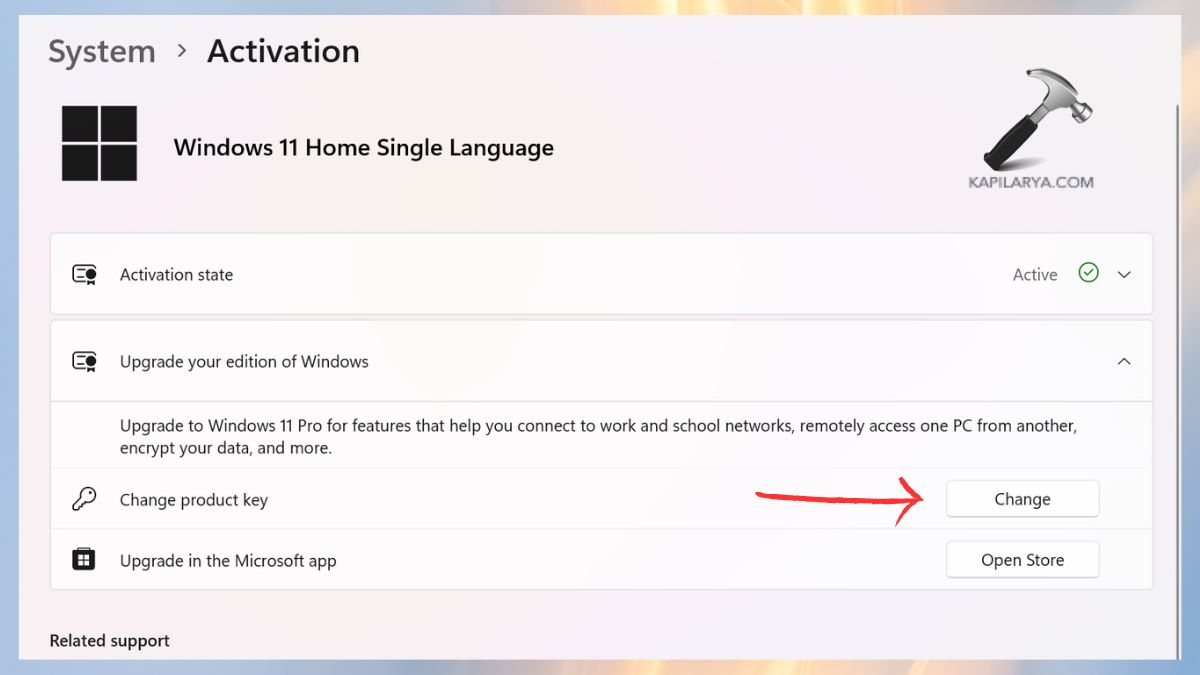
To find your genuine Windows product key, refer this guide.
Windows 11 Activation Error Codes
The list of all major and common Windows 11 activation errors with simple explanations and solutions are given below.
Error 0xC004F211 – Hardware Change Detected
This mistake shows up when Windows detects a major change of hardware on your computer, including a substitute of the motherboard, SSD, or CPU. Once the software is modified to exceed a specific level, Windows can no longer match your digital license to your signature on the device. The most appropriate solution to this is to run the Activation Troubleshooter. To have successful reactivation, it is necessary to sign in with the same Microsoft account that you used to hold your digital license.
“Your Windows License Will Expire Soon” Warning
The message normally appears when you are operating on a temporary, trial, or volume-based license, license about to expire. It may also happen when your device was turned on by using the KMS server of an organization to which your PC is now unreachable. In case you purchased your device in a company or at the school level, you might require IT services.
Error 0x803F7001 – No Valid License Found
This code implies that Windows could not find an authentic digital license of your system. It is known to frequently occur following a clean install, changing hardware, and changing editions. To fix it, it is typically found to be sufficient to run the Activation Troubleshooter or manually input the real product key.
Error 0xC004F213 – No Product Key Found
When Windows shows this error, it implies that the system is unable to identify a product key belonging to any device. This typically occurs when you reformat Windows 11 without entering the key or when the digital license was never associated with your Microsoft account. To fix this, you can either interact with the right Microsoft account associated with the license or type in a 25-character Windows key that is valid, and then Activation settings will be opened.
Error 0xC004F212 – Product Key Not Compatible
This is a mistake that happens when the key that you used does not correspond to the version of Windows installed in your computer. An illustration is the use of the Windows 11 Home key that is incapable of activating Windows 11 Pro. The remedy to this would be to type in a product key that corresponds to your version or reformat the Windows to install the correct version of the windows. In case you have bought your license in a store, you might have to contact them to receive the right key or buy a real one in the Microsoft Store.
0xC004C003 – Product Key Blocked by Microsoft
The fixation of this mistake is that your key is blocked by Microsoft due to the deliberate use of the key or it is considered a false key. The solution is to enter a new official product key. In case you have just bought the key, calling the seller to get another one can do.
0xC004F034 – Key Not Recognized
This is an indication that the activation server does not identify your product key. This could be because of typing erroneously, or regional limitations, or buying the key to a different version of Windows. Restarting the verification of the key by rechecking your version is usually the solution to the problem.
Error 0x800704CF – Network or Account Issue
This mistake shows that your computer is unable to provide a connection to Microsoft activation servers, either because of a network problem or an account problem. It is usually useful to make sure that there is a steady internet connection and that a person is signed into the appropriate Microsoft account. As soon as the connection is re-established, it should be activated automatically.
0xC004F210 – Hardware and License Mismatch
It is a mistake that is created when you have the wrong hardware setup, and you are attempting to use a key of the wrong type. As an example, OEM keys are only compatible with particular devices. The right license or association of a digital license with your Microsoft account usually fixes the problem.
0xC004E016 and 0xC004F210 – Edition Mismatch
The reason why these two codes will appear is because the edition of Windows that it is installed on your device does not match with the product key that is being typed in. The correct version can be known by checking your version under the settings System About.
0xC004FC03 – Network Connection Issue
Such an error means that your device has some issue with connecting to activation servers via a network connection. The issue is normally solved by fixing your Wi-Fi or Ethernet connection, turning off proxies, and checking that your firewall is not blocking the activation requests.
0xC004E028 – Activation Limit Reached
In case your product key has been used to its maximum usage limit, as it is possible, then Windows will present this error. OEM keys cannot be moved to other machines, and retail keys can. You can require the help of Microsoft Support or a new key.
0x8007267C – Activation Server Not Available
This is a message that shows up when your respective devices are trying to make an activation through a KMS server but fail to get access to the necessary DNS service. The most appropriate is to check the internet connection, use a retail key or simply call your organization.
0xC004C008, 0xC004C770, 0x803FA071 – Key Already Used Too Many Times
These pieces of evidence suggest that your key is overused on other gadgets. There are boundaries placed by Microsoft that are not to share or abuse. Assuming that this is your own key, then you may call Microsoft Support and ask them to reset it otherwise, you need a new key.
0xC004F00F – Invalid Activation Data
Windows gives an error when it finds bad or missing activation information. It typically does not require any one to re-enter a valid product key or repair system files, although doing so can cure it.
0xC004C020 – Volume License Not Supported
This is a mistake that indicates that your device is attempting to apply a key based on volume, which is designed for businesses or organizations. They should be personalized and not volume keys.
0xC004E003 – Internal Activation Issue
This code is a sign of failure in the part of license. Normally, reactivating a PC, Windows, or repairing system files will restore your activation.
0x80004005 – General Activation Error
Windows is a generic error, used when Windows is not able to know a definite cause. It can be resolved by normally running the troubleshooter and rebooting.
0x87E10BC6 – Activation Service Problem
This mistake indicates that there is a temporary hitch with activation servers or local licensing services. Create an option of a system refresh or retrying with the troubleshooter.
0x80070652 – Installation Conflict
This is because the other installation or update is already underway, preventing activation. Rebooting your computer and doing all the outstanding updates normally fixes the problem.
0xD0000272, 0xC0000272, 0xC004C012, 0xC004C013, 0xC004C014 – Corrupted Activation Files
These mistakes can be related to the failure of essential licensing files on your system due to corruption. The Repair commands SFC and DISM can restore missing parts and enable activation to be successful.
0x8007232B, 0xC004F074, 0xC004F038, 0x8007007B – KMS or DNS Activation Errors
These are created when Windows attempts to be activated on a KMS server of the organization, but is unable to connect. A Windows can be non-genuine in case you are not a member of an organization. The problem will be resolved using a valid retail key.
0xC004C060, 0xC004C4A2, 0x803FA067L, 0xC004C001, 0xC004C004, 0xC004F004, 0xC004C007, 0xC004F005, 0xC004C00F, 0xC004C010, 0xC004C00E, 0xC004C4A4, 0xC004C4A5, 0xC004B001, 0xC004F010, 0xC004F050 – Invalid or Blocked Product Key
All these error codes address problems of invalid, blocked, or corrupt keys of products. They will present themselves in the event that a key is overused, when a key is a fake, or when the key has no permission to be activated. In case you come across any of such codes, then it is advisable to check your key with your seller or directly buy an authentic license through Microsoft.
All Other Error Codes
In case of a code of errors that cannot be found in this list, go to the official Windows Help page (https://support.microsoft.com/en-us) and use a direct search. Just use the steps that are pertinent to each Windows version in order to avoid misconfiguration.
Video guide
To fix the common activation issues, you can also refer this detailed video guide:
Frequently Asked Questions (FAQs)
Why won’t my Windows 11 activate even with a genuine key?
In the version that you have installed, the key is not the correct one, or Windows is unable to recognize your digital license. Reloading the check and Activation Troubleshooter have a tendency to fix the problem.
Can I use a Windows 10 key to activate Windows 11?
Yes, but as long as the edition is identical. Windows 11 Home can be turned on by a Windows 10 Home key, and the same can be said of Pro versions.
How do I fix activation issues after replacing hardware?
Use the Activation Troubleshooter and then use your Microsoft account that is associated with your license.
Are cheap product keys from third-party websites safe?
There are numerous keys that are reused that are of low price and unauthorized. They can be working for some time and can break down with activation errors. It is always important to purchase them with trusted sellers.
That’s it!