

While working with Office, many times there comes a situation that you have to print documents. But recently I faced a weird problem with detection of printers connected to the system, in case of Office components. Whether I open Excel, Word or PowerPoint, whenever I want to print a documents, these components couldn’t detect the printer connected to the system. They keep saying The Active Directory Domain Services is currently unavailable error.
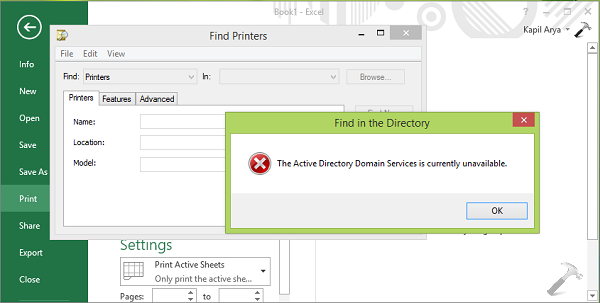
However if I use Internet Explorer, or any other application to print something, printer connected to the system easily detected by them. Then the question is, why only the Office components couldn’t detect same printer? Well, its the user permissions issue due to which printer is unable to listed in Office. Here are the simple steps you can follow to overcome this problem:
Page Contents
FIX: The Active Directory Domain Services is currently unavailable in Windows 11/10/8.1
Fix 1: Using Registry Editor
Registry Disclaimer: The further steps will involve registry manipulation. Making mistakes while manipulating registry could affect your system adversely. So be careful while editing registry entries and create a System Restore point first.
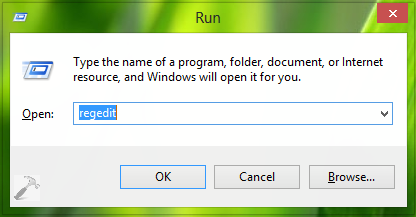
1. Press  + R and put regedit in Run dialog box to open Registry Editor (if you’re not familiar with Registry Editor, then click here). Click OK.
2. In the left pane of Registry Editor window, navigate here:
HKEY_CURRENT_USER\Software\Microsoft\Windows NT\CurrentVersion
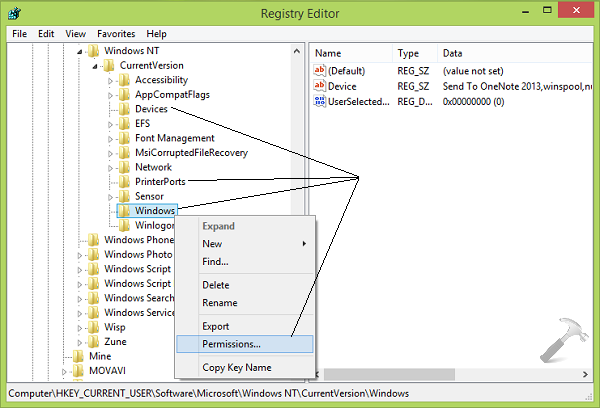
3. Moving on, in the left pane of above shown window, look for the three subkeys to CurrentVersion key; namely Devices, PrinterPorts and Windows. Right click each of them individually and select Permissions to get this window:
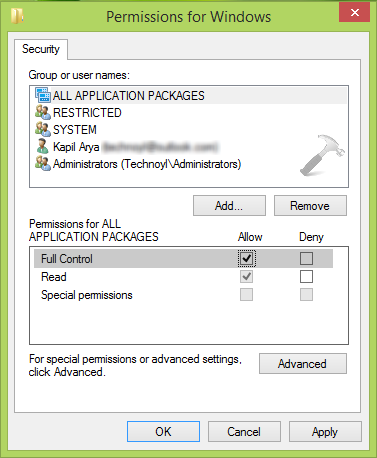
4. Now in the above shown window, firstly select the user account under Group or user names label, with which you’re facing the problem. Then provide a Full Control under Permissions label by putting a check mark against Allow. You can do this for all entry listed under Group or user names section. Click Apply followed by OK.
See: How To Take Ownership Of Registry Key In Windows
Now you can close Registry Editor and reboot the machine, reinstall printer and this time you won’t face any issue. Once Office components started detecting printer and the problem is solved, you can restore the permissions which we changed in step 4.
Fix 2: Recognize Printer Using Other Apps
Another way to suppress this issue is that you add the printer via those apps, to which printer is visible. For example, the Notepad app. Here is what to do:
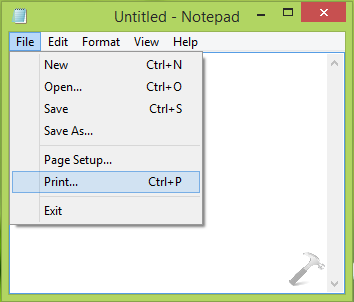
1. Close Office components and open Notepad, click File -> Print or press Ctrl+P key combination.
2. In the following Print window, you have to click Find Printer.
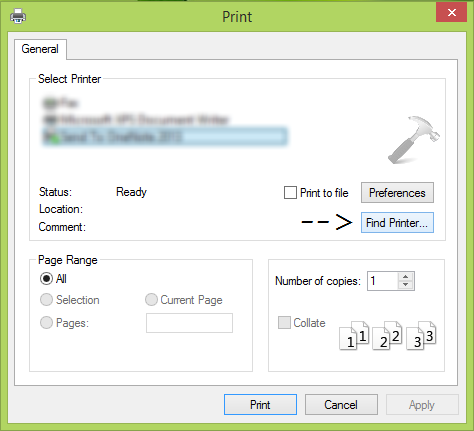
Now follow the on-screen instructions and in this way printer is added to the system. Most probably it should now be visible to Office components as well.
That’s it!





Thanks dude, this bug got me suddenly :)
Excellent fix Kapil solved my issue!
Great shared bro, it’s work to solve my problem.
Fix 1 solved my problem. Thank you sir ..:-)
Fix1 also work to me
^^ Glad we could help :)
Worked great. Appreciate it. As usual, the Windows help forums don’t.
One thing that I thought was interesting, was that all the permissions returned on their own to the original settings, except the Windows permission, when the computer restarted.
^^ :)
You are genius Arya, great…..what the suppliers and thousands of service engineers are struggling to fix…. has been fixed in few minutes…. hats off to you.. you deserve thosands thanks for your free service..
^^ Cool :)
Win7 64 bit- I tried the change permissions in Registry and they get applied as advised by you. However when I reboot the permissions are cleared so the problem starts again. Kindly advise – Thanks
Sorry the devices and Printer ports permission stay as they are for administrator but the Windows permission for “create owner” when I press apply delete the tick mark and it box is kept empty.
When I look for printers using control panel it shows a blank. However NotePad recognises the printer and I can print using word 2003 BUT the printer is not “found”. Would appreciate a fix – many thanks
^^ Have you taken ownership of all the keys as suggested, also make sure your system is a not a part of domain.
Thank you – ownership is in my name as administrator. I am using a standalone laptop not part of any domain. appreciate your help.
when I use control panel, printers and device the system seems to check and then the hour glass symbol turns up with a blank screen. Although when using MS office 2007 it prints the document but there is something funny as when I request for multiple copies it only prints it once. File, Print, shows the list of all printer and I can also scan documents into word.
Printers do not show and I cannot change paper type etc
I completed your fix 1. I double checked that the permission changes were still applied even after a restart of the computer. When it comes to fix 2, I still get the same error message…is there a fix 3? Help.
^^ After trying FIX 1, did you reinstall the printer?
not work in excel, cant find printer
Thanks, man! you’re the best :-)
Thanks dude.. Timely solution for tat issue
^^ Glad it helped :)
Yep, you are a star. Appreciated.
^^ Awesome :D
Fix 1 works, many thanks :)!
^^ Glad it helped! :)
Fix 2 didn’t work. First, With Find printer, Notepad only looks for network printers…which I don’t have. The printer is there when I go to Devices & printers, but I am told it needs troubleshooting however troubleshooting does nothing at all..
^^ What about the registry fix, did it help at all?
Step 2 fixed my problem. No matter what I did, my PC would not show my Brother printer. It would recognize it as a fax machine only and I could also use it to scan. I went to notepad and typed in “Test” and went to print. My Brother printer showed up here as an available printer, which I selected and applied. My printer is now recognized in my Microsoft Office Excel. MANY, MANY THANKS!!!
^^ Thanks for your feedback, glad we could help :)
I am not getting the printer installed. I tried fix one and restarted the pc and reinstalled the driver. and i checked the permissions as well. They are proper. But still when i go to Office or Notepad i cant print. Cant find the printer in there as well. What do i do now. If any suggestions plz. Frustrating.
I am following Fix 1 to correct printing problem of my Office 2013. However, I cannot find ALL APPLICATION PACKAGES under Group or User Name. Your help on this issue is greatly appreciated.
Security>Group or User Name>ALL APPLICATION PACKAGES
^^ It may possible that the group doesn’t exists on your system. Also you need to try that step for the group existing on your system and which is creating issue for you :)
Kapil Arya
I tried your fix and put the cks into the registry I still get the same error: The Active Directory Domain Services Is Currently Unavailable
I am running win 10…upgrade. And just installed a new printer Hp m277. My two printers are seen in the control panel. Just not in ms word or any other office product.
The Active Directory Domain Services Is Currently Unavailable
Blob
All set Kapil,
For some reason my spooler was shut down along with no checks in the registry . HP had another article about print spoolers in tools.
thanks
Bob
^^ I guess this is the article you’re talking about: https://www.kapilarya.com/windows-could-not-start-the-print-spooler-service
Thanks its working
^^ Nice to see it worked for you! :)
I did this, it didn’t work for me.
doesnt work on windows 10
Thank you. I followed your instructions and it worked perfectly on my PC-Windows 10.
^^ Perfect :)
HI, I have tried this 3 times now but Word 2013 (or notepad or excel) still doesn’t recognize the printer (its not on the list) and when I try to add it, I get the error message above. When I restart, the permissions have been taken away again. The Control panel has my printer there but I cannot make it default, there is not that option. Help!!!
^^ Try removing and then re-connect Printer, see if that helps!
thanks you very much..
^^ Happy to help! :)
Even the Microsoft forums couldn’t help. Thanks, everything works fine now. You are my hero
^^ Great :)
Thank you so much! I have been transferring my files through e-mail to print on the other computer. Saved so much of my time.
^^ !:)
It worked..thanks
^^ Great to see it worked!
This worked for me, using Office 2016 and Windows 10. Thank you!
Thanx a lot man. Saved so much of my time. Really worked for me. Cheers
^^ Thanq folks for your feedback!
problem fix 1 worked for me also thanks for grate solution
^^ Very cool !:)
thank you this worked for me you are great
Thanks and it worked for me.
^^ Thanks to both of you for feedback!
THANKS!!!!!!!!!!!! Simple but I really mean it!
Thanks. Great, it really helps . I’ve tried several other sites’ suggestions, but they didn’t solve
^^ Awesome 😎
Thank you so much!! It worked! :)
^^ Glad we could help 😎
Simply brilliant! I’m eternally in your debt. Thank you!
^^ 😊
mantappp,,, it works!!!!
Thanks. The solution was very useful and it worked
^^ Excellent!
Why was these registried altered in the first place?
Is it the fault if not a bug of Office 2013 or Office 365 installation?
Normal printer installation should not have touched these settings, right?
^^ Yeah, but this an unexpected issue!
After doing fix, uninstall/reinstall drivers, powerycle computer, same thing. What should I do?
Thank you!
^^ Welcome!
It works. Thanks! :)
^^ ☺️
Awesome.. Thank you for that mate… :) …searched for a good couple of hours.. This worked wooooooo…..!
^^ Wohoo!
thanks dude
Awesome.. Thank you for that mate… :) god protect u from bad thing
^^ 👍😀
Thanks very much!! This was a leap in faith for me. I am 65 and was able to follow your directions and fix this. Thank you for letting me do this without having to watch my son roll his eyes at me!! I shared this on FB because another friend is experiencing the same thing.
^^ That’s great Maureen, glad I could help 😊👍
i’ve been suffering this same printer problems & been doing many things from many webpages to fix it but THIS IS THE EXACT PROCESS THAT HELPED ME..Thank you very much for sharing this..i can now print anything…
^^ Thanks a lot for your feedback 😎
OMG – this was so easy and this compliment is from a layman’s perpsective – I’m not a computer geek or wiz!! I’ve been struggling printing in Word since the forced update to Win 10 from Mircrosoft and terrified of touching the registry. Your instructions are perfect for the average user like me and saved me time and $$ !!
Hi, I do not have a printer so my default printer is “Print to PDF” In the past I never had an issue but from some days now I couldn’t configure pages in excel because I didn’t had an installed printer… I am having this message when trying to select from office PDF printer …. So I try fix 1, reboot and at the beginning I could set the page layout but some minutes after everything began again…. So what is going on!? Is there a way to work without having installed printers!??
^^ Give a try to FIX 2, see if it works.
I have seen a number of other posts in the comments that indicate the registry changes are changed to allow full control they’re not being retained after rebooting. I’m having the same problem. the only change that saved was the windows permission
Thanks so much, it really helped doing stuff more easy in my business enviroment, God Bless you brother
^^ Thank you Matt for awesome feedback 😊
it worked, Thanks a ton!
^^ That’s awesome!
thankyou
Trying to work through this same issue however on the Permissions for Devices I see an Account Unknown with bunch of numbers in (). Not sure if I should delete or not??? Also, when I select my laptop it does not allow me to check Full Control or even Read. Should I check ALL APPPLICATION PACKAGES for to allow full control? Thanks in advance! Jani
^^ It seems you didn’t taken the ownership of registry key. Take the ownership first and then retry to alter permissions.
Thanks a lot, it works for me. :-)
^^ Thanks for feedback, Philip!
Thanks man so beautiful of a solution
^^ Cool Dorian 😎
THX … Boss … It was helpfull.. I work in Government Department. Thank you once again
^^ That’s awesome Pavan!
Nice job!! Thanks for the fix!!
^^ Glad I could help, Dailey!
Thanks man so beautiful of a solution :)
the Notepad fix worked like a charm in Nov 2017!! Thanks!
^^ Happy to help you!
Kapil you the man, You the man!!
Thanks you so much for your generosity and help.
^^ Glad to help, Kenneth 😎
Neither Fix works, for me, i have tried it using a friends computer added to the network.
not working for me, I have win 10 + HP 2600 series + Office 2010
I am having issues with your instructions on correcting “Active-Directory Domain Services is currently unavailable”. I have recently re-installed Windows 10 and now cannot print from Excel/Word/Outlook (before re-installation, printing was OK) when I try to add a printer I get the above “unavailable” message. I have tried to amend the Registry as you suggest. Under “Devices” there are no Group or User Names set up, which ones should I add? Also, I am denied permission to save these; I am confused! Under “Windows” full permission is granted for all Groups and User Names. I need a bit more detailed help here please? Thanks