If you’ve mapped drive and you’ve trouble moving your files from it to local drive, read on this article. While copying files from a mapped drive to your local drive folder, you may receive a typical Location is not available message as shown in below screenshot.
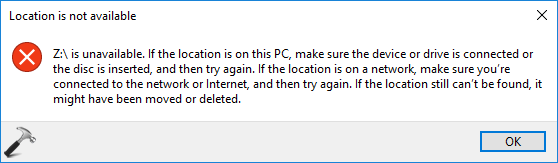
This error message appears only when you’ve User Account Control (UAC) enabled. In this article, we’ll learn why this problem occurs and how you can get rid of it.
‘Location Is Not Available’ While Moving Files From Mapped Drive
Well, this is a known issue when certain factors are involved, including:
- You’ve UAC enabled with Admin Approval Mode
- You mapped the drive as a standard user and you’re not logged with administrator account
- As a standard user, you don’t have write permissions on target directory
Now let us understand why this issue occurs. So basically when you map a drive as a standard user, the mapped drive is not available to elevated session i.e. when you log in as administrator or built-in administrator. Microsoft says, this is not a problem and is the expected behaviour because actually it was designed that way. When Admin Approval Mode is enabled, a full admin and a filtered standard user token is issued. The filtered standard user token is utilized in explorer.exe process. Hence when an administrator is logged in, he/she may not see this issue. While when a standard user is logged in, only standard user access token is granted and this issue occurs.
To resolve this problem, following recommendations can be applied:
1. You can use UNC path, for example \\server\share to access network resources.
2. Fix this issue by applying registry manipulation mentioned in this fix.
3. Use Group Policy Preferences (GPP) to map a drive.
For information on this issue, you can checkout this support article.
Hope this helps!