

In our previous article, we’ve seen what is Runtime Broker in Windows 10 and why is it running in background in your system. Now in this article, we’ll see what causes Runtime Broker to stopped working without your action and how to fix it.
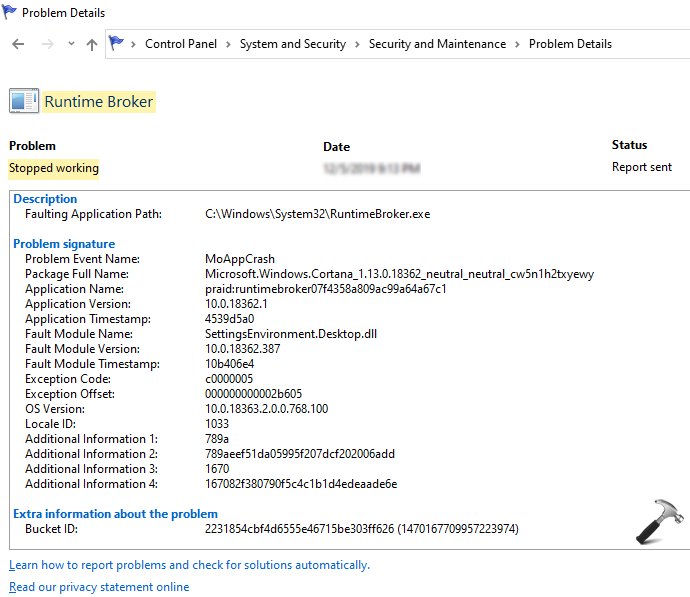
Well, recently we seen this issue and just thought it must be shared with our audience. In this case, if you check Reliability History and you eventually point out that one event is listed which mentions Runtime Broker has stopped working. Of course, you’ll be able to spot the cause as the Reliability Monitor provides complete detail for faults occurring in the system. But you might not understand how to deal with this fault, which we’ll share in this post.
Page Contents
Image credits: MSA
Well, if you see the Problem signature section, it lists Fault Module Name which is the actual root cause for issue. The item listed against it gives you straight hint to fix the problem from recurring. In above case, the Fault Module listed is SettingsEnvironment.Desktop.dll. Since this is a Dynamic Link Library (DLL) file plus a system file which caused this issue, you can apply general troubleshooting approaches mentioned below to fix this.
FIX: Runtime Broker Has Stopped Working In Windows 10
1. First of all, run System File Checker scan, followed by DISM command-line tool.
2. Boot your system into Safe Mode and check if issue still persists.
3. If issue is still present in Safe Mode, perform clean boot and eliminate third-party software which may cause this issue.
4. Install latest Windows Updates available to you.
5. In above case, Runtime Broker crash was co-related with Cortana. So check your system, in case if you’ve disabled Cortana. Re-enabling it may solve this problem for you. Additionally, if you’ve blocked Cortana for web search, remove that restriction as well.
6. If nothing works, perform an in-place repair upgrade.
Hope this helps!
