

Today I found a strange error on a Windows 11 system regarding default email client. Actually, when I right clicked a picture file/image in the File Explorer and opted Send To > Mail Recipient, the error message comes into play:
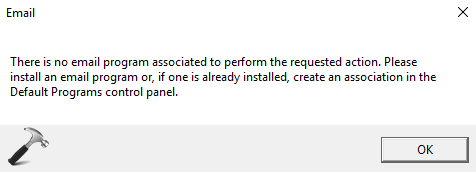
The machine on which I faced this error already had an email client installed and that was was Outlook app (part of Microsoft Office suite). But still the system fails to recognize it and thrown this error message. If you’re also having this similar problem with your Windows 11/10, you can try the steps mentioned below and resolve it for yourself.
Fix: There Is No Email Program Associated To Perform The Requested Action In Windows 11/10
Registry Disclaimer: The further steps will involve registry manipulation. Making mistakes while manipulating registry could affect your system adversely. So be careful while editing registry entries and create a System Restore point first.
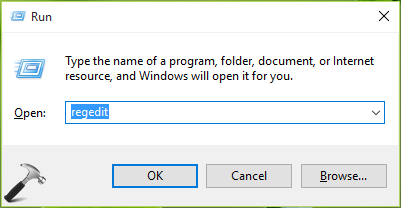
1. Press  + R and put regedit in Run. Click OK.
2. In the left pane of Registry Editor, navigate to following registry key:
HKEY_LOCAL_MACHINE\SOFTWARE\Clients\Mail\Microsoft Outlook
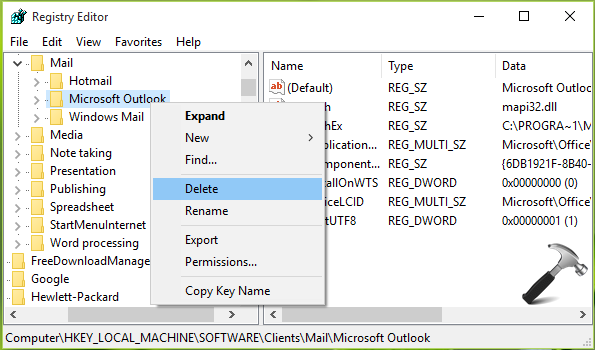
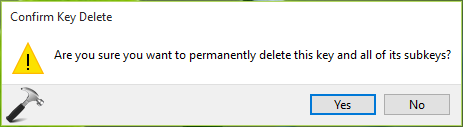
3. In the left pane of above shown window, right click over Microsoft Outlook key and select Delete. Provide the confirmation to erase the key by selecting Yes here:
4. Now open Settings app and go to System > Default apps. In the right pane of the window, scroll down and look for Email heading. Click on the app name next to it and under Choose an app, select Mail as the default email client.
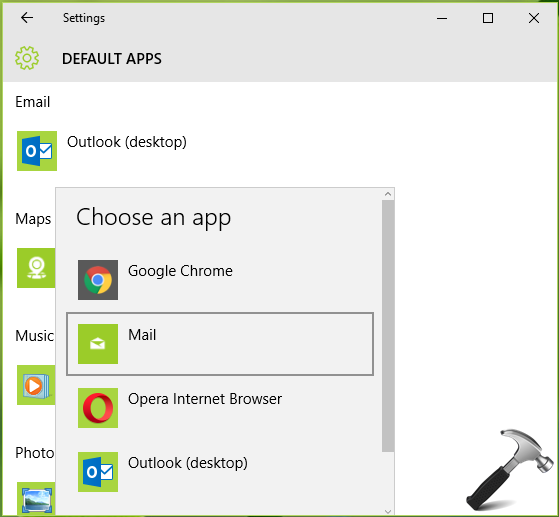
You may restart your machine to make changes effective. After rebooting the system, the error doesn’t occurs. If it still happens, do let me know via comments.
That’s it!
Originally written on Jun 2, 2016. Last updated for Windows 11.


![[How To] Allow/Prevent Apps To Access Email In Windows 10](https://www.kapilarya.com/assets/email_icon_1783831350.jpg)

I followed the steps you provided and I am still getting the message. I verified that there us no Outlook entry in the registry. Any ideas?
^^ Try removing other keys under Mail registry key. See if it helps.
removed all keys but issue still coming.is any other way?
In Control Panel, click or double-click Mail.
Where is Mail in Control Panel?
Mail appears in different Control Panel locations depending on the version of the Microsoft Windows operating system, Control Panel view selected, and whether a 32- or 64-bit operating system or version of Outlook is installed.
The easiest way to locate Mail is to open Control Panel in Windows, and then in the Search box at the top of window, type Mail.
NOTE: The Mail icon appears after Outlook starts for the first time.
Do any of the following:
To add another email account, click E-mail Accounts.
To change Outlook data storage options, click Data Files.
To see a list of the current profiles, click Show Profiles.—–set as outlook
prompt for a profile to be used…to be checked.
^^ Thanks for your efforts on this!
Doesnt work!
I open my Registry Editor but no HKEY_LOCAL_MACHINE\SOFTWARE\Clients\Mail\Microsoft Outlook appears. Only, HKEY_LOCAL_MACHINE (plus some other, ‘HKEY’S’ but none like you describe). Nothing appears when I expand it that seems related to what you describe either. Puzzle. Been a bother ever since I got Windows 10. Jack
^^ After expanding HKEY_LOCAL_MACHINE, you should be able to spot SOFTWARE folder. Can you?
I am also getting this error, but I’m NOT trying to send any kind of e-mail – it is coming up soon after I start my machine, as if some app on my machine is trying to ‘phone home’ via e-mail! for this reason alone, I will not make a default e-mail app on my computer as I use internet based e-mails to conduct my business and don’t really require a dedicated e-mail app on my machine…I’m just tired of seeing this error popping up every time I restart my machine. So…how do I get rid of THAT???
^^ Please run shell:startup command and delete the programs listed in the folder. This should prevent any email client, that is started as soon as you login and due to which you see the message.
Hey Kapil,
Thanks for the detailed article. Would this still work if I don’t install Outlook. I want to be able to use the default “Mail” app in Windows 10 to be able to send those files as e-mails (either in the File Explorer or through Word/Excel/Powerpoint)
^^ Yep, it should work.
This problem was fixed by deleting the Mail folder in the registry HKEY_LOCAL_MACHINE\SOFTWARE\Clients\Mail and then just restarted my PC. Voila! It worked. I did not expected this because I was fed up with this issue.
^^ Glad it worked, Manu 😎
Worked for me! Been getting this error on my windows 10 for a while now. It was getting super annoying. Thank you!
^^ You’re most welcome, Brooke 😊
Interesting. I am running Windows 10 64 bit. My registry does not have “outlook” even listed. The thing I noticed is that Windows Mail is lacking the “mailto” in the registry. Hotmail is the only item containing “mailto” in the registry. So I checked spreadsheets in the registry and there is no association with any email client.
I’ve seen this procedure post before on resolving this particular issue.
^^ Did the issue resolved?
that guy Manu, thanks. it worked!!
At startup, Cortana is trying to access email using the MAPI API. Outlook does not support MAPI. Other emails apps may not either.
On Windows 10, go to Settings, Cortana, Permissions & History, Manage the information Cortana can access from this device. Turn off Contact, email, calendar & communications history.
^^ Thanks David for your inputs 😊
Finally, a simple and accurate fix! Thx
^^ Welcome!
After perusing your site, I was, for the first time since the release of Win7, impressed that there actually existed a professional side of Microsoft. I find your responses to be exceptional.
Thank you for your contribution to providing more than Microsoft’s pat responses equal to or less than that in ‘F1″ “Help” &/or Windows Documentation. I have participated in Microsoft BETAs since the release of Win v3.1 [bundled with Novell,] and found them to be quite helpful back when the support ‘KB’ & TechNet were the primary technical resources, esp. for ITs. I have criticized them often and repeatedly since they implemented the less effective [butchering] of their website(s) to be primary sources for both end-users and ITs [without purchasing a subscription,] esp. considering we are all still scaling from XP to WinX.
I apologize to you, personally and professionally, for bundling All MVP’s as inept pieces of furniture in providing actually useful information. There is obviously exception(s) to the program.
I have the same error.. There is no email…windows 10..I am not a computer wiz
I have office 2007. Is there a way to make outlook 2007 the default? I deleted it like above and set it for a default. Still have the same issue. Outlook 2007 works fine with it except this error. It doesn’t want to accept outlook as a default.
Suppose you are using Windows Live Mail and have it set as the default. Do you follow the same steps. I use Windows live for work because it allows me to organize my folders in a way which is easier to work with. By the way my issue did not start until after I received a Windows update 2 days ago. Therefore I think they should send a fix/patch.
Still the issue is not fixed …
i have deleted the Microsoft Outlook from HKEY_LOCAL_MACHINE\SOFTWARE\Clients\Mail\ Microsoft Outlook.
and set the default to Mail from Default programs..
^^ Next thing you can try is in-place repair upgrade: https://www.kapilarya.com/how-to-repair-windows-10-using-in-place-upgrade
Or Shall I delete the Mail completely from HKEY_LOCAL_MACHINE\SOFTWARE\Clients\Mail\
i.e. the last sub directory completely
^^ Nope, only delete Microsoft Outlook key.
I am getting this error when trying to import calendars to Outlook, I want to carry on using outlook so do I just restore the Default as Outlook
Deleting the entire mail key works – take a backup of that key
^^ Thanks for your feedback Alwyn 😊
it doesn’t work… I have delete the fil and select Mail. But it doesn’t work.
It does not work. When I reboot as soon as I open Edge Explorer the error message comes up again.
Thanks Kapil, I found a very old and discontinued email program in “ShellStartup.” I’m OK now. Thanks again, John
^^ Glad to help John!
I have MS Outlook 2007 and wish to use this as my default mail client, but this poxy message keeps popping up every 10 minutes or so after I close it. It’s infuriating!
This is a new PC (well, a refurbished PC, but properly refurbished from a reputable company). It’s a clean build with Windows 10 Pro and came pre-installed with MS Office 2016. I had a 30-day Office 365 trial but decided to discontinue the trial as I felt Outlook 2016 was a downgrade on what I already had.
I’ve since uninstalled Office 2016 in an attempt to rid myself of this message, but to no avail.
I’d be really grateful if you’re able to help me solve this issue (which I don’t think I had before installing Office 2007).
The Manu Shukla solution worked for me also.
^^ Thanks for confirming this, David!
I had the same problem. The error would come up when I started the computer and if I used the send to email client feature in explorer. I didn’t even know I had the send to problem until I tried it after reading it in a post. What fixed it for me was deleting the ‘MAIL” folder in the client part of the registry. There wasn’t an Outlook folder there so I just deleted what was there and rebooted. After reboot, no error and I tried the send to email client feature and NO ERROR yeah…. Thanks all the information.
Dwight
^^ Glad we could help 😊
Deleting the Outlook key did not work, but deleting the mail key worked.
Thank you !!!
^^ Glad to help 😎
With a recent W10 update my Thunderbird email stopped working. I have tried all the previous suggestions of deleting the reg key, etc but nothing has worked. The Thunderbird key is the only email key now in the reg but I still get “no email client available” when I try to send mail from programs.