

In our past, we’ve shared many fixes for various issues while installing Windows Update. Windows Update keeps your system updated with the fixes/patches and security updates. A good Windows user always check for the new updates and install them as soon as possible. However, error may come into play while checking for new updates available. Today, we’re going to talk about the troubles faced while you look for new updates in Windows 8.1, have a look at one:
Page Contents
Windows could not search for new updates
There was a problem checking for updates.
Error Code 8024A008
Windows Update ran into a problem.
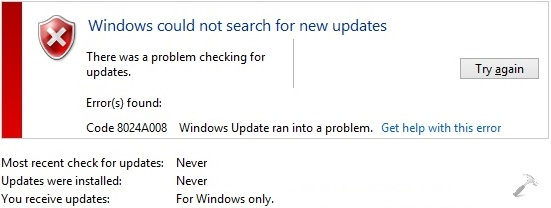
As you can see, it was the error code 8024A008 which entertained us, however you might get different error code with this same issue.
Read : “Windows Could Not Search For New Updates” In Windows 8 Or Later
In order to fix these kind of issues, you must try the Windows Update Troubleshooter opened after clicking the Get help with this error link provided in the error box.
Also checkout if resetting Windows Update components could help you: Reset Windows Update components manually.
If that doesn’t helps, you can try following fix to resolve this issue:
FIX : ‘Windows Update Ran Into A Problem. Error Code 8024A008’ In Windows 10/8.1/8/7
1. First of all download the Windows Update PowerShell Module from following link:
Download Windows Update PowerShell Module
The module is in ZIP format, so you can easily extract it using decompression software like 7-zip so that you’ll got the PSWindowsUpdate folder.
2. Now press  + R and type this into the Run dialog box and press Enter key / click OK:
%WINDIR%\System32\WindowsPowerShell\v1.0\Modules
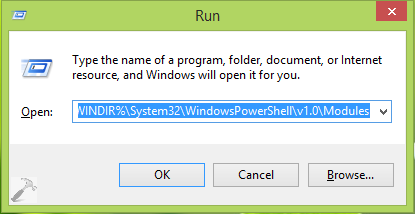
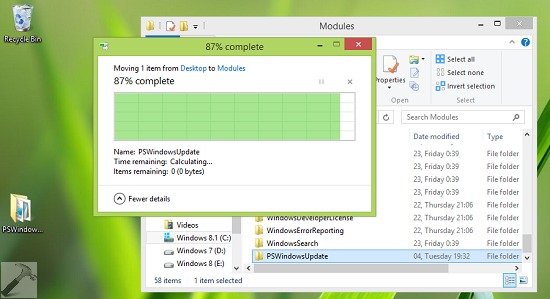
3. Now copy the extracted ZIP folder named as PSWindowsUpdate from step 1 to Modules folder so opened from step 2:
4. Moving on, Go to Start Screen, press + I, click Tiles and set the slider to Yes for Show administrative tools. From administrative tools so pinned to Start Screen now, open the administrative Windows PowerShell ISE and execute following commands one by one after pressing Enter key:
Set-ExecutionPolicy RemoteSigned
Import-Module PSWindowsUpdate
Get-WUInstall
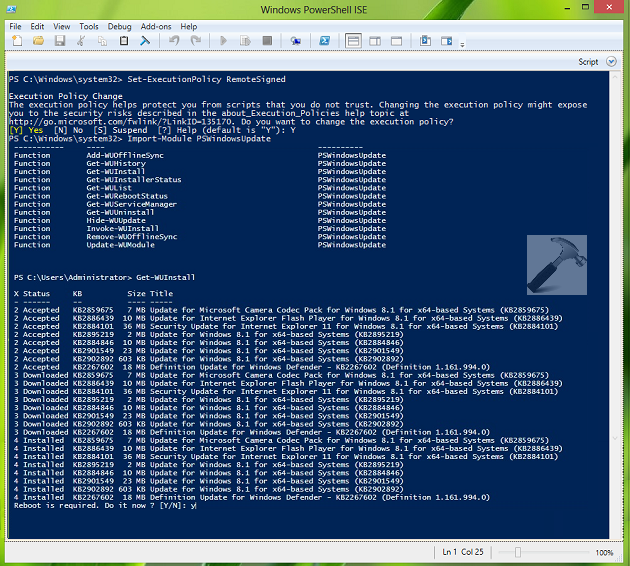
5. Get the things work done until you are asked to reboot. Once a reboot is done, you can check, download or install Windows Updates as usual.
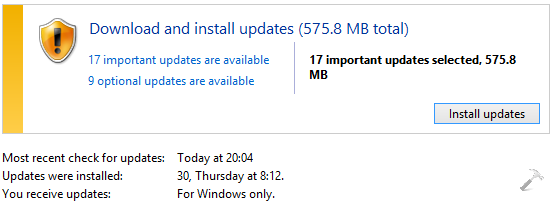
That’s it! Checkout how to prevent forced reboot after installing Windows Updates in Windows 8.





hi Kapil,
I followed your steps on this page to be able to do windows updates. It worked but when i tried doing it normally it still gives me the same error. what else can I do?
Thanks for your help.
^^ So after performing these steps, you still can’t check for new updates? Well, you can try this as well:
https://www.kapilarya.com/windows-updates-troubleshooting
Hello.
Can you explain more about how that powerShell module works? I am quite of a power user, so a geeky explanation is not a problem.
Thanks
^^ By default, it forcefully connects to Windows Update, presents a listing of available updates, and prompts to accept. There is an acceptall switch that will automatically accept the updates. You can run following command to get another switches for this module in the scheme:
Thank you for the reply.
I have successfully followed the steps above. I have installed all updates present in the PS ISE.
However, after restart, in Windows Update, the problem still occur. To make things interesting, the error code is exactly the same as the one shown in this article.
I will now do a WU reset (seven forums has this covered) and will see if I could solve this issue. In the mean time, if you could tell me what to do, please do so.
If else fails, I might need to depend on such PS module just to update my Windows 8.1.
Thank you in advance
For me the last part didn’t work, had to search for Powershell ISE manually in windows search, then right click run as administrator (wanted to share this)
After updating it still will not check for updates, and hang at checking for updates. (I did update it with ISE tho)
Hi Kapil,
I followed your steps but I got stuck at Windows PowerShell ISE. When I typed the commands above and tried to execute them, I got error messages in read and could not continue from there. Any comment?
Thanks in advance,
P.
^^ Make sure you’re running Windows PowerShell as administrator.
So I am working on all the steps and right now my computer is running through the updated in PowerShell ISE and they are all failing… is that okay? Will it still work?
I’ve been having the problems with my windows update since I first got it and have always just bypassed the update and now that I’m finally looking for a solution, I feel it might not work.
^^ Retry all the steps.
I tried every step twice but when I open powershell ISE
I paste commands I doesn’t do anything I run it as administrator aswell
its not working
By the way when I type the import module windows update command, I don’t get a result like the one that you show. I only get a return to the next line and a new PS C: prompt line. Also I have downloaded the trouble shooter and run it and it claimed to find problems and fix them but nothing is changed..
Thanks for posting this. It is working. But recently I went into some trouble doing this. Powershell downloaded almost 900mb of updates, but before it could install there was a power failure and I had to shutdown the computer. Now what are my options?
Can install these downloaded updates later? If I can’t I can definately re-download, but I will need clean up this large chunk of unused updates which will be taking space in the HD. Can please let me know how do I clean this data?
Thank you very much.
^^ Please follow the answer of this thread: social.technet.microsoft.com/Forums/windows/en-US/64bcd41c-59b0-44af-b59d-2433955d6fb2/delete-failed-updates and see if it helps.
Thanks for your reply.
This link is concerned with clearing the history of Windows updates. My concern was to either free up 900mb data, or install from it.
^^ Since you’re already evident about the update files size, I assume you can access the update files, correct? Do you have any option there to remove the failed ones. Also suggest to try the Windows Update Troubleshooter and checkout what it says: https://www.kapilarya.com/windows-updates-troubleshooting
I am specifying the size as it was displayed in the Powershell before downloading. I wanted to know if there is any option to remove the failed updates.
^^ Sorry, unfortunately there is no direct option to remove installation failed updates.The workarounds I’ve shared you already :)
Hello!, I am having the same trouble! i tried everything you said but when I get to Windows PowerShell and i run it as Administrator I get errors in Red for the second and third Comand Prompt.
For the prompt (Import-Moudule PSWindowsUpdate) It goes something like this:
Import-Module: The specified module ‘PSWindows Update’ was not loaded because no valid module file was found in any module directory. (Then it says more stuff).
For the prompt (Get-WUInstall) it goes like:
Get-WUInstall : The term ‘Get-WUInstall’ is not recognized as the name of a cmdlet, function, script file or operable program. etc.
Please help me you are my only hope.
My laptop is a Sony Vaio SVF14N13CXB
^^ You haven’t followed step 1-3, please try them first :)
Installed a third party app that cleared all the failed updates. Thanks for all this info, really helped a lot. God bless.
hi, i m having the same problem of windows updates. i followed your 1 to 3 steps successfuly and executed the first command but second command fails to find the directory of pswindowsudate…….! troubled!
^^ I’m still afraid you’ve copied extracted files to Modules folder, because if you’ve copied, you wouldn’t have got that error :)
Thank you so much for this, its the only thing thats worked for me.
The problem I’ve now got is updading to Windows 10- Windows update checks for updates for ever and apparently “most recent check for updates: Never” and “Updates were installed: Never.” The powershell starts downloading windows 10 but fails after several attempts. Any ideas?
^^ What error do you see now when it fails after trying above mentioned fix?
When i type “Get-WUInstall” nothing occurs… Just “Running script / selection. Press Ctrl + Break to stop.” Or it takes so much?
^^ Refer previous comments for hint.
Hello :) Does it really take that long ? And also some of it failed because its for 64x bits , My laptop is at 32x bits only . Is it really like that or does all of it have to be accepted ? Please help :)
Still no reply on what to do when you enter the commands in PowerShell and only get a return to the next line and a new PS C: prompt line without any error message. Running as admin, did everything twice… Nothing happens
^^ Please execute those commands one by one.
@Jerome, It’s obvious that 64-bit updates will fail to install on 32-bit edition. Perhaps, Windows would not even check for 64-bit updates if you’re on 32-bit system.
Ohhh . So that means I cant update my laptop to Windows 10 ? :(
Wait ohh I have been mistaken, I have a 64x bit operating system sorry :) I just checked my operating system . I thought it was the Adobe one’s. But when I try to update them . Does it really take this long and also why does some of them fail ? I have 64x bit and all of the updates are 64x bits but why are some of them are failed to update ? please help
Hello, I did all this, and it was successfully completed, but my windows update is still getting the same error “8024A008”. Are there any other thing I could do to fix this?
^^ Refer previous comments on this same thread for hint :)
Hi, This worked perfectly on Windows 8.1. Now, as I am on Windows 10 Pro, can I use this technique to get manual updates from Microsoft? The update process in 10 is completely automatic and it downloads a lot of unnecessary updates. Powershell was giving a manual way to select the updates we want in 8.1. Can I use this in Win 10 too? please let me know.
^^ Yes, you can :)
Did it in windows 10, worked like a charm. This is an amazing solution to the forced updates in Win 10. I am keeping the automatic update Service disabled in Win 10 and getting updates in this fashion. It allows me to choose what to install.
I think a lot of people are searching for this solution after upgrading to Win 10 that is forcing automatic updates. The automatic updates are creating lot of inconvenience in users. This can be a very fitting solution.
Thank you very much. :)
^^ Glad we could help :) FYI, you can also follow methods mentioned here to avoid automatic update problem in Windows 10:
https://www.kapilarya.com/avoid-windows-updates-automatic-download-windows-10
Thanks, this helped a lot. I had a few laptops that were not updating but are good now. Also, for those who had any errors you can run the second command manually as:
Import-Module “C:\System32\WindowsPowerShell\v1.0\Modules\PSWindowsUpdate\PSWindowsUpdate\”
Or
Import-Module “C:\System32\WindowsPowerShell\v1.0\Modules\PSWindowsUpdate\”
In my case it created a subfolder in the folder and couldn’t find the module. Or you could just check if there is a subfolder and copy that over instead.
^^ Appreciate your efforts Jay! Great to see the fix worked for you :)
Kapil,
First off, Thank you kindly for taking the time to explain this–much appreciated. I’m failing at the second command “Set-ExecutionPolicy RemoteSigned”. Every time I’ve entered (as Administrator) the failure says it cannot execute because “Format.ps1xml is not digitally signed.” Please help if you’re able. I’ve tried to follow each step exactly, but I’m not a programmer, so I could’ve missed something obvious.
Thanks again.
Kapil,
Never mind. I solved it through entering command “Set-executionPolicy Unrestricted”. Thanks again.
After typing import- module pswindows update. The list is not shownlike yours
After I gave 2nd command nothing popped up like yours
^^ Make sure you’ve tried steps 1-3!
Is there any trick to copy PS windpwsupdate
When i run get-WuInstall it does not seem to do anything. within 2 second im presented with “PS C:\windows\system32> “
^^ Make sure you’re connected to a stable and fast Internet connection.
Hi Kapil, I followed your steps, it installed all the updates, however there was this one update – Malicious tool removal software for Windows 8 and 8.1 which took 15 hours to install. So I just stopped the process in the Powershell ISE module. After that I restarted the computer and all the updates are now installed, except the one that I stopped. I hope this isnt a problem. Anything additional that I should do? Thanks.
^^ You’re good to go! It’s upto you which updates you want to install. If you like, you can install that update later :)
hi,
But it is showing after given command
PS C:\WINDOWS\System32> Set-ExecutionPolicy RemoteSigned
Set-ExecutionPolicy : Access to the registry key ‘HKEY_LOCAL_MACHINE\SOFTWARE\Microsoft\PowerShell\1\ShellIds\Microsoft.PowerShell’ is denied. To change the
execution policy for the default (LocalMachine) scope, start Windows PowerShell with the “Run as administrator” option. To change the execution policy for the
current user, run “Set-ExecutionPolicy -Scope CurrentUser”.
At line:1 char:1
+ Set-ExecutionPolicy RemoteSigned
+ ~~~~~~~~~~~~~~~~~~~~~~~~~~~~~~~~
+ CategoryInfo : PermissionDenied: (:) [Set-ExecutionPolicy], UnauthorizedAccessException
+ FullyQualifiedErrorId : System.UnauthorizedAccessException,Microsoft.PowerShell.Commands.SetExecutionPolicyCommand
PS C:\WINDOWS\System32>
“What I do for next?
^^ Please open administrative Windows PowerShell and run the command again :)
i have followed the steps over and over and yet I don’t get the same output as shown a running the second command everything was done as you showed but it just returns the prompt. please help
^^ Please refer previous comments for hint.
This solution can be applied to Windows 7 too?
^^ Yup!
Do you think this solution could work, for the big and general problems going on for about a year with Windows 7 updates? Thanks in advance.
FYI I used powershell successfully: copied windowspowershell module into system32 folder and by setting remote command on the right side of the window then went directly into the command windows just typed the 2nd command hit enter, then the 3rd command hit enter. It ran after waiting for a minute or two for it to process the setup.
After watching it for 6 hours downloading 250 updates successfully I was happy for that but sorry to see that Windows 8.1 still would not automatically download updates not matter what I tried. Have to deliver it to the customer without auto updates working. DO NOT understand why 1 of the 20 things I tried did not fix auto updates. Just hangs at checking for updates (3 days).
^^ To disable automatic updates, you can try this: https://www.kapilarya.com/avoid-windows-updates-automatic-download-windows-10
I’m not getting any output to the window, just says Running script / selection after 3rd command. How can I tell if it is working?
^^ You’ve to wait, and that’s the only option because it keeps working in background.
Thanks for your guidelines, Kapil Arya. It does pinpoint me to whee my issues are.
Everything is Ok until the Get WUInstall. Running with -verbose I get the message “”Connecting to Windows Updat”. Please Wait”. I run 8.1 x64 Pro, have no proxy in place (and reset using netsh winhttp reset proxy). I closed down the Defender and I can access the update.windows.com website. The catalogue website returns error 8DDD020 though.
How do I troubleshoot this connection?
(BTW: I could do the aug-2016 rollup with manual msi/msu download, so should be reasonably up to date. Reverting to “standard” update checking UI, and when observing the network adapter status I see 100Mb in in the first 10min, then it slows down).
(RESOLVED? Letting it run throughout the night, it some seems to have gained some speed again, and came back with quite some updates despite the aug2016 rollup. Now see if maintenance proces stabilizes and whether catalogie becomes accesable)
^^ It seems there are lot of updates. You may want to switch to different network connection, in case if that helps you.
(NOT RESOLVED after all: Tried wifi over iphone hotspot, but no improvement. Currently struggling to download .NET 3.5. Failed due to timeout…)
^^ Don’t struggle atleast for .NET download, enable it offline here: https://www.kapilarya.com/how-to-enable-net-framework-3-5-on-windows-10
i hope i could ask for help. running win 8.1
transfered unzipped folder to modules folder
ran the 1st command – hit yes
ran the 2nd command – nothing showed just said below “completed”
ran 3rd command – running script / selection seems like nothings happening.
i checked the router if any data is moving but nothing.
any help?
^^ First run the fixes mentioned here: https://www.kapilarya.com/windows-updates-troubleshooting and then re-try executing commands, see if it helps.
Running windows update from the powershell worked for me. Be greatly patient. After an hour I aborted the process and went to try other solutions. Nothing worked. I went back to this and let it run over night. It worked. Thanks, Kapil.
^^ Glad we could help 😎
Import-Module : The specified module ‘PSWindowsUpdate’ was not loaded because no valid module file was found in any module directory.
At line:1 char:1
+ Import-Module PSWindowsUpdate
+ ~~~~~~~~~~~~~~~~~~~~~~~~~~~~~
+ CategoryInfo : ResourceUnavailable: (PSWindowsUpdate:String) [Import-Module], FileNotFoundException
+ FullyQualifiedErrorId : Modules_ModuleNotFound,Microsoft.PowerShell.Commands.ImportModuleCommand
^^ Please retry all the steps carefully.
COPIED THE UPDATE FOLDER but after given command it asks to give command nothing hapens after a command it just goes on next line for a command
I know this is an old thread, but thought I’d leave a comment here anyway. I got the same error during the Import-Module command as some of the others (Red letters saying no valid module file was found). In order to fix it, I opened the extracted “PSWindowsUpdate” folder. Inside of it was another “PSWindowsUpdate” folder. Copy the second “PSWindowsUpdate” folder to the Modules folder. That worked for me anyway.
^^ Thanks for your input 😊
Administrator: Windows PowerShell ISE (x86)
PS C:\Windows\system32> Set-ExecutionPolicy RemoteSigned
PS C:\Windows\system32> Import-Module PSWindowsUpdate
Import-Module : The specified module ‘PSWindowsUpdate’ was not loaded because no valid module file was found in any
module directory.
At line:1 char:1
+ Import-Module PSWindowsUpdate
+ ~~~~~~~~~~~~~~~~~~~~~~~~~~~~~
+ CategoryInfo : ResourceUnavailable: (PSWindowsUpdate:String) [Import-Module], FileNotFoundException
+ FullyQualifiedErrorId : Modules_ModuleNotFound,Microsoft.PowerShell.Commands.ImportModuleCommand
PS C:\Windows\system32> Get-WUInstall
Get-WUInstall : The term ‘Get-WUInstall’ is not recognized as the name of a cmdlet, function, script file, or
operable program. Check the spelling of the name, or if a path was included, verify that the path is correct and try
again.
At line:1 char:1
+ Get-WUInstall
+ ~~~~~~~~~~~~~
+ CategoryInfo : ObjectNotFound: (Get-WUInstall:String) [], CommandNotFoundException
+ FullyQualifiedErrorId : CommandNotFoundException
No Dice, it doesn’t work…
Hi, i tried all the steps but in windows powershell ise, when i tipe the first comand nothing hapends, go to the next line. i ush win 8.1
I fixed my win 8.1 with this method which also occurred with my copy of windows 7 : First download two files KB3173424, and KB3172614 save to harddrive. Then disconnect computer from the internet. I disabled the windows updater in the update settings as well. If you donot disable windows from trying to update itself this won’t work.
Now go to the location of your downloaded files as above and you must install them in sequence. first KB3173424. (I could not get anything to download and install until I did it by this method), reboot.
Then install KB3172614 and reboot. Then restore windows updater to normal operating settings that you want and reconnect to internet . The updater as in my case returned to its normal function after a short delay and downloaded about 1 gb of updates Good Luck, Growbag
After entering the last Wuinstall cammand..it says running for a very long period of time… i am kid of stuck there…
@Growbag Thanks wery much. This solution works for me! Win 8.1
^^ Thanks for your confirmation. @Growbag, thanks for your inputs 😊
The first time i did the steps it wasnt in admin mode, will there be any problems if i just do it again in admin mode?
^^ Most probably, nope!
The downloaded zip file is empty, can you please check?
^^ Please re-download. It couldn’t be empty.
Hi, I stuck in command 2, please help!
PS C:\Windows\system32> Set-ExecutionPolicy RemoteSigned
PS C:\Windows\system32> Import-Module PSWindowsUpdate
Import-Module : Fehler beim Laden der Formatdatendatei:
C:\Users\Michael Milde\Documents\WindowsPowerShell\Modules\PSWindowsUpdate\PSWindowsUpdate.Format.ps1xml, ,
C:\Users\Michael Milde\Documents\WindowsPowerShell\Modules\PSWindowsUpdate\PSWindowsUpdate.Format.ps1xml:
Die Datei wurde wegen folgender Validierungsausnahme übersprungen: Die Datei “C:\Users\Michael
Milde\Documents\WindowsPowerShell\Modules\PSWindowsUpdate\PSWindowsUpdate.Format.ps1xml” kann nicht geladen
werden. Die Datei “C:\Users\Michael
Milde\Documents\WindowsPowerShell\Modules\PSWindowsUpdate\PSWindowsUpdate.Format.ps1xml” ist nicht digital
signiert. Sie könnend dieses Skript im aktuellen System nicht ausführen. Weitere Informationen zum Ausführen
von Skripts und Festlegen der Ausführungsrichtlinie erhalten Sie in “about_Execution_Policies” unter
“http://go.microsoft.com/fwlink/?LinkID=135170″…
In Zeile:1 Zeichen:1
+ Import-Module PSWindowsUpdate
+ ~~~~~~~~~~~~~~~~~~~~~~~~~~~~~
+ CategoryInfo : InvalidOperation: (:) [Import-Module], RuntimeException
+ FullyQualifiedErrorId : FormatXmlUpdateException,Microsoft.PowerShell.Commands.ImportModuleCommand
^^ Sorry, but I could not understand the language in which you mentioned the error 😔
Excellent work. Its working
^^ Awesome 😎
I am having problem installing updates. It gets to 98 percent then says failure in configuring and then reverts changes. Why?
^^ Please check: https://www.kapilarya.com/failure-configuring-windows-updates-reverting-changes
Hi I got as far as attempting to open powershell ise, on entering the screen popped up and then disappeared, so I entered just powershell, then entered commands, first went in fine, second didn’t recognise import pswindowsupdate, I have managed to zip and put into a folder. Any ideas?
^^ I suggest you to start from scratch and follow the steps again. Let me know if you fail at any step.
Hi, all of it has worked until the last part. The third command is running but isn’t completing for some reason. What should I do?
Hi, all of it has worked until the last part. The third command is running but isn’t completing for some reason. It’s been 5 minutes and its still running. Any solution?
^^ Wait, and let it complete.