

We have previously quoted in many articles that even a single driver or process can prevent your system from booting correctly. As we have already seen in the following article, there is an unexpected error due to which system halts and couldn’t be loaded:
Fix: Your PC Needs To Be Repaired. Error Code: 0xc0000225
Now, in this article, we’re going to discuss about another kind of instance we faced recently with a Windows 10 build running machine. Although, it has all the system drivers updated to the mark but still we faced the following error and thus system fails to boot:
Recovery
Your PC needs to be repaired
Page Contents
The operating system couldn’t be loaded because a critical system driver is missing or contains errors.
Error code: 0xc0000359
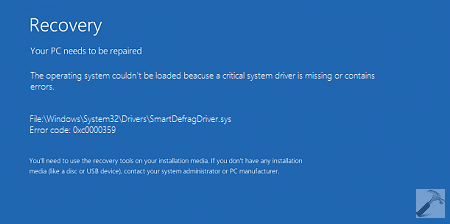
As per the error message, we can easily understand that a system driver is causing the problem. In such cases, we should perform the Automatic Repair by booting into System Recovery Options. In case the Automatic Repair fails, we can try this fix and let it working:
Fix: Automatic or Startup Repair Fails
Even if Automatic Repair doesn’t helps at all, you can opt for another Advanced Recovery Option, i.e. System Restore. The System Restore have capability to restore your system into last known good configuration. After restoring the system to good configuration, you can uninstall the faulty driver from Device Management and thus can avoid this error from happening in future. If System Restore fails, checkout this fix:
Fix: “System Restore Did Not Completed Successfully” In Windows
For some reasons, if you can’t do either Automatic Repair and System Restore, then we’ve selective fix for this error, which worked perfectly here. Here is what you need to do:
FIX : The Operating System Couldn’t Be Loaded Because A Critical System Driver Is Missing Or Contains Errors In Windows 10/8/7
1. Plug in the installation media or System Recovery Drive or recovery CD and start your system. You’ll see Press any key to boot from CD/DVD… message. So press any key and you’ll reach Windows Setup window, hit Next button to reach the below shown screen. Click on Repair your computer link here:
![[FIX] Your PC Needs To Be Repaired. Error Code: 0xc0000225](https://htse.kapilarya.com/FIX-Your-PC-Needs-To-Be-Repaired-Error-Code-0xc0000225-1.png)
2. Next, select the Troubleshoot option and then Advanced options. In the Advanced options screen shown below, select Command Prompt entry. This will make Windows to boot into Command Prompt mode and you will be asked to enter your administrative password to proceed, so do the needful.
![[FIX] Your PC Needs To Be Repaired. Error Code: 0xc0000225](https://htse.kapilarya.com/FIX-Your-PC-Needs-To-Be-Repaired-Error-Code-0xc0000225-2.png)
3. Moving on, in the Command Prompt window, type these commands (in bold letters) one by one and press Enter key after each:
cd..
cd windows\system32
del UsbFilter_Install.inf
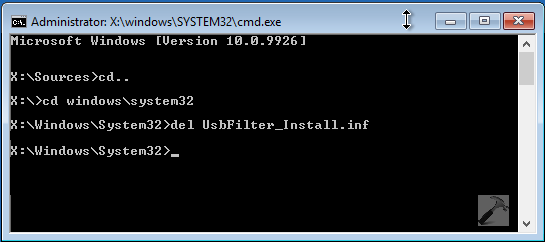
Once all the commands successfully executed, you can close the Command Prompt window and select Continue option at the Troubleshoot screen appears next. In this way, your Windows should be loaded up correctly now, else do a restart.
That’s it!



Hello, entering del UsbFilter_Install.inf says it could not be found, any chance you could provide me with any assistance?
^^ Can you try the steps mentioned here and see if they helps:
https://www.kapilarya.com/there-was-a-problem-refreshing-your-pc
I get the message “The process cannot access the file because it is being used by another process.
I Can’t type _ low Line in The command prompt Help plz
^^ Strange! Hope you’re using Shift + – keys.
I dont have the system restore or the automatic repair option and it keeps giving me other options that keeps failing like safe mode. what should i do?
Could Not Find X:\Windows\System32\UsbFilter_Install.inf
Thank you very much ! System restore point worked for me. I was going to format my laptop but then i was your post. U saved me man.
^^ Glad we could help 😊
My error code is 0xooooo7b
Hello brother i using window 8.1
Errors : 0xc0000185
Please help
;
^^ Try repairing boot records (works in Windows 8.1): https://www.kapilarya.com/fix-windows-10-master-boot-record-corrupted
works like a charm! Thanks brother! thanks a million & never end.