

Mail app in Windows 10 allows you to add email accounts from other email providers besides Outlook. However, sometimes users may not be able to set up email account for other email providers such as Gmail. Recently, many users have reported that they can’t add Gmail account to Windows 10 Mail app.
When they try to setup Gmail account, they receive following message:
Page Contents
Something went wrong
We’re sorry, but we weren’t able to do that.
Error code: 0x8000000b.

You may receive other error codes such as 0x8007042b, 0x80040154, 0x8000ffff, 0x8007000d, 0x80c8043e, 0x80070435, 0x8007006d, 0x80070425 with this same error message. Whatever error code you receive, the bottom line is that you can’t add your Gmail account, anyway. So ultimately this prevents you from using your Gmail account on Mail app.
To fix this issue, we recommend you to go ahead with resetting and re-registering Mail app first. If that doesn’t works for you, follow steps mentioned below to fix this issue.
FIX: Can’t Add Gmail Account To Windows 10 Mail App
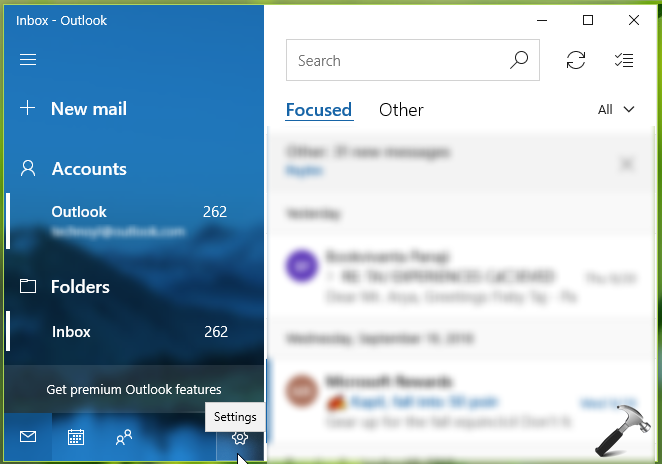
1. Open Mail app and click Settings icon.
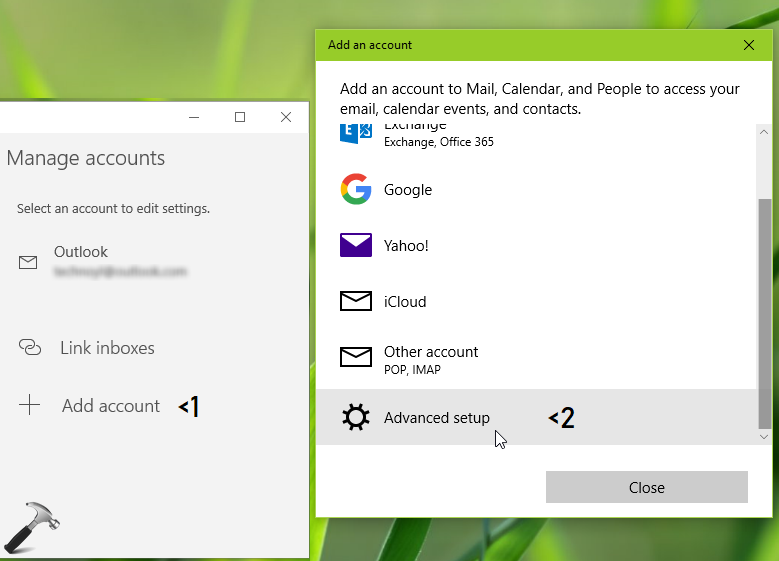
2. Then under Manage accounts, click Add account. Now in Add an account, click Advanced setup option. See this fix, if Add an account applet doesn’t loads.
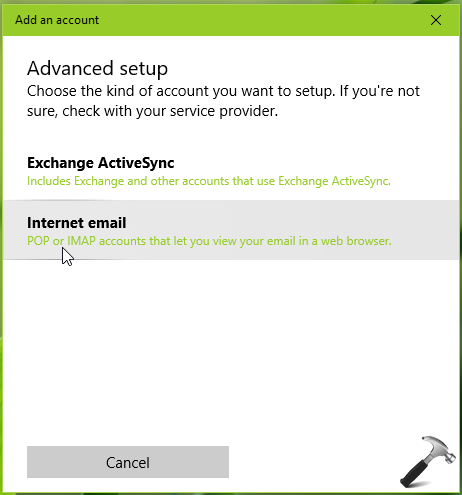
3. Next, in same Add an account window, click Internet email option.
4. Moving on, in the next screen on same window, provide your Gmail account details.
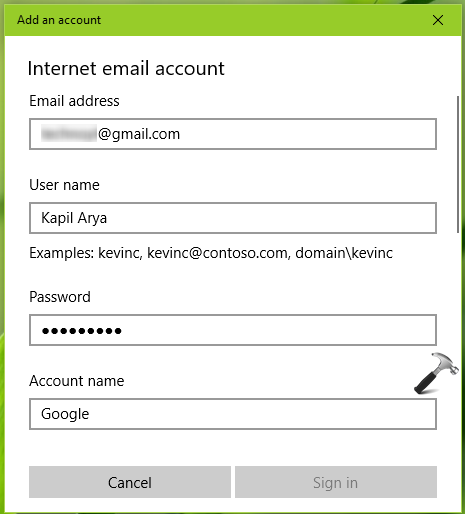
5. Scroll down and make sure you use these standard values:
Incoming email server: imap.gmail.com:993
Account type: IMAP4
Outgoing email server: smtp.gmail.com:465
Ensure these options are checked:
- Outgoing server requires authentication
- Use same user name and password for sending email
- Require SSL for incoming email
- Require SSL for outgoing email
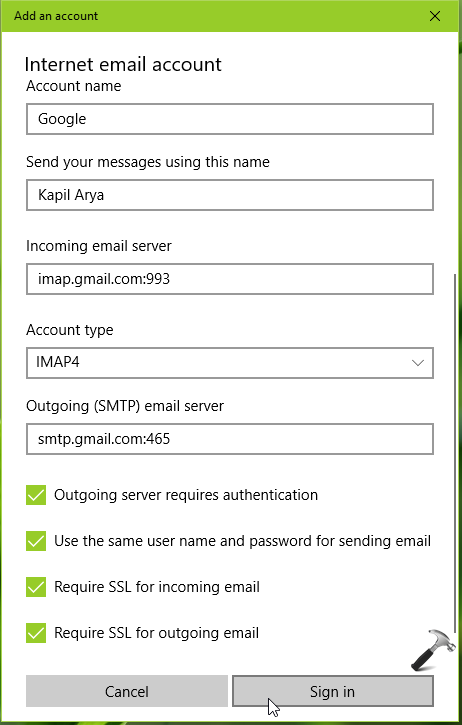
6. Finally, click Sign in and wait for few minutes, your Gmail account will be added successfully to Mail app.
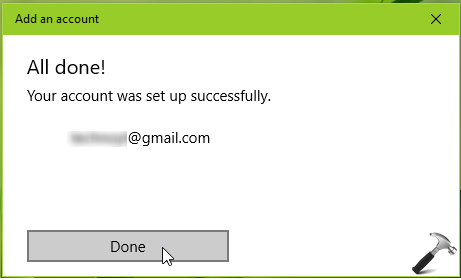
Hope this helps!
Related: Something went wrong and Outlook couldn’t set up your account.


This is not a fix.. this is a half workaround.. Anyone with a brain and google would have figured this out. It doesn’t fix **** as the s calender or contacts don’t sync only mail. Try again.
I have to agree with William. This “fix” has been posted several times before on other threads over the past few years. And it seems the issue is reviving recently. This may work fine for some people if all they want to sync is their email, but not for those of us who also want our Gmail calendar and/or contacts added and synced.
1. Go to Settings, Apps, scroll down to Mail and Calendar, click Advanced option, scroll down to Reset, hit it.
2. Go to Microsoft Store, update the Mail and Calendar app. This works for me.
3. Say **** to Microsoft bullshit app.
^^ Thanks for adding this!
Thnx for help
^^ Glad to help!
We couldn’t access this account gmail.or give account permission to sync this device
^^ Try re-registering Mail app and see if that helps.
this still isn’t working for some reason
^^ Try re-registering Mail app: https://www.kapilarya.com/how-to-re-register-a-specific-app-in-windows-10
Tanks so much is my first computer i without you help i never Open this is so hard
^^ Glad to help!
my problem was simply to get my gmail in the just downloaded windows 10 mail program. Your screen shots were very helpful and was sucessful on the first try. Thank you.
^^ Glad we could help 😎
Sir, I have tried the setup which you have posted regarding gmail account in the windows 10. But, I couldn’t able to retrieve my all contacts and mails to my Microsoft account in my laptop.
Kindly help me out.
^^ Try re-registering Mail app: https://www.kapilarya.com/how-to-re-register-a-specific-app-in-windows-10.
When I’ve registered, it shows that I have to update my Password. I did that and this is still happening. Is that thing normal?
^^ There is no requirement of updating password.
Super tank u thank u so much dude really very helpful
^^ Happy to help 😊
dont work
you solve my problem, tx:)
^^ Glad to help!
Thanks for the help, it has worked.
^^ Glad to help Jackson!
Kapil, thank you so much for this, I was extremely down in the dumps, because I was unable to set up the mails on my wife’s machine, but this process you described worked like a charm.
Kind regards
Thomas
^^ Glad I could help Thomas!
After following everything it says that :
“Your google account setting is out of date”
And asks to update my password for the account.
Works well, thank you.
^^ Happy to help!