

Previously, we’ve shared you following guide to convert your Pro edition into Enterprise edition:
How To Upgrade Windows 10 Pro To Enterprise Edition
Enterprise editions are usually used by corporate networks. In case if you’re no longer part of any organizational network and want to convert back your Enterprise edition to Pro, this article will help you with that. There might be some other reasons as well, which leads you to convert Enterprise into Pro edition such as activation method, telemetry etc.
But the good thing is that you can easily downgrade your Enterprise edition into Pro without reinstalling entire operating system and without losing your data. This will be most helpful to user accidentally and unknowingly moved to Enterprise edition while they opt to upgrade from Home to Pro edition via Microsoft Store. This is possible because the Pro edition and Enterprise edition are installed from same multiple edition Windows 10 ISO file. The ISO file based installation lets users to install or switch to any edition of choice they want.
So in this article, we’ll simply use Pro edition generic product key and switch back to Pro from Enterprise. As you’ve previously upgraded from activated Pro edition, your system will automatically activated when you switch to Pro. In case if you’re switching to Pro edition from Enterprise (never upgraded Pro to Enterprise), you’ll need to additionally activate Pro edition with its unique license key.
Please refer below mentioned steps to convert your Windows 10 Enterprise to Pro edition.
How To Downgrade Windows 10 Enterprise To Pro Edition
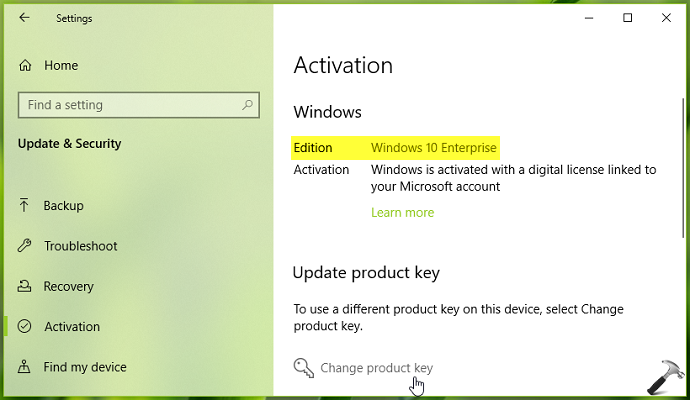
1. On your Windows 10 Enterprise, go to Settings app > Update & security > Activation. In the right pane of this window, click Change product key.
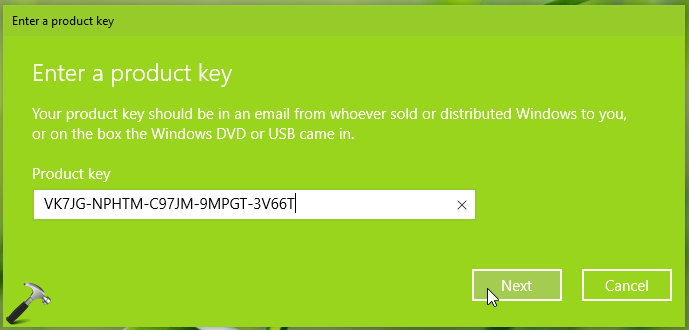
2. Now type following product key in Enter a product key prompt and click Next:
VK7JG-NPHTM-C97JM-9MPGT-3V66T
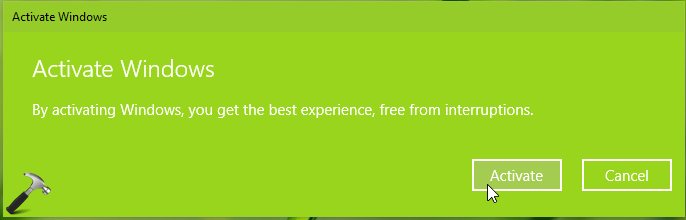
3. Moving on, in Activate Windows prompt, click Activate button.
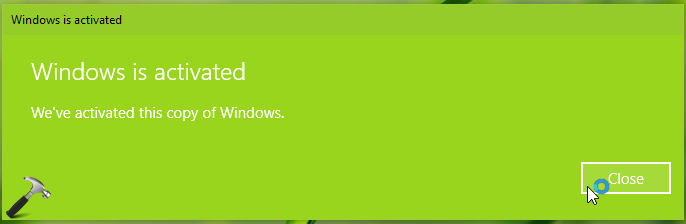
4. Assuming you’ve previously upgraded from activated Windows 10 Pro to Enterprise edition, in few seconds, you’ll receive We’ve activated this copy of Windows message. Click Close.
5. You can now check and confirm the Edition, which should be pointing to Windows 10 Pro.
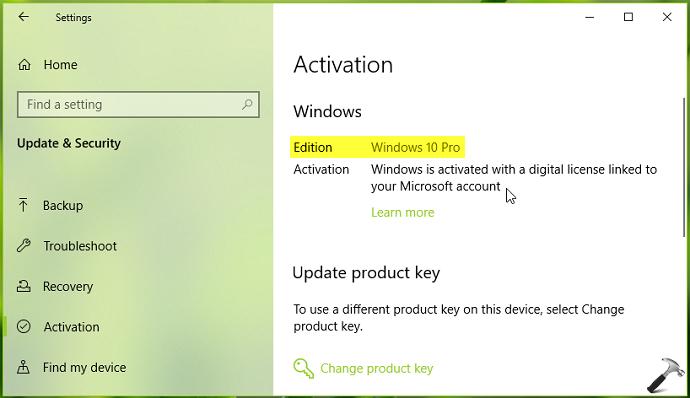
In this way, you can downgrade Windows 10 Enterprise edition to Pro edition.
Check this video to illustrate this method:
That’s it!


Hi Kapil, Nice article and would help alot ot there. I have a small query, somewhat related to this topic.
I have an unlicensed/unactivated Win10 Enterprice on my PC and want to downgrade it to Win10 Pro (I have a valid key for Win10 Pro).
Is it even possible? or does my Win10 Enterprise also needs to be activated with digital license to downgrade successfully?
Thank you so much!
^^ Glad to help Chuck!
I just want to say a fantastic thank you for this. I have had our IT guy at work, a friend who teachers IT and myself on this for two days. You are a star.
Thank you, simple, informative and helpful.
^^ Glad it helped 😎
Thankyou so much Kapil! I have spent so much time on this. Congrats on MVP also!!
^^ Glad to help Penny!
I have an unlicensed/inactivated Win10 Enterprise on my PC and want to downgrade it to Win10 Pro (I have a valid key for Win10 Pro).
Is it possible?
^^ Well, you can try this guide, and see if it works.
holy heck i have been trying to solve this problem for hours, you are a true hero
^^ Glad to help!
I literally followed Microsoft’s exact steps like your article suggested and somehow got moved from Home to Enterprise despite purchasing Pro.
What a *******.
You’d think if I drop $199 for a Windows 10 Pro license that they’d have something like this end-to-end figured out for christ sake.
^^ That’s a known issue, Cody! Hope the above steps should have helped you to keep the Pro edition.
THANK YOU SO VERY MUCH!!! Really thank you. This happened to me and my buddy a few months ago a ive been stumped on it.
^^ Glad to help Tim!
What is the product key for Win 11 Pro? I have the same issue but do not want to downgrade to Win 10 Pro from Win 11 Enterprise. The Activation error code I’m getting is 0xC004C003. Thanks!
^^ Activate it with your genuine product key in that case. Also refer: https://www.kapilarya.com/how-to-find-product-key-for-windows-operating-system.
Thank you!! Been trying to get rid of my “Activate Windows” watermark for months lol
^^ Glad to help 😎
Just commented last night, but it looks like it keeps reverting back to Enterprise and saying my “Windows isn’t activated” after 30 mins or so every time I “change” the product key.
Any ideas on how to make it permanent? Thanks!
^^ Try Activation troubleshooter: https://www.kapilarya.com/how-to-use-the-windows-10-activation-troubleshooter.
You’re a damn life saver!!
^^ Glad to help 😎
Thank you , I finally downgrade the enterprise to Pro version, but it is not activated , I got a key from the ************* , it helps me to activate it
Well, a great big thank you Kapil! Brand new Dell XPS and immediately initiated the upgrade to Pro which ended up in the “go no-where” Enterprise version! Thankfully, was able to find this fix! Up and running with the proper version of Pro now!
Great big thanks!
^^ Glad to help Robert 😎
how to downgrade Win 10 Pro to Win 10 Pro N, without clean install formatting disk.
it’s 2024 i spoke to microsoft advisor he gave me a complete different code it didn’t work. he told me to reinstall Windows. i decided to use my gut instead found this article and put that code in and bam what a surprise it worked. thank you so so very much
^^ Glad it helped 😎